
Volver al hub
Blog
IA
Claude Task Master: The AI Tool That's Replacing Your Project Manager
Publicado el 14 mar 2026Actualizado el 18 mar 2026
At Emelia, we build a B2B prospecting SaaS handling cold email, LinkedIn automation, and data enrichment. Our dev team, alongside Bridgers who collaborate on some of our projects, works daily inside AI-powered code editors like Cursor, Windsurf, and Claude Code. When an open-source tool racks up 25,000 GitHub stars in under a year and promises to bring order to AI-assisted development, we pay attention. Claude Task Master is that tool, and here's why it deserves yours.
What Is Claude Task Master and Why Should You Care?
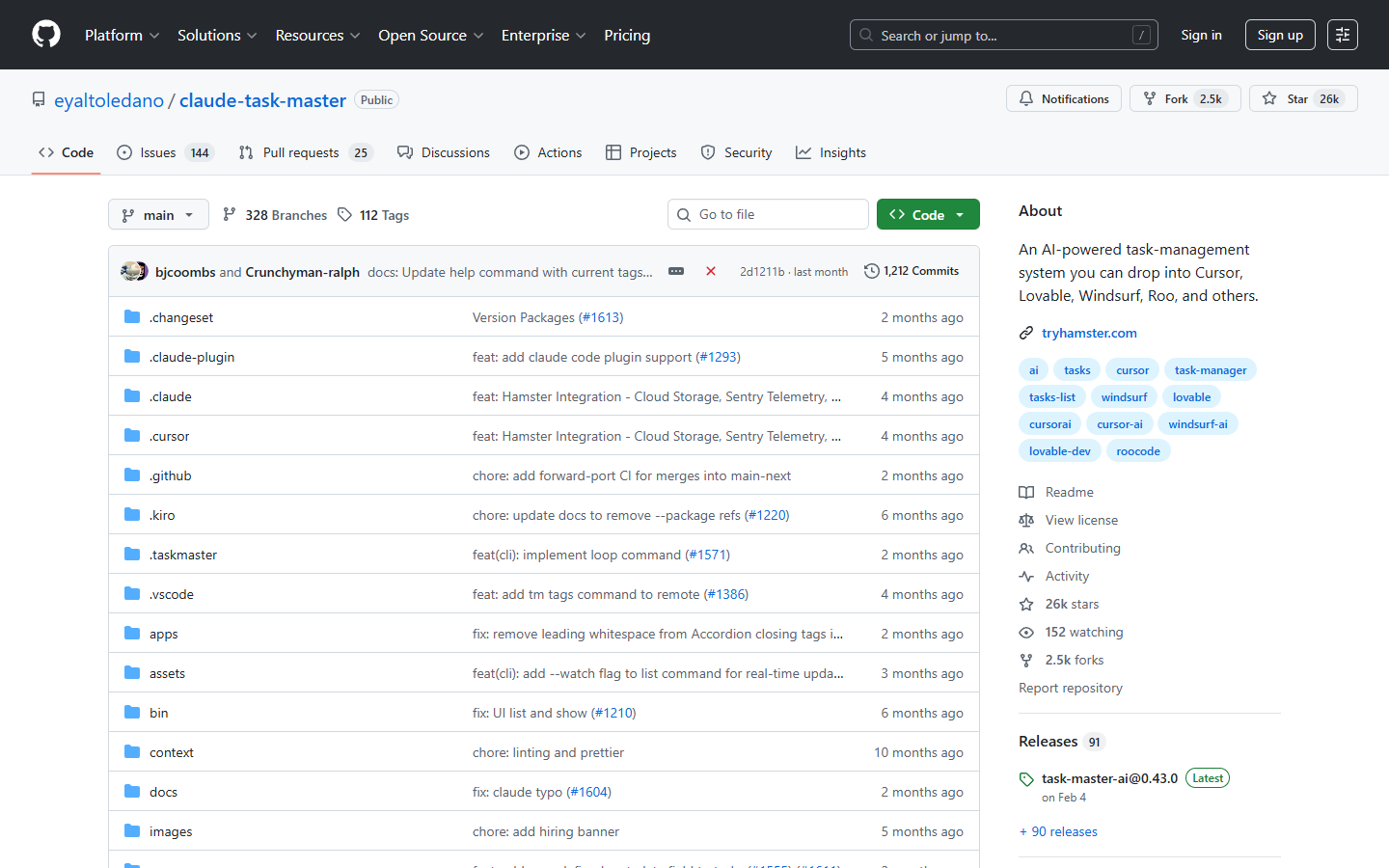
Claude Task Master (npm package: task-master-ai, GitHub) is an open-source, AI-powered task management system designed specifically for software development. Created by Eyal Toledano, Ralph Krysler, and Jason Zhou, it launched on March 4, 2025 and has experienced explosive growth since.
The core idea is deceptively simple: you write a PRD (Product Requirements Document) in plain language, and Task Master decomposes it into a structured list of tasks with dependencies, complexity scores, and subtasks. Instead of feeding your AI agent an entire project specification (which leads to hallucinations and context loss), Task Master serves it one focused task at a time.
The outcome? Developers reporting up to 90% fewer errors when using Cursor with Task Master, according to tutorials referenced by Shipixen.
25,000 GitHub Stars in Under a Year: The Numbers Behind the Hype
The growth trajectory tells the story. On its launch weekend, Claude Task Master had already amassed 250+ GitHub stars, 200,000 impressions, and 4,500 bookmarks on X.
https://x.com/EyalToledano/status/1904166743938855205
Within ten weeks, the counter showed 12,000 stars, 150,000 total downloads, and 100,000 monthly downloads. The project crossed 25,000 stars in January 2026 and now sits at 25,300 stars with 2,400 forks, 72 contributors, and over 90 published releases.
Metric | Value |
|---|---|
GitHub Stars | 25,300 |
Forks | 2,400 |
Contributors | 72 |
Releases | 90+ |
Peak npm Downloads | 100,000/month |
Discord Members | 1,000+ |
Latest Version | v0.42.0 (January 15, 2026) |
https://x.com/iannuttall/status/1931003483097825744
Developer and tech influencer Ian Nuttall went as far as predicting on X that "Taskmaster will get acquired by Cursor," a tweet that generated 52,700 views and over 2,000 likes.
How the MCP Server Works With 36 Integrated Tools
The recommended way to use Claude Task Master is as an MCP (Model Context Protocol) server. Once configured, it exposes up to 36 MCP tools to your AI code editor. In practice, this means your AI agent (in Cursor, Windsurf, VS Code, Claude Code CLI, or Amazon Q CLI) can directly read, create, modify, and track tasks without leaving your development environment.
Setup is quick. Add this configuration to your editor's mcp.json:
{
  "mcpServers": {
    "task-master-ai": {
      "command": "npx",
      "args": [
        "-y",
        "task-master-ai"
      ],
      "env": {
        "TASK_MASTER_TOOLS": "standard",
        "ANTHROPIC_API_KEY": "..."
      }
    }
  }
}
For Claude Code CLI, it's even simpler:
claude mcp add taskmaster-ai -- npx -y task-master-ai Tool Loading Modes and the 70% Token Reduction
One of Claude Task Master's most compelling selling points is its ability to cut token consumption by over 70%. This works through a tool loading mode system:
Mode | Available Tools | Token Usage | Use Case |
|---|---|---|---|
| 36 | ~21,000 tokens | Full feature set |
| 15 | ~10,000 tokens | Common operations |
| 7 | ~5,000 tokens | Essential daily workflow |
| Variable | Variable | Custom tool list |
Switching from all to core mode delivers roughly 76% token reduction. For teams working with paid APIs, that's meaningful savings. The 7 core tools cover the essentials: get_tasks, next_task, get_task, set_task_status, update_subtask, parse_prd, and expand_task.
From PRD to Tasks: The Workflow That Eliminates Prompt Chaos
The typical Claude Task Master workflow breaks down into clear steps. You start by writing a detailed PRD in plain language, placed in .taskmaster/docs/prd.txt. Then you ask your AI agent to parse it: "Can you parse my PRD?" Task Master generates a tasks.json file containing all tasks with their dependencies and complexity scores.
From there, you simply ask: "What's the next task?" The tool returns the highest-priority task whose dependencies are all satisfied. You implement, validate, and move on. For complex tasks, you can request subtask decomposition with expand_task.
A developer on Reddit shared their experience: "My rambling spec was turned into a crystal-clear PRD, then exploded into bite-sized, dependency-aware tasks. The LLM agents stayed laser-focused with these well-defined tasks: finish task, commit, next task. No context juggling, no sticky-note chaos."
Dependency Management: Why It's a Game-Changer
Each generated task includes an explicit dependency array (dependencies: [1, 3, 5]). The system ensures task A completes before task B can begin if B depends on A. The next_task command always returns the highest-priority task with all dependencies satisfied.
Additionally, the analyze_project_complexity tool assigns a score from 1 to 10 to each task before implementation begins. High-complexity tasks can be automatically decomposed into subtasks using expand_all.
Over 100 AI Models Supported: From Claude to Local Ollama
One of Claude Task Master's strongest advantages is its extensive AI model support. The project defines three model roles: main model (for implementation), research model (for technical research), and fallback model (in case main or research fail).
Provider | Top Models | SWE Score |
|---|---|---|
Anthropic | claude-opus-4-5, claude-sonnet-4-5 | 0.809, 0.772 |
Claude Code (no API key) | opus, sonnet, haiku | 0.725, 0.727, 0.45 |
Gemini CLI (no API key) | gemini-3-pro-preview | 0.762 |
OpenAI | gpt-5, o3 | 0.749, 0.5 |
Groq | kimi-k2-instruct | 0.66 |
Ollama (local) | devstral, qwen3, llama3.3 | 0 to 0.624 |
Can You Use Claude Task Master for Free?
Yes, and this is a crucial point. Several options let you run Task Master without spending a dime on API keys:
Claude Code CLI: uses your local Claude instance, no API key required
Gemini CLI: OAuth authentication, free access to Google models
Codex CLI: works via an existing ChatGPT subscription
Grok CLI: direct access to xAI models
Ollama: fully free local models (devstral, qwen3, llama3.3) running entirely offline
This flexibility is particularly valuable for indie developers and small teams who want to test the tool without financial commitment.
Autonomous TDD Autopilot: When AI Codes in a Loop
Since version 0.30.0 (October 2025), Claude Task Master includes an autopilot mode for Test-Driven Development (TDD). The tm autopilot command launches an autonomous loop: generate a test, implement the code, verify the test passes, commit, and repeat.
This mode relies on 7 new dedicated MCP tools and 3 specialized agents introduced with the Claude Code plugin (v0.29): a task orchestrator, a task executor, and a task checker. Everything is accessible via 49 slash commands in Claude Code (/taskmaster:command-name).
https://x.com/EyalToledano/status/1925966686076784858
Real-World Use Cases: Who Uses Claude Task Master and How?
The Solo Developer Shipping Faster
You write a PRD for your side project, Task Master breaks it into 10 to 20 tasks, and you implement them one by one with Cursor. The structured framing prevents the AI from going off-track, reducing errors and accelerating delivery.
The Startup Team Structuring Development
Teams use PRDs as living documents and sync tasks through Hamster, the collaboration platform built by Eyal Toledano on top of Task Master. Hamster provides "real-time PRDs, team plans, synced tasks."
The Agency Delivering Client Projects
According to Samelogic, "The Claude Task Master + Cursor agent workflow didn't just improve our development process, it completely transformed it. By giving Cursor structured task context through direct task-master commands, we turned our AI assistant from a helpful code suggester into an active implementation partner."
The No-Code Builder
A remarkable case reported by the community: a developer shipped an entire image generation app (ImgxAI) solely by steering Task Master tasks, without manually writing a single line of code.
Claude Task Master vs Competitors: Cline, Aider, Roo Code
How does Claude Task Master stack up against other tools? It's important to understand that Task Master is neither an IDE nor an AI model. It's task management middleware that sits between your spec and your AI editor. It works with all of the tools below, not against them.
Tool | Type | Core Strength | Structured Task Management |
|---|---|---|---|
Claude Task Master | MCP Server / CLI | PRD to tasks, dependencies, 36 tools | Yes (native) |
Cline | VS Code Extension | Full AI agent, approval checkpoints | No (linear workflow) |
Aider | Git-native CLI | AI pair programming, auto-commits | No (file-level focus) |
Roo Code (Boomerang) | VS Code Extension | Subtask decomposition, specialized modes | Partial (less structured) |
Continue.dev | IDE Extension | Local model support, extensible | No |
SPARC Orchestration | Community Workflow | Structured modes (spec, architect, code, TDD) | Manual |
Roo Code and Task Master are frequently used together. Roo Code's Orchestrator mode decomposes tasks into subtasks with specialized agents, while Task Master manages the global task graph with dependencies. The two are complementary.
Where Does Task Master Fit in the AI IDE Ecosystem?
Editor / Tool | Price | Task Master Integration |
|---|---|---|
Cursor | $20/month (Pro) | One-click install (deeplink) |
Windsurf | $15/month (Pro) | Via MCP |
VS Code | Free | Via MCP |
Claude Code CLI | Usage-based | Native support |
Gemini CLI | Free | Via MCP |
GitHub Copilot | $10/month | Compatible extension |
Limitations of Claude Task Master: Who Should Skip It?
No tool is perfect, and transparency matters. Here's what to know before diving in:
The MIT License with Commons Clause restricts resale. You can freely use Task Master to build your products, but you cannot sell Task Master itself, offer it as a hosted service, or create a competing product based on its code.
The learning curve is real. Writing a good PRD is a skill in itself. If your PRD is vague, the generated tasks will be too. The tool amplifies the quality of your specification; it doesn't replace it.
AI model dependency remains a factor. Even though Task Master supports over 100 models, the quality of generated tasks directly depends on the model used. A low-quality model produces low-quality decompositions.
The ecosystem moves fast. With over 90 releases in one year, the development pace is intense. That's an advantage in terms of features, but it also means documentation can lag behind and breaking changes can happen.
Who should skip it?
Developers working on very simple projects (a script, a landing page): the overhead isn't justified.
Teams with a well-established CI/CD pipeline and ticketing system: the added value will be marginal.
Those looking for a plug-and-play tool with zero configuration: Task Master requires initial investment in setup and PRD writing.
The Philosophy Behind Task Master: Permanent Context
Eyal Toledano sums up his tool's philosophy in a single sentence:
https://x.com/EyalToledano/status/1943188146633498864
"Taskmaster is a set of tools that lets the AI agent read and write to permanent context such that you, the orchestrator, can exercise more control."
This vision aligns with a broader trend in the AI development ecosystem: the most effective tools aren't those that give AI more autonomy, but those that give developers more control. Task Master follows this logic by structuring the AI's work rather than letting it improvise.
The "Orchestrated Code" pattern, described on Substack, formalizes this approach: "Step 1: PRD to Tasks. I write a PRD describing what I want to build. Taskmaster's AI parses it and generates tasks.json with dependencies already mapped: authentication before API endpoints, Redis before rate limiting."
How to Get Started With Claude Task Master in 5 Minutes
If you want to test Claude Task Master, here's the path:
Install the package:
npm install -g task-master-aior usenpx -y task-master-aidirectlyInitialize your project:
task-master initWrite your PRD in
.taskmaster/docs/prd.txtParse the PRD: ask your AI agent "Parse my PRD" or run
task-master parse-prd prd.txtStart building:
task-master nextto get your first task
For MCP mode (recommended), add the configuration to your editor's mcp.json and let your AI agent interact directly with all 36 available tools.
Should You Adopt Claude Task Master for Your Projects?
Claude Task Master isn't a gimmick. With 25,300 GitHub stars, 72 contributors, over 90 releases, and the backing of an active community of 1,000+ Discord members, it's a mature project addressing a real need: structuring AI agent work to produce predictable, quality results.
The tool is particularly relevant if you work with Cursor, Windsurf, or Claude Code and your projects go beyond simple scripts. The PRD-to-task decomposition, dependency management, and TDD autopilot mode are features that can meaningfully transform your productivity.
At Emelia, we're currently evaluating this tool on parallel projects to measure its impact on our development cycles. The potential is clear. The question is no longer whether AI agents need structure, but which tool will provide that structure most effectively.
https://x.com/ykxventures/status/2013042581920268661
Claude Task Master is, as of today, the most compelling candidate.

Precios claros, transparentes y sin costes ocultos.
Sin compromiso, precios para ayudarte a aumentar tu prospección.

Créditos(opcional)
No necesitas créditos si solo quieres enviar emails o hacer acciones en LinkedIn
Se pueden utilizar para:
Buscar Emails
Acción IA
Buscar Números
Verificar Emails
€19por mes
1,000
5,000
10,000
50,000
100,000
1,000 Emails encontrados
1,000 Acciones IA
20 Números
4,000 Verificaciones
€19por mes
Descubre otros artículos que te pueden interesar!
Ver todos los artículosBlog
Publicado el 20 may 2025
Las 6 mejores aplicaciones para gestionar tareas (lista de tareas pendientes)
 Niels Co-founder
Leer más
Software
Publicado el 21 may 2024
7 alternativas a Warmbox para evitar el spam
 Marie Head Of Sales
Leer más
Software
Publicado el 23 jun 2024
Las 5 mejores alternativas a Lusha: - más correos electrónicos (2026)
Marie Head Of SalesLeer más
Software
Publicado el 28 abr 2024
Hemos encontrado las 9 mejores alternativas a Wiza.
Marie Head Of SalesLeer más
Software
Publicado el 17 feb 2024
5 alternativas a Lemwarm que debes conocer para tu capacidad de entrega en 2026
Niels Co-founderLeer más
Software
Publicado el 6 abr 2025
7 alternativas a Cognism que cambian las reglas del juego y no te arruinarán (pero que impulsarán tus ventas)
Niels Co-founderLeer más
Enlaces útiles
HubCold-email: Guía CompletaEntregabilidad: Guía completaAlternativa a LemlistAPISolicitar una demoPrograma de afiliadosFind email Maylee
Made with ❤ for Growth Marketers by Growth Marketers
Copyright © 2026 Emelia All Rights Reserved