
Zurück zum Hub
Blog
KI
PinchTab: A 12MB Binary That Replaces Playwright for AI Agents
Veröffentlicht am 11. März 2026Aktualisiert am 27. Mai 2026
At Emelia, we build B2B prospecting tools that rely on intelligent automation: cold email, LinkedIn automation, data enrichment. At Bridgers, we design AI solutions for our clients. Browser automation sits at the core of both activities. When an open source tool weighing just 12MB promises to replace 500MB frameworks and cut AI agent token costs by 13x, we have to cover it.
PinchTab has erupted onto the browser automation scene with a radical promise: a single Go binary, zero dependencies, and complete Chrome control through a plain HTTP API. In just a few days, the project accumulated over 6,400 GitHub stars, a viral tweet surpassed 230,000 views, and developers building AI agents started migrating. Here is why.
What Is PinchTab, Exactly?
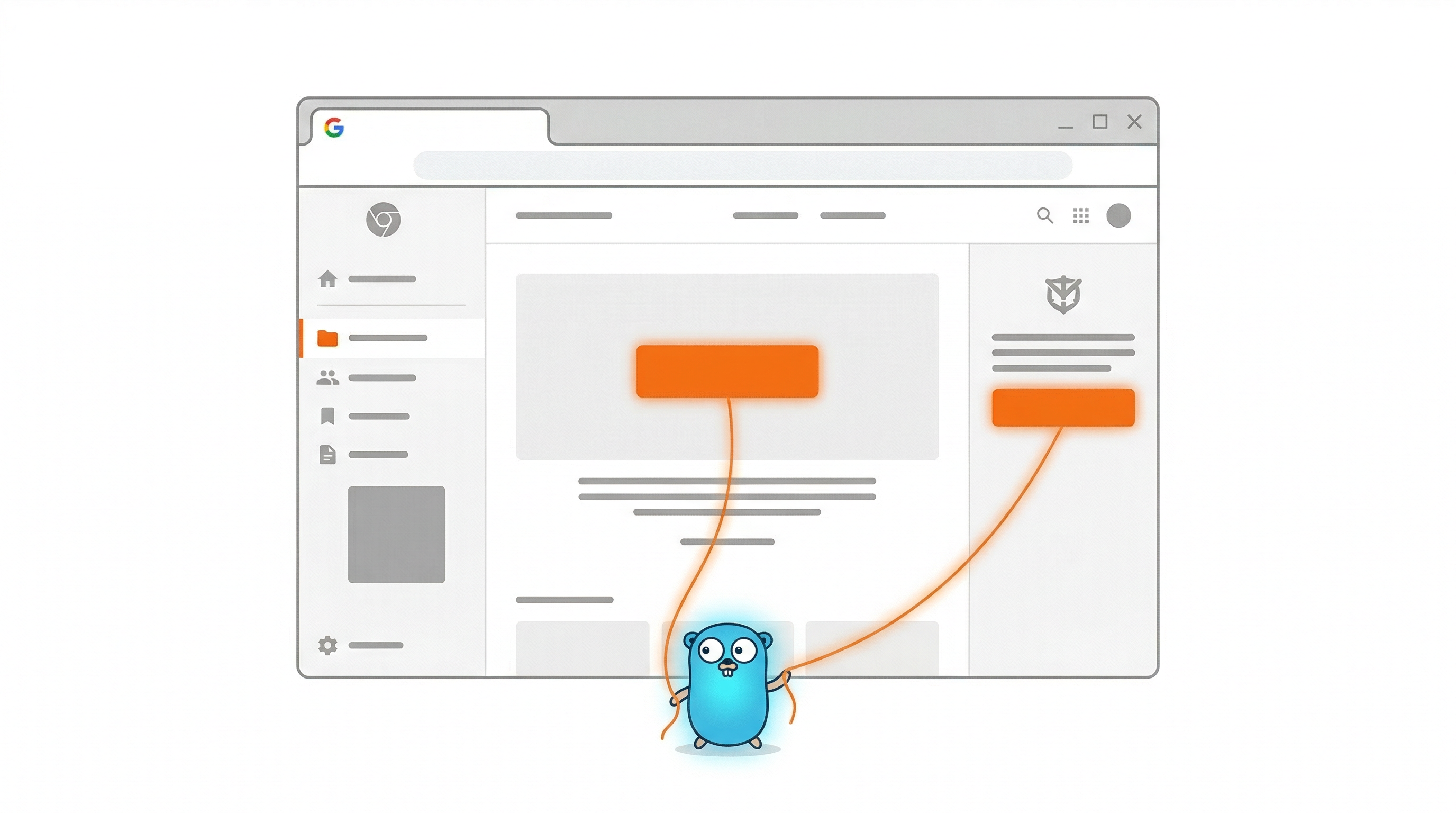
PinchTab is a standalone HTTP server written in Go that launches Chrome and exposes a REST API allowing any program to navigate the web, click, type, read content, and persist sessions. All in a 12MB binary.
In practice: you install PinchTab, Chrome opens, you log into your sites, and your AI agents take over. No Playwright. No Puppeteer. No 500MB node_modules folder. Just HTTP requests.
The architecture is deliberately minimalist: one binary, one Chrome, HTTP in, CDP (Chrome DevTools Protocol) out. PinchTab acts as a bridge between your agents and the browser, without imposing any framework, language, or ecosystem.
PinchTab vs Playwright: Why It's 13x Cheaper
The fundamental difference between PinchTab and traditional tools comes down to one concept: the accessibility tree.
When an AI agent uses Playwright or Puppeteer to "see" a web page, it typically takes a screenshot, sends it to a vision model, and receives an interpretation. This process consumes between 1,200 and 5,000 tokens per perception, according to published research on the topic.
PinchTab takes a radically different approach. Instead of photographing the page, it exposes the browser's accessibility tree, the simplified structure that screen readers use to describe content to visually impaired users. The accessibility tree only contains meaningful elements: buttons, links, form fields, headings, along with their roles and names. Decorative divs, CSS containers, and hidden elements are stripped away.
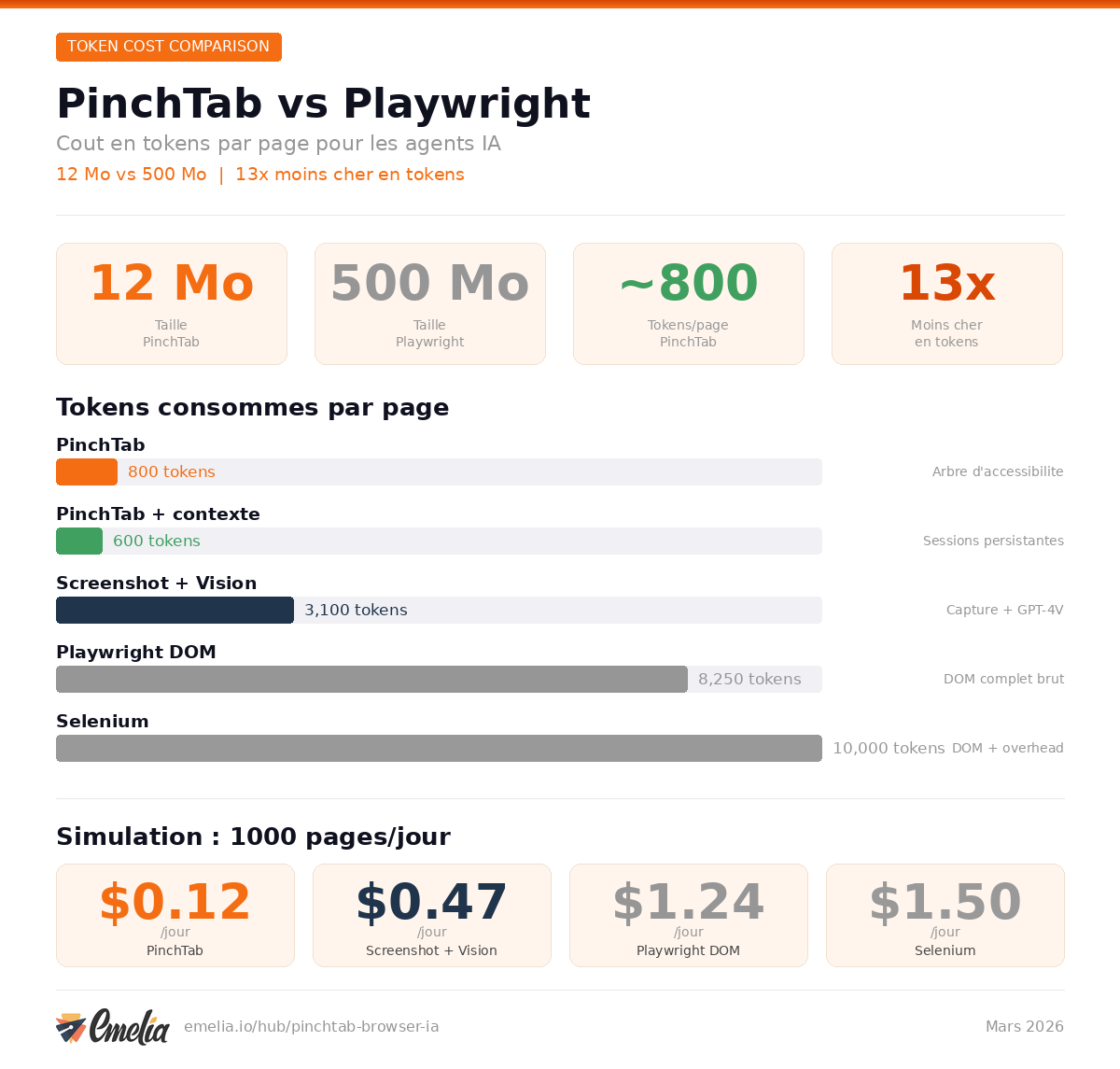
The results are dramatic. According to benchmarks from Dataconomy, PinchTab consumes around 800 tokens per page, compared to 4,500 to 12,000 for Playwright and over 10,000 for Selenium. On repeated tasks with context, PinchTab drops below 1,000 tokens.
Each interactive element receives a stable identifier (e0, e1, e5...). To click a button, your agent simply sends {"kind": "click", "ref": "e5"}. No coordinate guessing, no fragile CSS selectors, no XPath that breaks on every redesign.
Method | Tokens per page |
|---|---|
Screenshot + vision model | 1,200 to 5,000 |
Playwright full DOM | 4,500 to 12,000 |
Selenium | 10,000+ |
PinchTab (no prior context) | ~800 |
PinchTab (with context) | < 1,000 |
For an agent performing 10 interactions per task, the difference is massive. That is 5 to 13x fewer tokens, which translates directly into an LLM bill divided by the same factor.
How PinchTab Controls Browsers Without Puppeteer
PinchTab's architecture rests on a simple idea: completely decouple the browser control tool from the agent framework.
Playwright and Puppeteer are libraries. You import them into your Node.js code (or Python for Playwright), they install their own version of Chromium (around 250MB), and your agent is locked into that ecosystem. If you switch languages or agent frameworks, you start over.
PinchTab is a server. It listens on port 9867 and exposes JSON endpoints. Any program that can send an HTTP request can control the browser:
```bash
# Launch a Chrome instance INST=$(curl -s -X POST http://localhost:9867/instances/launch \ -H "Content-Type: application/json" \ -d '{"name":"work","mode":"headless"}' | jq -r '.id')
# Open a tab TAB=$(curl -s -X POST http://localhost:9867/instances/$INST/tabs/open \ -H "Content-Type: application/json" \ -d '{"url":"https://example.com"}' | jq -r '.tabId')
# Read the accessibility tree curl "http://localhost:9867/tabs/$TAB/snapshot?filter=interactive"
# Click an element curl -X POST "http://localhost:9867/tabs/$TAB/action" \ -H "Content-Type: application/json" \ -d '{"kind":"click","ref":"e5"}' ```
The API is intentionally small. Read-only GETs for data, POSTs for mutations. Everything in JSON:
Method | Endpoint | Description |
|---|---|---|
GET | /health | Connection status |
POST | /navigate | Go to URL |
POST | /action | Click, type, fill, press, scroll |
GET | /find | Find elements by text or selector |
GET | /text | Readable text (readability or raw mode) |
GET | /snapshot | Accessibility tree |
GET | /screenshot | JPEG screenshot |
GET | Export page as PDF |
A Python agent can use PinchTab with three lines of code:
```python import requests
# Navigate to a page requests.post("http://localhost:9867/navigate", json={"url": "https://example.com"})
# Read the content snapshot = requests.get("http://localhost:9867/snapshot").json()
# Click a button requests.post("http://localhost:9867/action", json={"kind": "click", "ref": "e5"}) ```
This framework-agnostic approach means PinchTab works with Python, TypeScript, Go, Rust, or even a simple bash script with curl. Switch your AI model or agent framework? PinchTab stays the same.
Install PinchTab in One Command
Installing Playwright typically requires setting up Node.js, then the npm package, then downloading browsers (about 250MB), often followed by Docker configuration for production environments. PinchTab reduces this friction to a single line:
curl -fsSL https://pinchtab.com/install.sh | bash You can also use npm:
npm install -g pinchtab Or Docker:
docker run -d \ --name pinchtab \ -p 127.0.0.1:9867:9867 \ -v pinchtab-data:/data \ --shm-size=2g \ pinchtab/pinchtab The binary is 12MB. Startup time is under 100 milliseconds, compared to roughly 1.2 seconds for Playwright and 2.5 seconds for Selenium. This detail matters when your agent launches dozens of parallel sessions.
Give Your AI Agent Full Browser Control
The primary use case for PinchTab is clear: serve as the browser layer for autonomous AI agents. Here is how a typical agent uses PinchTab in practice.
Scenario: competitive intelligence agent. Your agent needs to log into LinkedIn every morning, check profiles of 10 competitors, extract their latest posts, and compile a report.
With PinchTab, the agent launches an instance with a persistent profile (LinkedIn login cookies are preserved between sessions). It navigates to each profile, reads the accessibility tree to identify publications, extracts text via the /text endpoint, and moves to the next profile. Stealth mode masks automation indicators (navigator.webdriver, User-Agent, Canvas fingerprint), significantly reducing detection risk.
Scenario: e-commerce price monitoring. An agent needs to check prices of 50 products on a competitor site. PinchTab launches multiple Chrome instances in parallel, each with an isolated profile, and distributes the 50 URLs between them. Tab locking (/tab/lock) prevents collisions between agents working simultaneously.
Scenario: form filling. The agent identifies form fields through the accessibility tree (role: textbox, name: "Email"), fills them with the fill action, and submits with press Enter. No need to guess button coordinates from a screenshot.
Scenario: automated data entry. A financial services agent needs to enter data into a legacy web application with no API. The agent reads the accessibility tree to find form fields by their semantic labels, fills them sequentially using stable refs, validates submitted data by reading the confirmation page's tree, and logs any discrepancies. Because PinchTab operates on a real browser with your authenticated sessions, it handles even complex SPA (Single Page Application) workflows where content loads dynamically.
As one developer put it on X: "PinchTab was the solution to all my automation problems. I simply told my agent to install and use PinchTab for all browser automations and it works like a dream."
Another commenter captured the broader significance: "The 12MB size is the real story here. Most browser automation tools require a full Playwright/Puppeteer setup just to get started. PinchTab removes that entire onboarding barrier for agent builders. The zero-config part matters most for people wrapping this inside larger multi-agent pipelines where adding Chrome dependencies breaks everything downstream."
Built-In Stealth: Bypassing Bot Detection
One of the most discussed advantages of PinchTab is its ability to bypass anti-bot systems without additional configuration. PinchTab's stealth mode:
Masks navigator.webdriver (the classic signal that reveals automation)
Spoofs the User-Agent to mimic a real browser
Fakes Canvas and WebGL fingerprints
Offers humanized actions: humanClick (Cubic Bezier curves for mouse movements) and humanType (random keystroke timing variation)
Playwright and Puppeteer require third-party plugins for comparable stealth (puppeteer-extra-plugin-stealth for Puppeteer, playwright-extra for Playwright). PinchTab integrates it natively through the BRIDGE_STEALTH environment variable.
For B2B prospecting professionals using LinkedIn automation, this native capability represents a significant advantage.
Going Viral: When GitHub and X Took Notice
PinchTab's trajectory has been explosive. The GitHub Projects Community account, followed by over 305,000 people, published a tweet that reached 230,000 views and generated nearly 5,000 bookmarks:
A few days later, Simplifying AI (25,000 followers) amplified the phenomenon with a thread reaching 163,000 views and 4,339 bookmarks:
And Brady Long's tweet (@thisguyknowsai) surpassed 30,000 views with 546 bookmarks in just hours:
The GitHub repo jumped from a few hundred stars in early March to over 6,400 in ten days. PinchTab appeared in GitHub's trending repositories for several consecutive days.
Open Source Playwright Alternative for AI Automation
Let's compare PinchTab to the available alternatives:
Criteria | PinchTab | Playwright | Puppeteer | Browser-Use |
|---|---|---|---|---|
Size | 12MB (Go binary) | ~250MB (Node + drivers) | ~200MB (Node + Chromium) | Cloud / Python SDK |
Dependencies | Zero | Node.js, npm | Node.js, npm | Python, API key |
Bot detection bypass | Native stealth | Third-party plugins | Third-party plugins | Cloud anti-detect |
Parallel instances | Native, isolated profiles | Browser contexts | Separate instances | Cloud scale |
Token cost per page | ~800 | 4,500 to 12,000 | Similar to Playwright | Variable |
Language support | Any (HTTP) | JS, Python, C#, Java | JavaScript | Python |
Startup time | < 100ms | ~1.2s | ~1s | Variable (cloud) |
Setup complexity | 1 command | npm + browser install | npm + Chrome install | pip + API key |
License | MIT | Apache 2.0 | Apache 2.0 | Proprietary (cloud) |
GitHub stars | 6,400+ | 70,000+ | 89,000+ | 78,000+ |
Persistent sessions | Native | Manual | Manual | Cloud |
Browser support | Chrome | Chrome, Firefox, WebKit | Chrome | Chrome (cloud) |
PinchTab does not aim to replace Playwright for multi-browser end-to-end testing. Its positioning is different: provide the lightest, most token-efficient browser layer for AI agents.
PinchTab Limitations: When to Stick with Playwright
Honesty requires mentioning what PinchTab does not do, or does not do yet.
One browser only. PinchTab supports Chrome/Chromium exclusively. If your workflow requires cross-browser testing (Firefox, Safari/WebKit), Playwright remains essential.
No test code generation. Playwright offers a codegen mode that records your actions and automatically generates test code. PinchTab does not. It is an execution tool, not a test authoring tool.
Maturity gap. Playwright has 70,000 stars, years of production use, and Microsoft backing. PinchTab is a recent project with 21 contributors. Documentation is functional but less comprehensive.
Accessibility tree quality varies. A page's accessibility tree is only as good as its HTML implementation. A poorly structured web app with clickable divs instead of semantic buttons will cause issues for PinchTab, as for any accessibility-based tool.
Security considerations. PinchTab gives your agents control of a real browser with your authenticated sessions. If your agent is misconfigured or compromised, it has access to all your connected accounts. The authentication token (PINCHTAB_TOKEN) is essential in production.
No cloud API. Unlike Browser-Use which offers cloud infrastructure, PinchTab runs locally. For massive scaling, you will need to manage your own infrastructure.
Who Should Use PinchTab?
Use PinchTab if:
You are building AI agents that need to interact with the web
You want to minimize token costs for browser interactions
You work with multiple languages or frameworks
You need persistent sessions and native stealth
You want a lightweight tool with no heavy dependencies
Stick with Playwright if:
You do multi-browser end-to-end testing
You need automatic test code generation
Your team is already invested in the Playwright ecosystem
You require cross-browser support (Firefox, WebKit)
Persistent Sessions and Multi-Instance Orchestration
An often underrated aspect of PinchTab is session management. When you log into a site through PinchTab's Chrome window, those cookies and authentication tokens are preserved across restarts. You log into LinkedIn, Gmail, or your CRM once, and the agent reuses that session indefinitely without needing to manage credential storage.
Multi-instance orchestration goes further. PinchTab can launch multiple Chrome processes in parallel, each with its own isolated profile. This means you can run one agent on LinkedIn with one profile, another on an e-commerce site with a different profile, and a third on a SaaS tool, all simultaneously without interference.
Each instance gets a unique identifier, and tabs can be locked via the /tab/lock endpoint to prevent two agents from interacting with the same tab simultaneously. For multi-agent architectures, this is a critical feature.
PinchTab also offers a real-time dashboard for monitoring CPU usage, memory, and active tab states. In production environments where dozens of instances run in parallel, this visibility is essential.
Finally, PinchTab is optimized for ARM64, making it a serious candidate for Raspberry Pi deployments or edge servers. A cluster of Raspberry Pis each running PinchTab can serve as a distributed automation infrastructure at minimal cost.
What PinchTab Changes for AI Automation
PinchTab's emergence illustrates a broader trend: browser automation tools are splitting into two categories. On one side, testing frameworks (Playwright, Cypress, Selenium) optimized for cross-browser reliability and CI/CD integration. On the other, browser bridges for AI agents (PinchTab, but also Vercel's agent-browser, WebClaw) optimized for token efficiency and LLM integration.
The choice is no longer Playwright vs Puppeteer. The question is: are you building a test pipeline or an autonomous agent? If it is an agent, PinchTab deserves your attention.
The convergence of lightweight browser bridges, token-efficient accessibility trees, and framework-agnostic HTTP APIs is creating a new category of infrastructure purpose-built for the agentic web. PinchTab sits right at the center of that shift.
The project is 100% open source under the MIT License, available on GitHub. Written primarily in Go (72.6%) with TypeScript (14%) and Shell scripts, PinchTab runs on macOS, Linux, and Docker. With 6,400 stars in just a few weeks, 21 contributors, and a rapidly growing community, PinchTab is emerging as an essential building block in AI agent infrastructure for 2026.
Whether you are building prospecting tools, competitive intelligence bots, or full-scale autonomous agents, the browser layer is the piece that connects AI to the real internet. PinchTab makes that piece small, fast, and cheap.

Klare, transparente Preise ohne versteckte Kosten.
Keine Verpflichtung, Preise, die Ihnen helfen, Ihre Akquise zu steigern.

Credits(optional)
Sie benötigen keine Credits, wenn Sie nur E-Mails senden oder auf LinkedIn-Aktionen ausführen möchten
Können verwendet werden für:
E-Mails finden
KI-Aktion
Nummern finden
E-Mails verifizieren
€19pro Monat
1,000
5,000
10,000
50,000
100,000
1,000 Gefundene E-Mails
1,000 KI-Aktionen
20 Nummern
4,000 Verifizierungen
€19pro Monat
Entdecken Sie andere Artikel, die Sie interessieren könnten!
Alle Artikel ansehenBlog
Veröffentlicht am 5. Apr. 2025
FullEnrich: Bewertungen, Preise und Alternativen, um böse Überraschungen zu vermeiden
 Mathieu Co-founder
Weiterlesen
Software
Veröffentlicht am 11. Juli 2024
7 Alternativen zu Expandi, um Ihre Akquisitionskosten zu senken
 Marie Head Of Sales
Weiterlesen
Software
Veröffentlicht am 22. Apr. 2024
Die 5 besten Alternativen zu Dropcontact für eine bessere B2B-Kundenakquise
Marie Head Of SalesWeiterlesen
Software
Veröffentlicht am 31. März 2025
9 Alternativen zu UpLead, um Ihre Kundenakquise WIRKLICH anzukurbeln
 Niels Co-founder
Weiterlesen
Software
Veröffentlicht am 8. März 2025
7 Alternativen zu Kaspr für Ihre B2B-Akquise 2026
Niels Co-founderWeiterlesen
Software
Veröffentlicht am 26. Apr. 2024
Email Finder 2026: Die 9 besten Hunter.io-Alternativen
Marie Head Of SalesWeiterlesen
 Maylee
Made with ❤ for Growth Marketers by Growth Marketers
Copyright © 2026 Emelia All Rights Reserved