
Lightpanda: The Open-Source Headless Browser Built From Scratch in Zig (Everything You Need to Know)
Publicado el 18 mar 2026Actualizado el 27 may 2026
Why Chrome Is No Longer Enough for AI Agents and Web Automation
If you work with AI agents, large-scale web data collection, or browser automation, you already know the problem: headless Chrome is slow, memory-hungry, and expensive to run in production. Each Chrome headless instance eats between 500 MB and 1 GB of RAM, takes hundreds of milliseconds to start, and hogs CPU resources even when it has nothing to visually render.
The root cause is straightforward. Chrome was built for humans. It ships with a full graphical rendering engine (Blink), a display compositor (Skia), font handling, image decoding, CSS animations, and layout computation. When you launch Chrome in headless mode so an AI agent can browse a web page, all of that graphical machinery runs idle. You pay the full price of a complete browser while using a fraction of its capabilities.
This becomes critical at scale. When you need to orchestrate dozens or hundreds of simultaneous browsing sessions to feed a data pipeline, train a language model, or run a fleet of autonomous agents, infrastructure costs spiral. This is exactly the problem that led the Lightpanda team to make a radical decision: build an entirely new browser from scratch, designed exclusively for machines.
Lightpanda: A Browser Designed for Machines, Not Humans
Lightpanda is an open-source headless browser written entirely in Zig, a low-level systems programming language. It is not a Chromium fork. It is not a stripped-down version of Chrome. It is a completely new browser built from a blank page, with a clear philosophy: do only what is strictly necessary for web automation.
The Story Behind the Project
The project was founded in April 2022 by Francis Bouvier, a developer and entrepreneur based in Paris. Before Lightpanda, Francis cofounded BlueBoard, an e-commerce analytics platform that crawled over 20 million web pages per day using a massive fleet of headless Chrome instances. That infrastructure was a constant battle: memory leaks, frequent crashes, pages that would not load, and staggering server costs.

That firsthand experience gave birth to Lightpanda. As Francis explains, the ecosystem needed a tool built from first principles, designed for automation at scale. The team initially considered forking Chromium and stripping out its graphical components, but they quickly found that Chromium's architecture is so deeply intertwined that removing the rendering layer without breaking everything is virtually impossible. The only viable option was to start from scratch.
Technical Architecture
Lightpanda is built on four core components:
An HTTP loader based on libcurl, the industry-standard library for network requests
An HTML parser and DOM tree built from Netsurf libraries, a proven open-source project
A JavaScript engine using V8, the same engine that powers Chrome, via a Zig interoperability layer (zig-js-runtime)
A CDP server (Chrome DevTools Protocol) that enables compatibility with existing tools
What is absent matters as much as what is present. Lightpanda contains no graphical rendering engine. No layout computation, no rasterization, no image decoding, no display compositing. It only manipulates the DOM, executes JavaScript, and handles network requests. This minimalist approach is the key to its exceptional performance.
Why Zig?
The choice of Zig as the development language is one of the most interesting aspects of the project. Francis Bouvier acknowledges with some humor that he chose Zig because he was not smart enough for C++ or Rust. Behind that quip lies solid technical reasoning.
Zig offers three decisive advantages for a browser project:
Explicit memory management: Every allocation goes through an explicit allocator, which enables the use of arenas (memory zones freed in bulk). For a browser processing ephemeral web pages, this is ideal. Each page gets its own arena, and when the page is done, all memory is freed at once with no garbage collector overhead.
Comptime (compile-time execution): Zig can automatically generate code at compile time, which allows the creation of bindings between native Zig code and JavaScript APIs without writing thousands of lines of glue code by hand.
C interoperability: Zig interfaces seamlessly with existing C libraries. This is what makes it possible to integrate V8 (via its C headers) and libcurl without rewriting these components.
Other notable projects using Zig successfully include Ghostty (terminal emulator), Bun (JavaScript runtime), and TigerBeetle (financial database).
Benchmarks and Performance: The Numbers Speak for Themselves
The Lightpanda team published detailed benchmarks comparing their browser to headless Chrome under realistic conditions. Tests were run on an AWS EC2 m5.large instance, browsing 933 real web pages (an Amiibo character database with JavaScript-rendered dynamic content).
Results at 25 Parallel Tasks
Metric | Lightpanda | Chrome | Ratio |
|---|---|---|---|
Memory | 215 MB | 2 GB | 9x less |
Duration | 3.2 s | 46.7 s | 14x faster |
CPU | 185% | 254% | 27% less |
Results at 100 Parallel Tasks
Metric | Lightpanda | Chrome | Ratio |
|---|---|---|---|
Memory | 696 MB | 4.2 GB | 6x less |
Duration | 4.45 s | 69 min 37 s | Chrome collapses |
Behavior | Stable | Severe degradation | Chrome falls apart |
The most striking finding is the behavior under load. Lightpanda continues to scale linearly up to about 25 parallel processes, then stabilizes. Chrome, on the other hand, plateaus at just 5 tabs and begins to degrade seriously beyond 10. At 100 tabs, Chrome takes over an hour to finish the 933 pages, while Lightpanda completes the job in under 5 seconds.
Local Benchmark (E-commerce)
The project's initial benchmarks, run on a local server with a synthetic e-commerce page using Puppeteer, showed even more impressive results: 11x faster and 9x less memory. These numbers, measured under ideal conditions (no network latency), remain a useful reference for evaluating the browser's raw performance.
Why Such a Gap?
The performance difference comes down to fundamental architecture. Chrome, even in headless mode, runs its full rendering engine. Each tab launches separate processes (Chromium's multi-process model), each with its own V8 instance, its own memory space, and its own rendering stack. Lightpanda eliminates the entire graphical layer and handles parallelization through independent, lightweight processes.
The result is a browser that uses roughly 100x fewer combined resources (CPU and memory) than Chrome for the same automation tasks. That translates directly into infrastructure savings for anyone running web operations at scale.
Installation and Compatibility: A Near-Transparent Chrome Replacement
One of Lightpanda's strongest selling points is its compatibility with the existing ecosystem. Thanks to its CDP (Chrome DevTools Protocol) server, it works directly with the tools you already use.
Compatible Tools
Playwright (with some caveats about stability, as the project is still in beta)
Puppeteer
chromedp (for Go users)
Installation
Installation is remarkably simple. A single command downloads the binary for your platform:
Linux (x86_64):
curl -L -o lightpanda https://github.com/lightpanda-io/browser/releases/download/nightly/lightpanda-x86_64-linux && chmod a+x ./lightpandamacOS (Apple Silicon):
curl -L -o lightpanda https://github.com/lightpanda-io/browser/releases/download/nightly/lightpanda-aarch64-macos && chmod a+x ./lightpandaDocker:
docker run -d --name lightpanda -p 9222:9222 lightpanda/browser:nightlyUsing It With Your Existing Scripts
Replacing Chrome requires changing a single line in your scripts. Instead of launching Chrome, you start Lightpanda in CDP server mode:
./lightpanda serve --host 127.0.0.1 --port 9222Then point your Puppeteer or Playwright script to this endpoint:
const browser = await puppeteer.connect({
  browserWSEndpoint: 'ws://127.0.0.1:9222'
});
That is it. Your existing automation code works without further modification.
Cloud Offering and Pricing
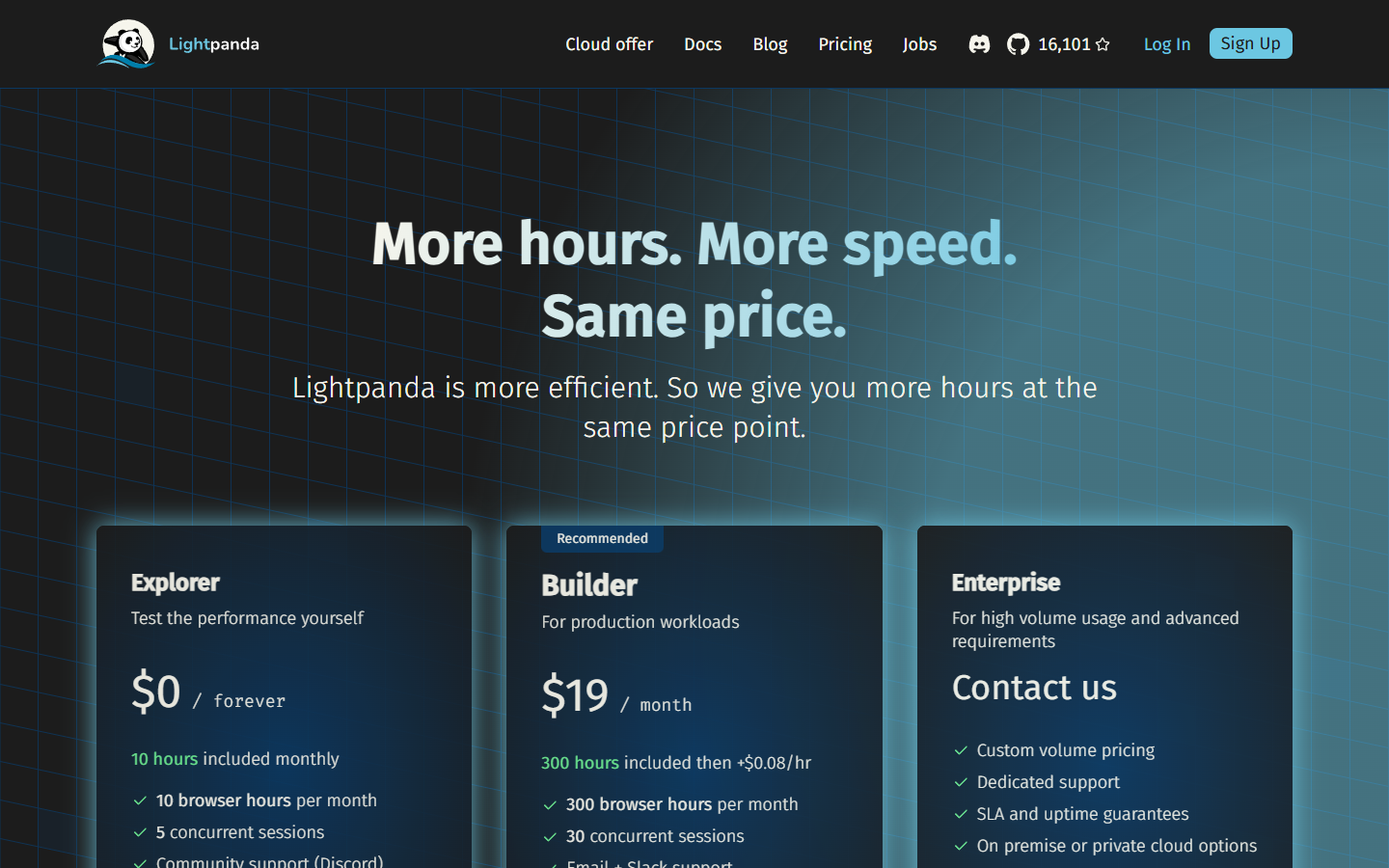
Lightpanda also offers a cloud service (browser-as-a-service) that lets you use the browser without installing anything. Three plans are available:
Explorer (free): 10 browser hours per month, 5 concurrent sessions, community support via Discord
Builder ($19/month): 300 hours included, then $0.08 per extra hour, 30 concurrent sessions, email and Slack support
Enterprise (custom pricing): dedicated support, SLA and uptime guarantees, on-premise or private cloud deployment
The company's business model relies on this managed offering, which funds the open-source project under the AGPL-3.0 license.
Current Features and Limitations You Should Know
Lightpanda is currently in beta. It is important to understand clearly what it already does and what it does not yet support.
What Works
Full JavaScript execution (V8 engine)
DOM APIs
Ajax requests (XHR and Fetch)
Cookie management
Forms and click events
Custom HTTP headers
Proxy support
Network interception
DOM dump
robots.txt compliance
Native Markdown output
MCP (Model Context Protocol) support
What Does Not Work Yet
Screenshots: Since there is no rendering engine, screenshots are not supported. This is a design choice, not a bug.
Some advanced Web APIs: Support for the hundreds of Web APIs in the standard is ongoing. Some complex sites may not function correctly.
Stability on all sites: The team warns that crashes are still possible on certain pages. Coverage improves with each release.
Recent Features
Development is very active. Recent additions include robots.txt support (for ethical browser usage), native Markdown output (particularly useful for feeding LLMs), network interception, and MCP protocol support for direct integration with AI agents.
Comparison With Alternatives: Lightpanda vs the Competition
To properly position Lightpanda in the ecosystem, it is worth comparing it to other available solutions in 2026.
Criteria | Lightpanda | Chrome Headless | Browserless | Playwright (browsers) |
|---|---|---|---|---|
Type | Native browser | Chrome headless mode | Cloud browser (Chrome) | Automation library |
Codebase | Zig (from scratch) | Chromium (C++) | Chromium | Uses Chromium/Firefox/WebKit |
Memory (25 tasks) | 215 MB | 2 GB | Variable (cloud) | Similar to Chrome |
Speed (25 tasks) | 3.2 s | 46.7 s | Plan-dependent | Similar to Chrome |
Graphical rendering | No | Yes (even headless) | Yes | Yes |
Screenshots | No | Yes | Yes | Yes |
Web compatibility | Partial (beta) | Complete | Complete | Complete |
License | AGPL-3.0 | Chromium License | Proprietary (cloud) | Apache-2.0 |
Startup time | Instant (~20 ms) | Slow (~600 ms) | Variable | Similar to Chrome |
When to Choose Lightpanda
Lightpanda is particularly compelling when you need to browse a large volume of pages without visual rendering: collecting training data for LLMs, running AI agents that navigate the web, extracting structured data, or running simple automated tests. If speed and memory footprint are your top priorities, and you can tolerate partial web compatibility for now, it is a very strong choice.
When to Stick With Chrome Headless
If you need screenshots, pixel-perfect visual rendering, or complete compatibility with every existing website, Chrome headless remains the reference. The same applies if you work with highly complex sites using advanced Web APIs that Lightpanda does not yet support.
The Future of Lightpanda and Browsers for Machines
With over 21,000 stars on GitHub and very active development, Lightpanda fits squarely into a major trend: the proliferation of AI agents that need to interact with the web. LLMs are becoming increasingly autonomous, and they need optimized tools to browse, extract, and interact with web pages without the overhead of a browser designed for human display.
Lightpanda's business model (open source with a paid cloud offering) is well-designed. It lets the community benefit from the browser for free while funding ongoing development. The AGPL-3.0 license ensures contributions stay open while protecting the company's commercial model.
Announced next steps include expanding Web API coverage, deeper integration with AI agent frameworks, and an embeddable mode (C library and WASM module) that would let developers integrate Lightpanda directly into other applications, including serverless environments like Cloudflare Workers. The startup time advantage (20 ms versus 600 ms for Chrome) would be a major asset in that context.
For developers and teams working at the intersection of AI and the web, Lightpanda represents a paradigm shift. It is no longer about adapting a human browser to machine needs, but about building a native tool for those use cases. And the benchmarks show that this from-scratch approach delivers results that could never be achieved by patching Chromium.
The project is still in beta, and it would be premature to deploy it in mission-critical production without thorough testing. But the trajectory is clear, and if you do web automation at scale, this is a tool you should be watching very closely.

Precios claros, transparentes y sin costes ocultos.
Sin compromiso, precios para ayudarte a aumentar tu prospección.

Créditos(opcional)
No necesitas créditos si solo quieres enviar emails o hacer acciones en LinkedIn
Se pueden utilizar para:
Buscar Emails
Acción IA
Buscar Números
Verificar Emails
€19por mes
1,000
5,000
10,000
50,000
100,000
1,000 Emails encontrados
1,000 Acciones IA
20 Números
4,000 Verificaciones
€19por mes
Descubre otros artículos que te pueden interesar!
Ver todos los artículosBlog
Publicado el 24 feb 2025
Herramientas avanzadas de envío masivo para usar en 2026
 Marie Head Of Sales
Leer más
Software
Publicado el 21 jul 2024
7 alternativas a Zoominfo: comparación de herramientas
Marie Head Of SalesLeer más
Prospección B2B
Publicado el 3 nov 2024
7 alternativas a Humanlinker para una prospección B2B eficaz sin agotar tu presupuesto
Marie Head Of SalesLeer más
Software
Publicado el 8 may 2024
Las 7 mejores alternativas a Lix
Marie Head Of SalesLeer más
Blog
Publicado el 3 abr 2025
5 herramientas de ventas B2B para disparar tus ventas en 2026
 Niels Co-founder
Leer más
Software
Publicado el 25 abr 2024
Las 7 mejores alternativas a Apollo.io [2026]
Marie Head Of SalesLeer más
Enlaces útiles
HubCold-email: Guía CompletaEntregabilidad: Guía completaAlternativa a LemlistAPISolicitar una demoPrograma de afiliadosFind email Maylee
Made with ❤ for Growth Marketers by Growth Marketers
Copyright © 2026 Emelia All Rights Reserved