
Zurück zum Hub
common:hub.delivrabilite
Software
B2B-Prospektion
SPF, DKIM, DMARC: the complete guide to email authentication (2026)
Veröffentlicht am 28. Apr. 2026Aktualisiert am 29. Apr. 2026
SPF, DKIM, and DMARC: if you send emails and especially cold emails you've probably already run into these three acronyms. And probably already sighed at the technical docs. In 2026, these three email authentication protocols are no longer optional: since February 2024, Google and Yahoo reject unauthenticated emails from bulk senders, and Microsoft followed suit in May 2025. For B2B cold email teams, this has become the minimum condition to reach the inbox. In this complete guide, we explain exactly what SPF, DKIM, and DMARC are, how they work together, and how to configure them correctly on your domain. With concrete DNS record examples, common mistakes to avoid, and a FAQ to answer all your questions.
What are SPF, DKIM, and DMARC?
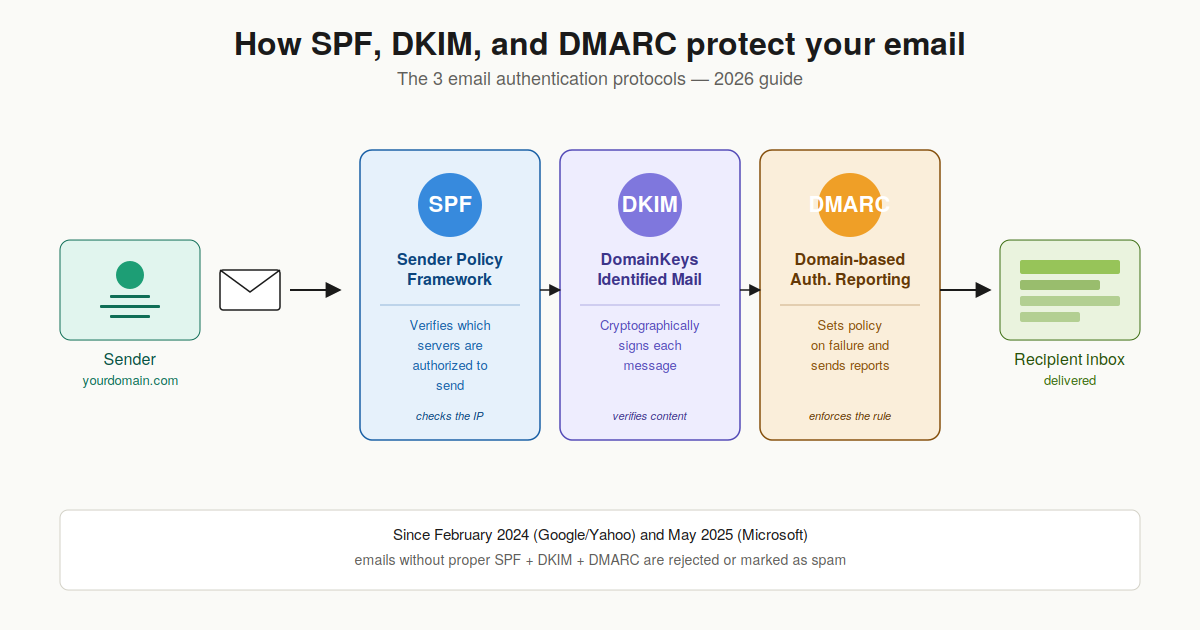
SPF, DKIM, and DMARC are three complementary email authentication protocols. Each plays a different and specific role in verifying that an email sent from your domain is legitimate.
SPF (Sender Policy Framework): declares which servers are authorized to send emails from your domain.
DKIM (DomainKeys Identified Mail): adds a cryptographic signature to each email to prove it hasn't been tampered with.
DMARC (Domain-based Message Authentication, Reporting and Conformance): tells receiving servers what to do if SPF or DKIM fail, and sends monitoring reports.
Configuring all three correctly is the minimum condition to reach the inbox in 2026. Miss any one of them, and your emails risk landing in spam or worse, being rejected outright by Gmail, Outlook, or Yahoo.
SPF (Sender Policy Framework): what is it?
SPF is the oldest of the three protocols (officially introduced in 2006 with RFC 4408, updated in 2014 with RFC 7208). The principle is simple: you publish in your DNS the list of servers authorized to send emails on behalf of your domain. When a server receives an email claiming to come from your domain, it checks that the sender's IP address is in this list.
How SPF works concretely
SPF is implemented via a TXT record in your DNS zone, at the root of your domain. Here's a typical example:
v=spf1 include:_spf.google.com include:spf.protection.outlook.com ~allThis record says: "Emails from this domain can be sent by Google Workspace or Microsoft 365 servers. Any other server should be considered suspicious (~all = soft fail)."
Example SPF record with multiple services
If your company uses several sending services (Google Workspace for internal email, a cold email tool like Emelia, and a transactional tool like SendGrid), your SPF must include all of them:
v=spf1 include:_spf.google.com include:_spf.emelia.io include:sendgrid.net ~allThe 10 DNS lookup limit: a classic trap
SPF imposes a technical constraint that's often forgotten: an SPF record cannot generate more than 10 DNS lookups. Each include: mechanism triggers an additional lookup, and some services (like Microsoft 365) consume several on their own. Beyond 10, the entire SPF returns a PermError and verification fails. If you have many services to authorize, you need to flatten your SPF (SPF flattening) with a dedicated tool.
Hard fail (-all) vs soft fail (~all): which to choose?
The final mechanism in your SPF determines how servers handle an email that fails verification.
~all (soft fail): the email fails SPF but can still be delivered, generally marked as suspicious. Recommended during installation phase and most of the time in 2026.
-all (hard fail): the email is rejected by strict servers. Use only after validating that all your legitimate sending services are in the SPF.
In 2026, the recommended practice is to start with ~all, then after validating via DMARC reports that everything is clean, switch to -all if you want strict mode.
DKIM (DomainKeys Identified Mail): what is it?
DKIM (RFC 6376) adds a cryptographic signature to each outgoing email. This signature, computed with a private key, is verified by the receiving server using a public key published in your DNS. DKIM proves two things: that the message comes from your domain, and that it hasn't been modified in transit.
How DKIM works concretely
When your sending server sends an email, it computes a cryptographic fingerprint of the content (header + body) and encrypts it with a private key. This signature is added to the DKIM-Signature header of the email. The receiving server retrieves the corresponding public key in your DNS, decrypts the signature, and verifies it matches the received email. If even a single comma was modified along the way, verification fails.
Example DKIM record
A DKIM record is a TXT published at a specific selector in your DNS. The selector lets you have multiple DKIM keys in parallel, which is useful for rotation. Typical format:
selector1._domainkey.yourdomain.com IN TXT "v=DKIM1; k=rsa; p=MIGfMA0GCSqGSIb3DQEBAQUAA4GNADCBiQKBgQ..."In practice, your email provider (Google Workspace, Microsoft 365, or a tool like Emelia) generates the key pair and gives you the exact content to paste in your DNS zone.
DKIM's key advantage: it survives forwarding
Here's why DKIM is so important: unlike SPF, DKIM survives email forwarding. When a recipient forwards your message to someone else, the sender's IP address changes (it's no longer your server, it's the forwarder's server). So SPF mechanically fails. But the DKIM signature stays intact as long as the content isn't modified. That's why in 2026, DKIM has become the cornerstone of email authentication.
DKIM key size: RSA 2048 bits recommended
DKIM keys historically come in 1024-bit or 2048-bit. In 2026, the clear industry recommendation is to use 2048-bit. 1024-bit keys are still accepted but increasingly penalized by anti-spam filters. Ideally, rotate your DKIM keys every 6 to 12 months to limit the risk window in case of private key leak.
DMARC: the policy layer above SPF and DKIM
DMARC (RFC 7489) replaces neither SPF nor DKIM. It comes on top of them to answer two questions: "What should the receiving server do if SPF or DKIM fail?" and "How do I know who's trying to send emails on behalf of my domain?".
How DMARC works concretely
DMARC relies on a concept called alignment. For an email to pass DMARC, SPF or DKIM must succeed AND the domain verified by either must match the visible "From" domain of the email (the one the recipient sees). Without this alignment, an attacker could pass SPF with their own domain while spoofing yours in the From which is exactly the spoofing technique DMARC prevents.
Example DMARC record
DMARC is published as a TXT at _dmarc.yourdomain.com:
_dmarc.yourdomain.com IN TXT "v=DMARC1; p=quarantine; rua=mailto:dmarc@yourdomain.com; pct=100; aspf=r; adkim=r"The 3 DMARC policies: none, quarantine, reject
The p= tag defines what servers should do in case of failure:
p=none: monitoring only, the email is delivered normally. This is the recommended starting mode to collect reports without breaking anything.
p=quarantine: unauthenticated emails go to spam. Intermediate stage after a few weeks of clean monitoring.
p=reject: unauthenticated emails are rejected outright. This is the final target mode, offering the best protection against spoofing.
The standard 2026 progression: start with p=none for 4-6 weeks, analyze DMARC reports, fix all legitimate email sources that fail, then move to p=quarantine for 2-4 weeks, then finally p=reject.
Strict vs relaxed alignment
The aspf= and adkim= tags control the level of alignment required between domains.
Relaxed mode (r): subdomains are accepted. If your From is "contact@yourdomain.com" and SPF passes with "mail.yourdomain.com", alignment is OK. This is the recommended mode for most organizations.
Strict mode (s): exact match required. "contact@yourdomain.com" and "mail.yourdomain.com" are no longer aligned. Use only if you have full control over all your sending subdomains.
DMARC reports: your eye on authentication
This is probably the most underrated benefit of DMARC. With rua=mailto:dmarc@yourdomain.com, you receive daily aggregated XML reports detailing who's trying to send emails on behalf of your domain, from which IPs, and with what SPF/DKIM success rate. These reports reveal forgotten services (sending for you without authentication), spoofing attempts, and configuration errors. Several free or paid tools like dmarcian, Postmark DMARC, or URIports parse these XMLs into readable dashboards.
Why you need all 3 protocols together
Each protocol covers a gap that the others don't fill:
SPF alone is not enough: it checks the sending server IP (Return-Path), not the visible From. An attacker can pass SPF with their own domain while spoofing yours in the From.
DKIM alone is not enough: it proves the message hasn't been altered, but doesn't tell the receiving server what to do in case of failure. And not all senders sign with DKIM.
DMARC alone is meaningless: it relies on SPF or DKIM to function. Without them, DMARC has nothing to evaluate.
Together, the three form a complete system: SPF verifies the IP, DKIM verifies content integrity, DMARC enforces policy and provides visibility. That's exactly why Google, Yahoo, Outlook, and Apple now require all three for bulk senders.
How to configure SPF, DKIM, and DMARC step by step
The logical implementation order is: SPF first (the fastest), DKIM next (requires generating a key pair), DMARC last (depends on the other two). Here's the procedure.
Step 1: configure SPF
List all the services that send emails on behalf of your domain: your mail provider (Google Workspace, Microsoft 365), your cold email tools, your transactional services, your newsletters. Ask each one for the include: value to use. Combine them in a single TXT record at the root of your domain. Start with ~all (soft fail). Then verify via a tool like MXToolbox that the record is syntactically correct and stays under the 10 lookup limit.
Step 2: configure DKIM
For each sending service, follow the DKIM key generation procedure in its interface (Google Workspace: Apps → Gmail → Authenticate email → Generate new record at 2048 bits). Copy the provided TXT and publish it in your DNS at the indicated selector. Wait for DNS propagation (5 to 60 minutes), then activate authentication in the provider's interface. Repeat for each sending tool.
Step 3: configure DMARC progressively
Start with a permissive policy to collect reports without risking blocking legitimate traffic:
v=DMARC1; p=none; rua=mailto:dmarc@yourdomain.com; pct=100; aspf=r; adkim=rFor 4 to 6 weeks, read the daily reports and identify all legitimate email sources that fail. Fix them (add the missing SPF include, enable DKIM on the forgotten service, etc.). Once your reports are clean, move to p=quarantine for 2-4 weeks, then p=reject.
Verify your configuration: the tools
Several free tools allow you to test your configuration:
MXToolbox: SPF, DKIM, DMARC verification and complete domain diagnostic.
Google Admin Toolbox: specific diagnostic for Google Workspace domains.
dmarcian: DMARC report analysis in readable dashboards.
Local dig command: "dig TXT yourdomain.com" for SPF, "dig TXT _dmarc.yourdomain.com" for DMARC.
Common mistakes to avoid
Even with the best intentions, certain errors keep coming up in SPF, DKIM, and DMARC configurations.
Exceeding the 10 DNS lookup limit on SPF: your record returns a PermError and everything fails. Flatten your SPF if necessary.
Publishing multiple separate SPF records: you can only have one TXT SPF per domain. Multiple records = automatic failure.
Forgetting to align the sending domain: if DMARC is in strict mode and your From is on the root domain while SPF passes with a subdomain, alignment fails.
Not monitoring DMARC reports: publishing a DMARC in p=none without ever reading the reports is useless. That's precisely when you identify problems.
Using a too-short DKIM key (1024 bits): increasingly penalized by modern filters. Prefer 2048 bits.
Moving to p=reject too quickly: without prior monitoring, you block your own legitimate emails. Count at least 6 weeks before enforcement.
SPF, DKIM, DMARC and cold email: why it's critical
If you do B2B cold email in 2026, configuring SPF, DKIM, and DMARC correctly is not an option it's the survival condition for your campaigns. Anti-spam filter tolerance thresholds have radically tightened since 2024: Gmail, Outlook, and Yahoo now reject unauthenticated emails instead of simply classifying them as spam like before. Concretely, a cold email sent from a domain without proper SPF/DKIM/DMARC has a near-zero chance of reaching the inbox.
The other critical point: your domain reputation is built on all the emails sent. If part of your sending is poorly authenticated, your entire domain suffers. That's why cold email pros often use dedicated prospecting domains (like "company-contact.com" rather than the main domain "company.com"), with their own SPF/DKIM/DMARC, to isolate their reputation.
At Emelia, SPF/DKIM/DMARC authentication is handled automatically when you connect your mailboxes to the platform. The DNS configuration stays on your side (you keep control of your domain), but the tool guides you step by step and verifies the validity of your setup before each campaign send.
Conclusion: make SPF, DKIM, DMARC your 2026 email foundation
SPF, DKIM, and DMARC are no longer an option in 2026: they are the technical foundation on which your email deliverability rests. Whether you do cold email, newsletters, transactional emails, or simply internal communication, these three protocols determine whether your messages reach the inbox or disappear into spam folders.
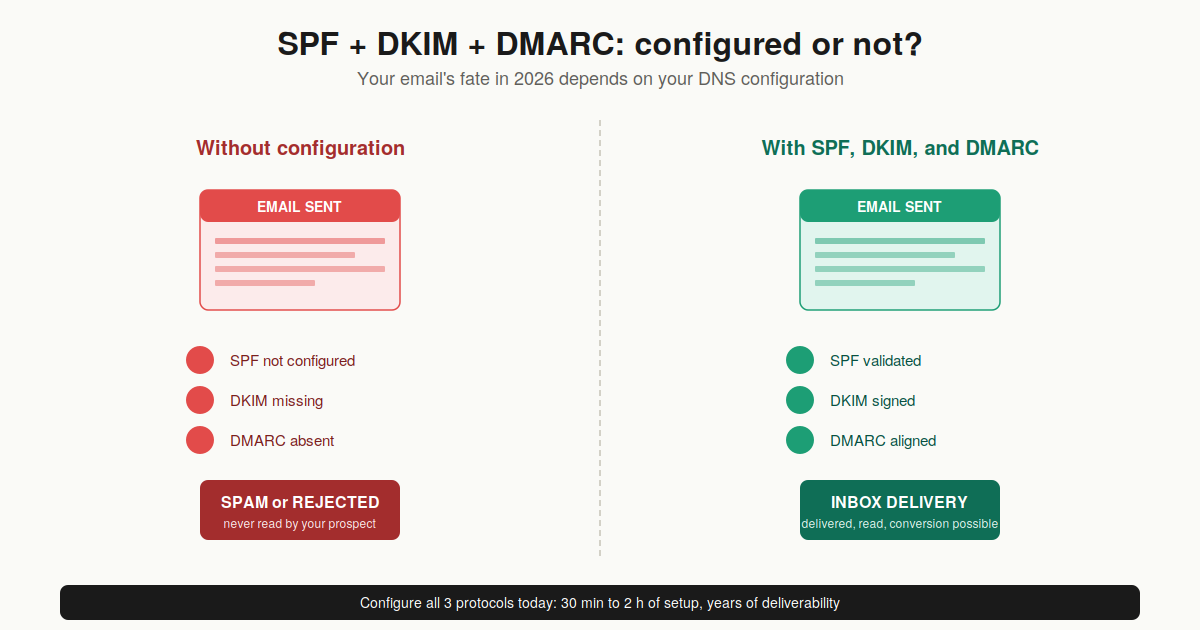
The good news: setup is a one-time investment that pays off over time. Once configured correctly and moved to p=reject, you protect your domain against spoofing, you significantly boost your deliverability, and you gain visibility through DMARC reports. If you're starting a B2B cold email strategy today, start there before even thinking about copywriting or sequence.
FAQ: SPF, DKIM, DMARC: your questions
What is the difference between SPF and DKIM?+
SPF verifies where the email comes from (is the sending server's IP address authorized for this domain?), while DKIM verifies content integrity (has the message been altered along the way?) via a cryptographic signature. SPF fails when emails are forwarded DKIM doesn't, it survives forwarding. That's why you need both.
Do I really need all 3 protocols, or is SPF enough?+
You absolutely need all three in 2026. Since February 2024, Google and Yahoo reject emails from bulk senders that don't have SPF + DKIM + DMARC properly configured. Microsoft followed in May 2025. SPF alone doesn't cover From field spoofing, DKIM alone has no policy, and DMARC alone doesn't work without the other two.
How do I check my SPF, DKIM, DMARC configuration?+
The simplest way: use MXToolbox (mxtoolbox.com), which offers free verification of all three protocols in seconds. For Google Workspace domains, Google's Admin Toolbox is also very reliable. If you're comfortable with the command line: "dig TXT yourdomain.com" for SPF, "dig TXT _dmarc.yourdomain.com" for DMARC.
How long to configure SPF, DKIM, DMARC?+
The technical configuration itself takes between 30 minutes and 2 hours depending on the number of services to authorize. But the complete deployment up to p=reject typically takes 6 to 12 weeks: you have to start with p=none, monitor reports, fix errors, then progressively raise the policy level.
What happens if I move to p=reject too quickly?+
You risk blocking your own legitimate emails. If a forgotten service sends for your domain without authentication (typically a newsletter, a CRM, an HR tool), all its messages will be rejected. That's why you always start with p=none for a minimum of 4-6 weeks.
Does DMARC work for forwarded emails?+
DMARC relies on SPF or DKIM. SPF almost always fails in case of forwarding (the IP changes), so DMARC then relies solely on DKIM, which survives forwarding. That's precisely why DKIM has become critical in 2026 without it, forwarding breaks your authentication.
Can I have multiple SPF records?+
No. You can only have one TXT SPF record per domain. If you publish several, verification fails automatically. If you need to authorize multiple services, combine them in a single SPF with multiple include:.
DKIM 1024 or 2048 bits?+
2048 bits, no hesitation. 1024-bit keys have been considered weak for several years and are increasingly penalized by modern anti-spam filters. All serious providers offer 2048 bits by default now.

Klare, transparente Preise ohne versteckte Kosten.
Keine Verpflichtung, Preise, die Ihnen helfen, Ihre Akquise zu steigern.

Credits(optional)
Sie benötigen keine Credits, wenn Sie nur E-Mails senden oder auf LinkedIn-Aktionen ausführen möchten
Können verwendet werden für:
E-Mails finden
KI-Aktion
Nummern finden
E-Mails verifizieren
€19pro Monat
1,000
5,000
10,000
50,000
100,000
1,000 Gefundene E-Mails
1,000 KI-Aktionen
20 Nummern
4,000 Verifizierungen
€19pro Monat
Entdecken Sie andere Artikel, die Sie interessieren könnten!
Alle Artikel ansehenBlog
Veröffentlicht am 5. Apr. 2025
FullEnrich: Bewertungen, Preise und Alternativen, um böse Überraschungen zu vermeiden
 Mathieu Co-founder
Weiterlesen
Software
Veröffentlicht am 11. Juli 2024
7 Alternativen zu Expandi, um Ihre Akquisitionskosten zu senken
 Marie Head Of Sales
Weiterlesen
Software
Veröffentlicht am 22. Apr. 2024
Die 5 besten Alternativen zu Dropcontact für eine bessere B2B-Kundenakquise
Marie Head Of SalesWeiterlesen
Software
Veröffentlicht am 14. Juli 2024
6 Alternativen zu Skylead, um Kosten zu sparen und Ihre Lead-Generierung zu verbessern
Marie Head Of SalesWeiterlesen
Software
Veröffentlicht am 31. März 2025
9 Alternativen zu UpLead, um Ihre Kundenakquise WIRKLICH anzukurbeln
 Niels Co-founder
Weiterlesen
Software
Veröffentlicht am 26. Apr. 2024
Email Finder 2026: Die 9 besten Hunter.io-Alternativen
Marie Head Of SalesWeiterlesen
 Maylee
Made with ❤ for Growth Marketers by Growth Marketers
Copyright © 2026 Emelia All Rights Reserved