Hunter.io Pricing 2026: Plans, Cost per Search and Real Budget
Hunter.io is one of the few prospecting tools almost everyone has heard of before they even have a budget. You install it to find one address, you come back to verify a thousand, and one day you realize it also sends sequences. That drift is exactly what makes its pricing hard to read: the price does not mean the same thing depending on whether you use it as an email search engine or as a sending platform.
This article breaks down the pricing observed in August 2026, how the credit system works, the real cost of a found email and of a verification, then the budget to plan for once you actually have to contact the prospects you found.
One framing point before the numbers, because it changes the comparison. Hunter is not a database of decision-makers the way Lusha or ZoomInfo are: it guesses and verifies the addresses attached to a domain, then it knows how to sequence them. Find, verify, send. Those three building blocks, and only those, are what this article compares against anything else.
How much does Hunter.io cost in 2026? The full pricing table
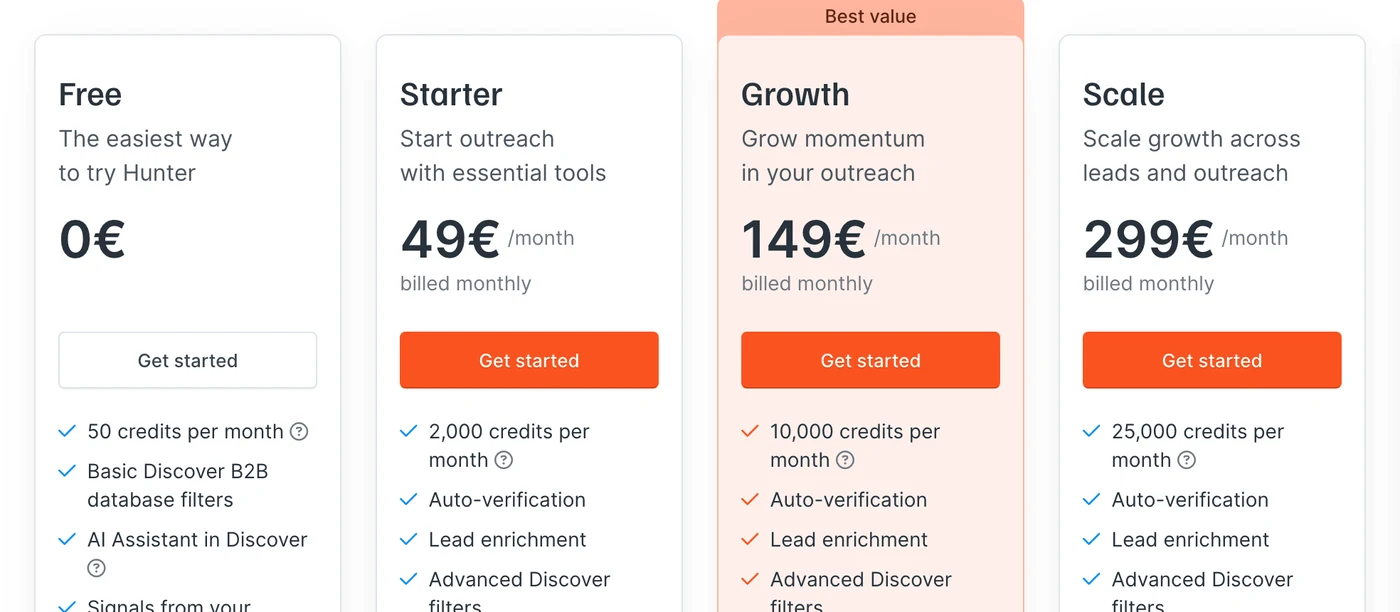
Hunter offers five tiers. The amounts below are in dollars, on monthly billing.
Plan | Monthly price | Credits per month | Mailboxes | Users |
|---|---|---|---|---|
Free | $0 | 50 | 1 | Unlimited |
Starter | $49 | 2,000 | 3 | Unlimited |
Growth | $149 | 10,000 | 10 | Unlimited |
Scale | $299 | 25,000 | 20 | Unlimited |
Enterprise | Custom quote | Custom | Custom | Unlimited |
The most interesting column is the last one, and it is rarely put forward: users are unlimited on every plan, including the free one. The whole team draws from the same credit pool. On that specific point, Hunter is the opposite of most data tools, which charge per seat and watch the bill double the moment a second rep joins.
The free plan: 50 credits and one mailbox
The Free plan gives you 50 credits per month and one connected mailbox. That is enough to test address quality in your market and send a handful of messages, not to run outbound. Its strength is that it is not capped on users, so a small team can evaluate it together before paying.
Starter at $49: the plan for a rep prospecting solo
Starter unlocks 2,000 monthly credits and three connected mailboxes. It is the serious entry point of the range, and the credits-to-price ratio is already good. Its limit is not the volume of addresses, it is the number of mailboxes: three is thin as soon as you want to spread your sends to protect deliverability.
Growth at $149: the plan for teams that really send
Growth multiplies credits by five, to 10,000 per month, and moves you up to ten mailboxes. This is the plan that matches a team sending every day. Tripling the price compared with Starter is offset by five times the credits, which mechanically drives the unit cost down.
Scale at $299: volume, if you actually use it
Scale gives you 25,000 monthly credits and twenty mailboxes. It is the best unit rate in the self-serve range, but it only pays off if you genuinely burn those 25,000 credits. Below roughly 20,000, Growth stays the better deal even after paying for a few extra credits.
Enterprise and the Data Platform: two separate quotes
Beyond that, Hunter switches to a custom-quoted Enterprise plan. Alongside it, the Data Platform, which opens large-scale API access, is priced separately with its own volume slider. A team automating enrichment therefore has to budget two lines, not one.
Move from raw data to complete prospecting
Cold email, LinkedIn, email finder and warmup in one subscription, from $37/month.
How Hunter credits work
The system is one of the clearest on the market, which is worth pointing out in a sector where opacity is the norm.
1 credit per email found, 0.5 credit per verification
One credit is deducted for every address found, whether through the Email Finder from a name and a domain, or through Domain Search, which pulls every known address at a company. Verifying an address costs half a credit. There is no different rate by data type, no hidden multiplier, and no charge for an unsuccessful lookup.
The addresses you find arrive already verified
This is the detail that changes the math and that many comparisons forget. On paid plans, an address returned by the Email Finder is delivered verified without burning an extra verification credit. You only pay the half unit on lists imported from outside. On a workflow built entirely inside Hunter, the real cost per usable address is therefore one credit, not one and a half.
Switch to Emelia
Find, contact and follow up with your prospects from a single tool, from $37/month.
The real cost of an email with Hunter
Broken down per unit, here is what each action actually costs on monthly billing.
Plan (monthly) | Cost per credit | One email found | One verification | 1,000 emails found |
|---|---|---|---|---|
Starter ($49) | $0.0245 | $0.0245 | $0.0123 | $24.50 |
Growth ($149) | $0.0149 | $0.0149 | $0.0075 | $14.90 |
Scale ($299) | $0.0120 | $0.0120 | $0.0060 | $12.00 |
Let us be blunt: Hunter is very cheap on data, and there is a genuine economy of scale. The credit drops from $0.0245 on Starter to $0.0120 on Scale, cutting the unit price in half. Plenty of data tools post a unit rate that never moves as you climb the range; that is not the case here, and Hunter deserves credit for it.
A thousand professional addresses found and verified for $24.50 on the entry plan is a rate that is hard to beat. So the question is not whether Hunter is expensive. It is what it costs you to turn those thousand addresses into a thousand prospects you actually reach.
Your ceiling does not come from your Hunter plan, it comes from your mailboxes
This is where reading the price gets complicated, and the mechanism is widely misunderstood. The number of emails you can send each day does not depend on the Hunter plan you pay for: it depends on your mailbox provider and on the cautious setting Hunter applies.
Source of the limit | Daily cap per mailbox | Where it comes from |
|---|---|---|
Hunter default setting | 15 emails | The vendor's choice to protect deliverability |
Gmail and Google Workspace | 400 emails | Provider technical limit |
Outlook and SMTP-IMAP connection | 250 emails | Provider technical limit |
Your Hunter plan | No cap of its own | The plan sets the number of mailboxes, not the volume per mailbox |
In other words, moving up a tier at Hunter never increases your daily sending capacity per mailbox. It increases your credits and the number of mailboxes you can connect, nothing else. Real volume is therefore the number of mailboxes multiplied by what each one can absorb, and Hunter itself starts at 15 sends a day, a deliberately cautious setting.
The technical caps of 400 and 250 emails per day are provider maximums, not targets. Getting anywhere near them in cold outreach from a fresh address is the surest way to land in spam within days. Between Hunter's default setting and the provider ceiling, the volume gap is roughly twentyfold, and the call is yours to make, at your own risk.
How many prospects can you really contact each month
Since the constraint is sending rather than credits, the right calculation starts from the number of mailboxes. The two columns below bracket reality: on the left Hunter's default setting, 15 emails per day per mailbox, on the right a pace ramped up gradually to 40, which is still cautious for a properly warmed mailbox. Twenty working days a month in both cases.
Plan | Credits per month | Mailboxes | At Hunter's default (15/day) | At a ramped pace (40/day) |
|---|---|---|---|---|
Starter | 2,000 | 3 | 900 | 2,400 |
Growth | 10,000 | 10 | 3,000 | 8,000 |
Scale | 25,000 | 20 | 6,000 | 16,000 |
The lesson is clear and it runs against intuition: the higher the tier, the more addresses you buy that you will not have the capacity to contact within the month. At Hunter's default setting, the Scale plan sells 25,000 searches for a sending capacity of roughly 6,000. Even pushing the pace, the gap is still 9,000 credits.
Two important caveats. The pace of 40 sends a day is an estimate of cautious usage, not a figure published by Hunter, and it assumes warmed mailboxes and a clean list. And if you are enriching a CRM or feeding a team that calls, those surplus credits serve a purpose other than sending, in which case the reasoning does not apply.
What Hunter does well on sending, and deserves credit for
Before listing the gaps, fairness demands this: Hunter is not a simple send button bolted onto a directory. The tool runs real sequences with conditional follow-ups, automatic stop on reply and personalization through variables. It also rotates sends across several connected mailboxes, which is exactly the right practice for diluting volume and protecting sender reputation. On a Growth plan with ten mailboxes in rotation, the machinery holds up perfectly well.
So the honest comparison is not between a tool that sends and a tool that does not, but between two levels of sophistication. Hunter covers cold email properly; what it does not cover is everything that comes around it.
What Hunter does not do, and what you have to buy alongside it
Three gaps shape the real budget, and none of them shows up on the pricing page.
No warmup: Hunter does not warm up your sending mailboxes. The vendor's documentation is explicit on this point, you have to arrive with mailboxes that are already warmed. A dedicated tool costs between $19 and $29 per month.
No LinkedIn automation: Hunter is an email tool, and nothing else. Any multichannel follow-up means a second subscription, starting at around fifty euros a month.
No phone numbers in the sequences: phone lookup is not included in the Campaigns offer. A prospect who ignores your email stays out of reach.
These three lines are not refinements. Without warmup, deliverability degrades and the emails you found at $0.0245 land in spam, which makes the unit rate purely theoretical. Without LinkedIn or phone, you bet the entire relationship on a single channel.
You need more than an email finder
Find, verify and contact your prospects in one place, from $37/month.
Who Hunter pays off for, and who it does not
Hunter is excellent if your main need is building and cleaning a list of addresses, if you already have a sending stack that works, or if several people need to draw from the same credit pool without stacking up licenses. For a marketing team feeding a CRM, or a growth marketer enriching files, the value for money is hard to fault.
It becomes expensive as soon as you count on it for the whole chain. You then have to add a warmup tool, a LinkedIn tool, sometimes a source of phone numbers, and the total quickly exceeds what a single platform would cost. The paradox is that the more you use Hunter as a complete prospecting tool, the less its excellent cost per credit weighs in your budget.
Six alternatives to Hunter.io and what they cost
Hunter is not alone in the email search niche, and several competitors post a lower unit cost. Here are six comparable tools, with pricing observed in August 2026. A word on method before the numbers: unless stated otherwise, the amounts are on monthly billing, and prices quoted on annual billing are flagged as such, because comparing an annualized price to a monthly one skews the whole picture. These grids move fast, with Skrapp and Snov.io having already reworked their plans several times: check the vendor's pricing page before you sign.
Snov.io
Snov.io is the competitor whose scope looks most like Hunter's: it finds the addresses, verifies them and sends the sequences. Its difference lies in the mailbox cap, which disappears from the second paid plan onward, whereas Hunter keeps one all the way to the top of the range. In exchange, LinkedIn automation is not included and is billed per seat. Watch how the prices are displayed: Snov.io leads with amounts on annual billing, 25% below the monthly rate. Both modes are listed below.
Snov.io pricing
Trial: free, 50 credits, 1 mailbox, 100 recipients
Starter: $29.25 per month on annual billing, $39 on monthly billing, 1,000 credits, 3 mailboxes, 5,000 recipients
Pro S: $74.25 annual, $99 monthly, 5,000 credits, unlimited mailboxes, 25,000 recipients
Pro M: $141.75 annual, $189 monthly, 20,000 credits, or $0.0071 per unit on annual billing
Pro L: $276.75 annual, $369 monthly, 50,000 credits
Unlimited users on every plan
LinkedIn automation: $69 per month per seat, as an add-on
Skrapp.io
Skrapp is a pure email finder, with no sequences and no sending. Its appeal rests on two things: the cheapest credit in this selection, and results-based billing that only counts the addresses that are genuinely deliverable. This is the one to keep in mind if your need stops at building the list.
Skrapp.io pricing
Free: 50 credits per month, 1 user
Professional: $39 per month, 2,000 credits, 2 users, or $0.0195 per address
Enterprise: $349 per month, 50,000 credits, 15 users, or $0.00698 per address
Addresses flagged invalid or unknown consume no credit
GetProspect
GetProspect applies the same principle of billing per verified contact, with a range sliced more finely by volume. Its entry plan costs twice as much per unit as Hunter's, but the logic flips completely as you move up. Rolling unused credits over from one month to the next is an advantage Hunter does not offer.
GetProspect pricing
Free: 50 valid addresses and 100 verifications
Starter: $49 per month, 1,000 valid addresses and 2,000 verifications, or $0.049 per unit
Growth 5k: $99 per month, 5,000 valid addresses
Growth 20k: $199 per month, 20,000 valid addresses
Growth 50k: $399 per month, 50,000 valid addresses, or $0.00798 per unit
Unused credits roll over to the following month
Findymail
Findymail positions itself on reliability rather than on headline price. Its promise fits in one sentence: you only pay for what is actually found. It is also one of the rare tools in this selection to cover phone numbers, which Hunter does not do in its sequences.
Findymail pricing
Free account: 10 credits on sign-up
Starter: $99 per month, 5,000 search credits plus 5,000 verification credits, or $0.0198 per address
Enterprise: custom quote, with auto-recharge and a dedicated account manager
1 email found = 1 credit, 1 phone number = 10 credits
No address found, no credit spent
Dropcontact
Dropcontact plays a different tune and its unit rate is not comparable with the others. It does not guess an address from a domain: it rebuilds and verifies a complete record from European sources, with no purchased database, and a GDPR compliance argument that carries real weight for many French companies. The price per enrichment is high; so are the quality and the compliance.
Dropcontact pricing
No free plan, but 50 credits offered on sign-up
Starter: $79 per month, 500 credits, or $0.158 per enrichment
Growth: $120 per month, an adjustable credit volume, with credit rollover, LinkedIn enrichment and job change detection
Enterprise: custom quote, from 200,000 credits per month
Address not found, credit refunded
Apollo.io
Apollo.io plays in a different league, and that is exactly why it belongs here: it is the biggest competitor on the market on the "data plus sequences" scope. Where Hunter starts from a domain to pull up the addresses attached to it, Apollo opens up a database of over 275 million contacts, with targeting filters, sequences, a dialer and enrichment inside the same tool. There are two catches. The model is billed per seat, whereas Hunter allows unlimited users on all its plans: with five reps, the gap is a different story entirely. And the headline prices assume an annual commitment, with monthly payment costing 20 to 25% more.
Apollo.io pricing
Free: free, capped email credits, 5 mobile credits and 10 export credits per month
Basic: $49 per user per month on annual billing, $59 on monthly billing
Professional: $79 per user per month annual, $99 monthly
Organization: $119 per user per month annual, $149 monthly, with a three-seat minimum
Overage credits: about $0.20 per unit, in blocks of 250
With five reps on Professional paid monthly, you are at about $495 per month in seats alone, while Hunter stays at $49 whatever the headcount
Entry plans side by side
Tool | Entry plan | Credits included | Unit cost | Sequence sending |
|---|---|---|---|---|
Hunter.io | $49 | 2,000 | $0.0245 | Yes, 3 mailboxes |
Snov.io | $29.25 (annual) | 1,000 | $0.0293 | Yes, 3 mailboxes |
Skrapp.io | $39 | 2,000 | $0.0195 | No |
GetProspect | $49 | 1,000 | $0.0490 | No |
Findymail | $99 | 5,000 | $0.0198 | No |
Dropcontact | $79 | 500 | $0.158 | No |
Apollo.io | $49 / user (annual) | Capped email credits | Not comparable | Yes, sequences and dialer |
Two readings stand out. On the raw cost of an address, Hunter is not the cheapest: Skrapp and Findymail do better right from the entry tier, and both Snov.io and GetProspect beat it clearly at volume. But of the seven tools compared, only Hunter, Snov.io and Apollo can also send the sequences, which explains part of the gap and makes a purely unit-based comparison misleading. Apollo is also the only one on the list billed per user, which changes the math entirely as soon as you prospect as a team.
So the real question stays the same as everywhere else in this article: what does the whole chain cost, once you add what it takes to actually contact the addresses you bought.
Hunter or Emelia: comparing like for like
The two tools genuinely do the same job on three building blocks: find an address, verify it, send a sequence. That shared scope is where they compare, and Hunter has to be credited with a clear advantage on the cost of raw data. Emelia stands apart on what comes next: active warmup on every connected mailbox, LinkedIn automation with the Sales Navigator scraper, phone number lookup and sending with no cap.
The scraper illustrates the difference in approach well. Hunter starts from a domain and pulls the addresses attached to it, which assumes you already know which companies to target. Emelia starts from a Sales Navigator search, with its filters on job title, industry and headcount, and extracts the full list before going after the emails. The two logics are complementary more than opposed.
Emelia pricing and its credit system
Emelia splits its offer into three tiers, at 37, 97 and $297 per month, which differ by the number of connected sending mailboxes and the volume of enrichment credits. These tiers describe sending capacity, not headcount: a connected mailbox is not a user, and Emelia does not offer a team mode yet.
Email sending is unlimited across the whole range and warmup is active from the first tier. Email finder and phone lookup credits reload independently of the subscription, which saves you from jumping a whole plan to absorb a one-off spike.
One decisive point against a database: the LinkedIn Sales Navigator scraper is included in all three plans, with no cap, and consumes no credits. That is how a team builds its lists without buying access to a stock of records: you run a Sales Navigator search with its filters and it feeds a campaign directly. Credits are only used for the email finder, the phone lookup, AI actions and address verification.
Criterion | Hunter.io | Emelia |
|---|---|---|
Email search | Email Finder and Domain Search | Email Finder included, rechargeable |
Cost of data | $0.012 to $0.0245 per email | Credits, rechargeable on demand |
Verification | 0.5 credit, free on the Finder | Included |
Cold email sending | Included, 3 to 20 mailboxes by plan | Included, unlimited sending |
Mailbox warmup | Not offered | Included on every mailbox |
LinkedIn automation | Not offered | Included, Sales Navigator scraper |
Phone numbers | Not included in the sequences | Dedicated credits |
Users | Unlimited, shared pool | By plan |
Entry price | $49 per month | $37 per month, no commitment |
Hunter wins on data, Emelia on execution. If your bottleneck is finding addresses, Hunter is probably the best choice on the market at that price. If your bottleneck is reaching those addresses without landing in spam and without limiting yourself to a single channel, the math changes.
The real cost of a campaign, from list to send
The table below prices the full chain for a rep who wants to find prospects, warm up mailboxes, run multichannel outreach and follow up. Hunter amounts are in dollars and Emelia amounts in euros, in line with the official pricing pages.
Chain building block | With Hunter | With Emelia |
|---|---|---|
Email search | Included, Starter at $49 | Included, from $37 |
Address verification | Included | Included |
Cold email sending | Included, 3 mailboxes | Included, unlimited sending |
Mailbox warmup | Third-party tool, from $19 | Included on every mailbox |
LinkedIn automation | Third-party tool, from $49 | Included |
Phone numbers | Not included | Dedicated credits |
Monthly total | $49 plus about $65 of third-party tools | $37 |
The gap does not come from the price of the data, where Hunter is better, but from the three lines it does not cover. It is the same reasoning as for any specialized tool: an excellent rate on one building block says nothing about the budget for a six-block chain.
That reading holds in an all-in-one logic, though, and it deserves some nuance. The total of $49 plus about $65 assumes you actually use the warmup and the LinkedIn automation. If you only do email, if your mailboxes are already warmed by a tool you pay for anyway, or if LinkedIn is not part of your approach, those two lines drop out of the calculation and Hunter becomes the cheaper option again, all the more so as it keeps the edge on the unit cost of an address. Conversely, the higher the volume and the more channels you stack, the wider the gap grows in favor of a tool that includes everything. So the right reflex is not to hold on to a total, but to cross off the lines in that table you will never use.
How to choose your Hunter plan in 2026
Think in two steps. First the volume of addresses: below 2,000 a month, Starter is enough; between 2,000 and 10,000, Growth cuts the unit cost by 40% and is worth the move; above 20,000, Scale becomes the best rate. Then the sending volume, which is the real constraint: count the mailboxes you need rather than the credits, because that is what will cap your outreach.
And ask the scope question before the price question. If Hunter is meant to stay your source of addresses inside a stack that already works, take the plan matched to your volume and you will get a good deal. If you are trying to do everything from a single tool, compare the total of your stack rather than the Hunter line, warmup and LinkedIn channel included.
One last useful reflex before you sign: check who on your team really needs an access. This is the one area where Hunter is clearly more generous than its competitors, since users are unlimited on every plan. A team of five pays exactly the same price as a single rep, which is not the case at Lusha, at Apollo, or at most sequencers billed per seat. If you are hesitating between two plans, free access for everyone can be enough to tip the balance toward the higher tier, since the cost spreads across the whole team.
In 2026, the price of a found email is no longer the right indicator. An address at $0.012 that lands in spam costs infinitely more than an address at $0.05 that reaches the inbox and triggers a reply. The right trade-off is not between two unit rates, but between the cost of the data and the cost of the ability to use it.
One subscription for all your prospecting
Email finder, unlimited sending, LinkedIn and warmup, from $37/month.
Frequently asked questions about Hunter.io pricing in 2026
Does Hunter.io have a free plan?+
Yes, with 50 credits per month, one connected mailbox and 15 sends per day. Users are already unlimited there, which lets a small team evaluate it together before paying.
Is Hunter priced per user?+
No, and that is its main pricing advantage. Every plan includes an unlimited number of users sharing the same credit pool. A team of five pays the same price as a single rep.
How much does an email found with Hunter cost?+
One credit per email found, which works out to $0.0245 on Starter, $0.0149 on Growth and $0.0120 on Scale on monthly billing. A verification costs half a unit, and addresses returned by the Email Finder arrive already verified at no extra cost.
Does Hunter include warmup for sending mailboxes?+
No. The vendor states explicitly that you have to arrive with mailboxes that are already warmed. So budget for a dedicated tool, between $19 and $29 per month, otherwise deliverability degrades fast.
Can you prospect on LinkedIn with Hunter?+
No, Hunter is an email tool only. There is no LinkedIn automation, no Sales Navigator scraper and no phone numbers in the sequences. Any multichannel follow-up means a second subscription.
Which Hunter plan should you choose for your volume?+
Below 2,000 addresses a month, Starter is enough. Between 2,000 and 10,000, Growth cuts the unit cost by about 40%. Above 20,000, Scale offers the best rate, but first check that you have enough mailboxes to contact all that volume.