
DESIGN.md: How a Simple Markdown File Solved Vibe Coding's Biggest Design Problem
Publicado el 10 abr 2026Actualizado el 13 abr 2026
On March 31, 2026, a seemingly unremarkable repository appeared on GitHub: VoltAgent/awesome-design-md. Ten days later, it had amassed 40,700 stars and 5,100 forks. For context, the most iconic "awesome" lists on GitHub, like awesome-react and awesome-go, took an entire month to reach 3,200 stars when they launched back in 2014. Even accounting for the massive growth of GitHub's user base (from 10 million in 2014 to over 150 million in 2026), the velocity of awesome-design-md is unprecedented.
The fork-to-star ratio of 12.6% tells an even more compelling story. On an average GitHub project, this ratio hovers between 5% and 8%. When it exceeds 10%, it means developers are not just starring out of curiosity. They are forking the project, copying it into their own repositories, and actively integrating it into production workflows. For comparison, awesome-go sits at 7.8% and awesome-python at 9.5%.
What these numbers reveal is a fundamental shift in how teams build interfaces with AI assistance. Until now, asking an AI agent to generate a user interface was a visual lottery: arbitrary colors, inconsistent typography, components that respect no design system whatsoever. DESIGN.md solves this problem by giving agents a readable, standardized, and immediately actionable design brief.
What Is DESIGN.md and How Does It Actually Work
DESIGN.md is a standardized markdown file that serves as a design specification for AI agents. You place it in your project root directory, alongside your source code. When you ask an AI agent (Claude Code, Cursor, GitHub Copilot, or any other tool) to build a user interface, the agent reads this file as a constraint document. It functions as a detailed design brief, a style guide, and a component specification rolled into one plain-text file.
The elegance of DESIGN.md lies in its simplicity. It is not a binary format. It is not a proprietary tool. It is pure markdown, which means it is version-controllable with Git, human-readable, and editable in any text editor. This universality is deliberate: markdown is the format LLMs read best, requiring no parser or schema validation.
To install it, a single command is enough:
bash
npx getdesign@latest add stripeThis command creates a complete package in your project: the DESIGN.md file itself, a preview.html file to visualize the design in light mode, and a preview-dark.html for dark mode. No Figma exports. No JSON schemas. No specialized tooling. Just a text file that any AI agent can read natively.
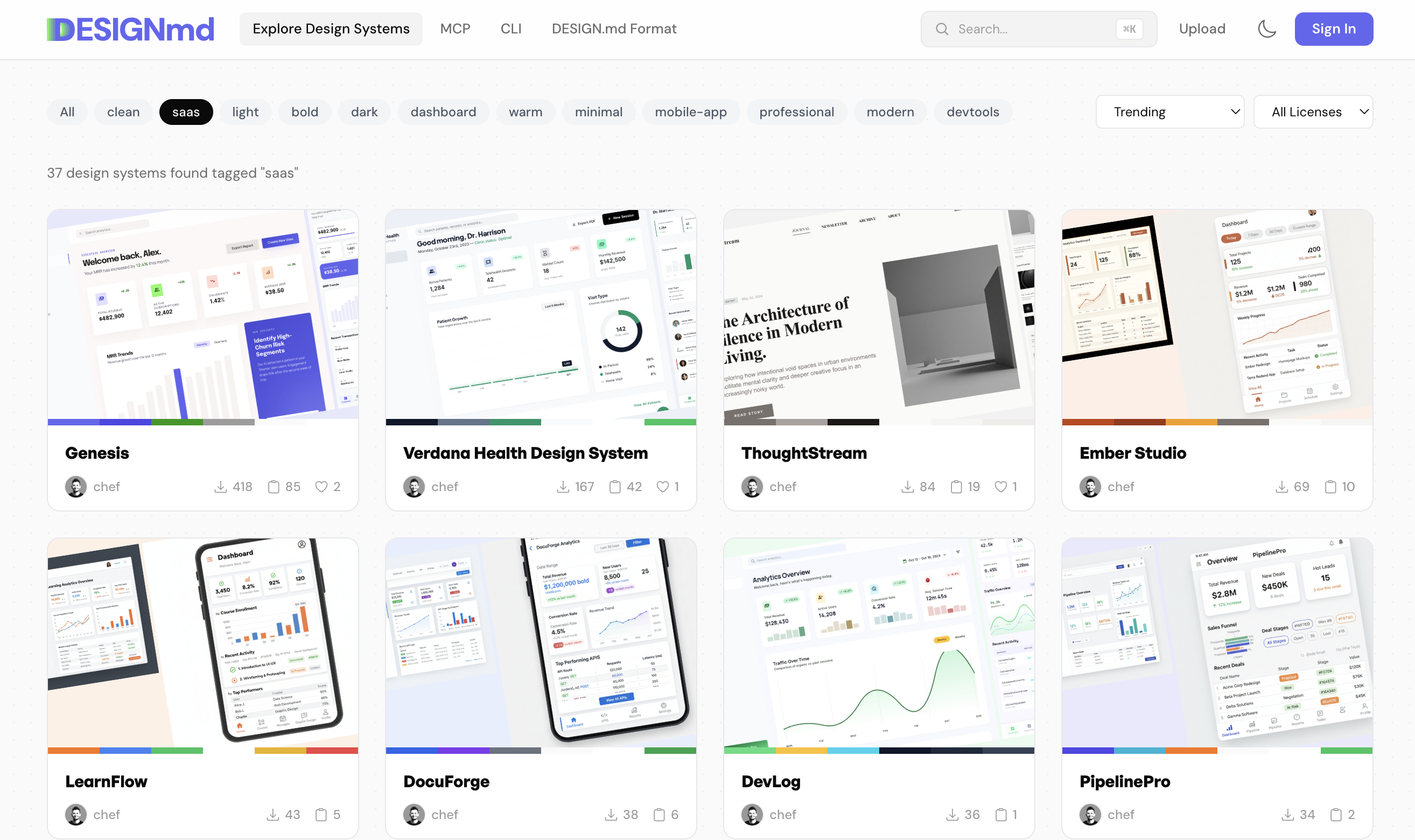
The website getdesign.md also lets you browse and preview all available design systems before installing them.
Google Stitch: The AI Design Tool That Started It All
To understand why DESIGN.md is structured the way it is, you need to trace it back to Google Stitch. On March 18, 2026, Google Labs launched a complete rebuild of Stitch, its AI design tool. Unlike previous attempts at AI-assisted design, Stitch was not designed to replace designers or compete with Figma. Its objective was different: to understand and execute design specifications provided in a standardized format.
That format is DESIGN.md.
When you use Google's Gemini model within Stitch to generate UI mockups or refine design iterations, the model operates within the guardrails defined by your DESIGN.md. The AI does not generate random design choices. It does not contradict itself from one screen to the next. It maintains visual and behavioral consistency because the specification tells it exactly what consistency means for your product.
The implications extend well beyond Google's own tools. Once the format was published, developers realized they could use the same DESIGN.md file with other AI agents. A specification written for Stitch could now serve Claude Code, Cursor, or any LLM-powered script. This interoperability is why DESIGN.md adoption exploded so quickly: the format was not locked to a single vendor.
VoltAgent, the open source organization founded by Omer and Necati Ozmen (also known for their TypeScript AI agent orchestration framework at voltagent.dev), seized this opportunity. By extracting design specifications from 62 real websites used by millions of people daily, they created a library of proven, battle-tested design systems. Publishing under an MIT License ensured that any team could use, fork, and distribute these files without restrictions.
Breaking Down the 9 Sections Inside Every DESIGN.md File
Every DESIGN.md file follows a standardized structure with nine sections. This consistency is what makes the format machine-readable while remaining flexible enough to accommodate different design philosophies.
Visual Theme and Atmosphere establishes the emotional and visual intent of the product. Should the interface feel corporate and trustworthy? Modern and playful? Minimalist and utilitarian? For an AI agent, this section becomes a reference point when it needs to decide between multiple valid design choices.
Color Palette and Roles specifies which colors are used, where they appear, and what semantic meaning they carry. Instead of a vague directive like "use blue for primary actions," this section defines precise values: the primary button background is #0066FF, the hover state is #0052CC, the disabled state is #CCCCCC. These definitions eliminate all ambiguity.
Typography Rules defines font families, sizes, line heights, letter spacing, and weights for each text element. For AI agents, these rules prevent the layout disasters that occur when typography is left to chance.
Component Stylings documents how each UI component appears and behaves: buttons, input fields, modals, cards, navigation elements. The specification includes default states and interactive states (hover, active, focus, disabled).
Layout Principles defines the grid system, spacing scale, and container widths. This section establishes the skeleton on which all visual elements rest.
Depth and Elevation covers how the design communicates depth and layering: shadow specifications, z-index layering, and spatial relationships between elements.
Do's and Don'ts provides explicit guardrails. "Never use more than three colors in a single card." "Always ensure minimum 44px touch targets on mobile." These constraints are particularly valuable for AI agents, which operate most confidently within explicit boundaries.
Responsive Behavior specifies how the design adapts across screen sizes: breakpoints, component stacking on mobile, elements hidden or shown depending on viewport width.
Agent Prompt Guide is a meta-section that directly instructs the AI agent. It might say: "When building forms, always include validation feedback" or "Card components have a maximum width of 400px." This section treats the AI as a team member with explicit instructions.
Using DESIGN.md with Claude Code, Cursor, and Other AI Agents
The practical workflow with DESIGN.md varies by tool, but the core pattern remains the same: copy DESIGN.md into your project, reference it when asking the AI to build UI, and let the agent use the specification as its guiding reference.
With Claude Code, Anthropic's official CLI tool, the integration is particularly seamless. Claude Code automatically reads project files, including DESIGN.md. When you ask it to "build a login page that matches the design system," it automatically incorporates the DESIGN.md constraints into its reasoning. No additional prompting required.
With Cursor, you can reference the file explicitly in your prompts: "Build a dashboard using the DESIGN.md in this project." Cursor reads the file and uses it as context for code generation.
For custom workflows or teams building their own AI agents, the approach is to include DESIGN.md in the system prompt or context window. Before asking the agent to generate UI, you provide the specification and instruct it to treat it as binding constraints.
Here is what a practical command-line workflow looks like:
bash
# Install DESIGN.md inspired by Stripe
npx getdesign@latest add stripe

# The tool creates:
# design-md/DESIGN.md          (Stripe design specification)
# design-md/preview.html       (light mode preview)
# design-md/preview-dark.html  (dark mode preview)

# With Claude Code, request generation:
# "Build a user dashboard following the DESIGN.md"
The practical impact is dramatic. Teams report that AI-generated UIs without design constraints require significant rework. Those generated with DESIGN.md constraints need only minor adjustments. The specification shrinks the iteration cycle from dozens of back-and-forths to just a few refinements.
62 Ready-Made Design Systems: From Stripe to Tesla
The awesome-design-md repository does not just provide the specification format. It offers 62 actual DESIGN.md files extracted from real products used daily by millions. This library is the project's secret weapon and a significant competitive advantage for teams looking to accelerate development.
These are not fictional design systems. They are specifications reverse-engineered from live websites and applications. The collection spans nine categories:
Category | Examples | Count |
|---|---|---|
AI and LLM Platforms | Claude, Mistral AI, Ollama, Replicate | 12 |
Developer Tools and IDEs | Cursor, Vercel, Raycast, Warp | 7 |
Backend, Database and DevOps | Supabase, MongoDB, PostHog, Sentry | 8 |
Productivity and SaaS | Linear, Notion, Zapier, Cal.com | 7 |
Design and Creative Tools | Figma, Framer, Webflow, Airtable | 6 |
Fintech and Crypto | Stripe, Revolut, Coinbase, Wise | 6 |
E-commerce and Retail | Airbnb, Shopify, Nike, Meta | 4 |
Media and Consumer Tech | Apple, Spotify, Uber, NVIDIA | 7 |
Automotive | Tesla, BMW, Ferrari, Lamborghini | 5 |
For a B2B team building a new product, landing page, or internal tool, this library is immediately actionable. Need a SaaS dashboard that inspires trust and professionalism? Start with Stripe's DESIGN.md. Building something technical and developer-focused? GitHub's design system is extracted and available. Want a more modern, playful aesthetic? Figma's design system is in the collection.
The diversity of the collection deserves emphasis. The 62 systems represent different philosophies, different industries, different audiences. A fintech's design looks nothing like an automotive manufacturer's. Stripe's minimal high-contrast palette differs significantly from Slack's softer, more colorful approach. By offering this diversity, the repository demonstrates that DESIGN.md is flexible enough to capture varied visual languages.
Each entry includes not just the DESIGN.md file but also light and dark mode previews that let you see what the design system looks like in practice before adopting it.
DESIGN.md vs AGENTS.md vs CLAUDE.md: Which File for Which Agent
The emergence of DESIGN.md coincides with an ecosystem of similar .md files, each serving a different purpose. Understanding the distinction clarifies why DESIGN.md is necessary rather than redundant.
AGENTS.md specifies how to build software. It contains build instructions, dependency specifications, and architectural guidance. An AI agent reading AGENTS.md understands: "Use Node.js for the backend, React for the frontend, connect via REST API." It is the construction blueprint.
CLAUDE.md is specific to Claude Code. It configures Claude Code's behavior for a particular project: which folders to explore, which files to ignore, whether to run tests automatically. It is a configuration file that tells Claude Code how to operate within a specific project context.
SKILL.md defines reusable capabilities. In the VoltAgent ecosystem, SKILL.md files describe agent skills that can be composed together. A skill might be "send an email," "query a database," or "generate an image."
DESIGN.md is different from all three. It is not about construction, agent configuration, or available capabilities. It is about the appearance and behavior of the user interface. It answers the question: "What should the UI look like?"
File | Read By | Defines | Primary Purpose | Stars |
|---|---|---|---|---|
DESIGN.md | Design agents, UI generators | UI appearance, component styling | Consistency across AI-generated interfaces | 40.7K |
AGENTS.md | Coding agents, orchestrators | Build instructions, architecture | Reproducible development | ~20K |
CLAUDE.md | Claude Code specifically | Agent behavior, project configuration | Tailored Claude Code experience | ~38K |
SKILL.md | Any VoltAgent ecosystem agent | Reusable capabilities and components | Modular, composable AI tasks | Varies |
In practice, a real project might include all four files. AGENTS.md tells the AI how to structure the code. CLAUDE.md tells Claude Code how to interact with the project. SKILL.md defines reusable components. DESIGN.md ensures that the generated interface matches your visual specifications. These files do not conflict: they operate at different levels of abstraction and complement each other.
The Growing DESIGN.md Ecosystem: Forks, Extensions, and Community
The derivative projects built around DESIGN.md demonstrate genuine ecosystem maturity. It is no longer just the core repository. Specialized extensions and integrations are emerging to address specific use cases and technical requirements.
awesome-design-md-jp (263 stars) extends DESIGN.md for CJK (Chinese, Japanese, Korean) typography. Typography rules for these languages differ significantly from design systems optimized for the Latin alphabet. The rapid appearance of this Japanese extension, barely days after the main repository launched, signals organic international adoption.
stitch-mcp (95 stars) wraps the Google Stitch integration as an MCP (Model Context Protocol) server. This allows any MCP-compatible AI agent to connect directly to Stitch tools via DESIGN.md files, making the integration automatic and seamless.
awesome-design-md-skills (53 stars) provides AI agent skills specifically designed to work with DESIGN.md files. Rather than building a UI from scratch, these skills let agents reference, iterate on, and refine existing design specifications.
Figma-to-AI-prompter (27 stars) solves a backward-compatibility problem: how to convert existing Figma designs into DESIGN.md format. Many companies have years of design work in Figma. Rather than recreating those specifications from scratch, this tool automates the extraction process.
Community sentiment has been remarkably positive. The existence of Japanese typography extensions signals international adoption. MCP servers signal enterprise interest. Skills libraries signal that teams are building production workflows around DESIGN.md. Figma converters signal that teams are migrating existing design systems into the new format.
Why DESIGN.md Matters for B2B Teams and Sales Tech Builders
For B2B teams, DESIGN.md has immediate, practical relevance that touches landing pages, internal tools, and prospecting workflows.
Consider the classic cold email landing page problem. A B2B team launching an outreach campaign needs a page that converts. That page must look professional, load fast, and communicate a specific value proposition. Traditionally, this required either hiring a designer or wrestling with a no-code tool. With DESIGN.md, a team can use Claude Code with a proven design system (say, Stripe's minimalist approach) to rapidly generate a landing page that meets professional standards.
The "vibe coding" approach that has emerged in the AI tools community is particularly relevant here. Vibe coding means asking an AI: "Build me something that looks like Stripe's design, but for our product." The AI agent, with access to Stripe's DESIGN.md, understands exactly what "like Stripe" means. It is not a vague aesthetic judgment. It is a concrete specification the AI can execute against. The results are consistently better than asking an AI to build a "professional-looking" landing page without guidance.
Internal tools represent another strong use case. B2B companies frequently build internal dashboards for their sales teams, operations teams, or customer success teams. These tools do not need cutting-edge design, but they do need consistency and professionalism. An internal tool built with Linear's or GitHub's DESIGN.md will feel coherent with the rest of the company's web presence.
The productivity gains are quantifiable. If a design iteration that would typically take a designer two hours can now be completed in 15 minutes with AI assistance and a DESIGN.md, the economic implications for B2B teams are significant. Multiply that across dozens of pages and projects, and you are looking at weeks of saved time annually.
There is also the competitive angle. A prospect who sees a polished, well-designed demo site or pitch deck forms impressions about your company's quality and attention to detail. DESIGN.md makes it easier to maintain high design standards across all customer-facing assets without requiring a full design team.
What DESIGN.md Signals About the Future of AI-Assisted Development
The rapid adoption of DESIGN.md is not an isolated phenomenon. It is part of a broader pattern in how AI tools are reshaping development workflows.
For years, the conversation around AI and software development centered on code generation. Can an AI write JavaScript? Python? The implicit assumption was that code was the bottleneck. But in practice, most developers report that the real bottleneck is specification: understanding what to build and why.
This is where DESIGN.md fits into a larger picture. AI tools are getting better at executing specifications, but only if those specifications are clear. DESIGN.md is a specification format. It says: "This is what good specification looks like for design." The format is explicit, measurable, and machine-readable.
The old model was "write better prompts to get better results." The new model is "write better specifications to get consistent results." This shifts responsibility from prompt engineering (a fragile, ephemeral skill) to specification writing (a more structured, scalable discipline).
Several directions are emerging. Interoperability will become more important than integration. The original power of DESIGN.md lies in the fact that it works across multiple AI tools simultaneously. As more AI assistants enter the market, the ability to move a specification between tools (from Claude Code to Cursor, from Stitch to custom agents) will become a competitive advantage.
Specification formats will proliferate. DESIGN.md for UI design, AGENTS.md for architecture, SKILL.md for capabilities. Expect new formats for other development aspects: SECURITY.md for compliance, PERFORMANCE.md for performance targets, TESTING.md for test strategies.
Design consistency will become a competitive differentiator. Companies that can rapidly generate UIs consistent with their brand identity, without lengthy design review cycles, will move faster than their competitors.
Cross-functional collaboration will also evolve. A designer writing a DESIGN.md is documenting their decisions in a format that developers and AI assistants can understand and execute. This creates a tighter feedback loop. Rather than creating static mockups that developers attempt to interpret, designers can iterate directly on the specification that drives code generation.
Markdown is quietly becoming the universal protocol between humans, design, and AI agents. DESIGN.md is the first successful instantiation of this principle for the design domain. It will not be the last. Teams that invest now in understanding and adopting these specification formats will find themselves advantageously positioned in a future where AI-assisted development is the norm rather than an emerging technique.

Precios claros, transparentes y sin costes ocultos.
Sin compromiso, precios para ayudarte a aumentar tu prospección.

Créditos(opcional)
No necesitas créditos si solo quieres enviar emails o hacer acciones en LinkedIn
Se pueden utilizar para:
Buscar Emails
Acción IA
Buscar Números
Verificar Emails
€19por mes
1,000
5,000
10,000
50,000
100,000
1,000 Emails encontrados
1,000 Acciones IA
20 Números
4,000 Verificaciones
€19por mes
Descubre otros artículos que te pueden interesar!
Ver todos los artículosSoftware
Publicado el 6 jul 2025
Lead411 vs Lusha vs Emelia: el duelo definitivo entre las herramientas de prospección B2B
 Mathieu Co-founder
Leer más
Software
Publicado el 1 jul 2025
Lusha vs Waalaxy vs Emelia: ¿quién dominará en 2026?
 Niels Co-founder
Leer más
Software
Publicado el 24 jun 2025
PhantomBuster vs Waalaxy: automatización B2B para dominar la prospección en 2026
Niels Co-founderLeer más
Software
Publicado el 6 jul 2025
Kaspr vs ZoomInfo vs Emelia: ¿quién dominará la prospección B2B en 2026?
Niels Co-founderLeer más
Software
Publicado el 30 jun 2025
Comparación entre Snov.io y Waalaxy para la prospección B2B
Mathieu Co-founderLeer más
Software
Publicado el 15 may 2025
Los 6 mejores programas gratuitos de edición de vídeo: contenidos profesionales gratuitos
Mathieu Co-founderLeer más
Enlaces útiles
HubCold-email: Guía CompletaEntregabilidad: Guía completaAlternativa a LemlistAPISolicitar una demoPrograma de afiliadosFind email Maylee
Made with ❤ for Growth Marketers by Growth Marketers
Copyright © 2026 Emelia All Rights Reserved