The short answer
- 1In the UK, Companies House names the directors of every company, but never gives their email. Use it to confirm names.
- 2In Sales Navigator, search titles such as Managing Director or Company Director, with the Owner and CXO seniority levels (not Director) and 11 to 500 employees.
- 3Send the search to Emelia with Export with Emelia, then run Find email on the list: 1 credit per email found, given back when no address is found.
- 4For a single director, use the Emelia Chrome extension on their LinkedIn profile.
- 5Keep the brand website and the registered company name: if the domain gives nothing, Emelia automatically retries with the name.
Who counts as a "company director"?
In the UK, and in countries with a similar system such as Ireland or Australia, a company director is an official role, not just a job title. Every private limited company has at least one, recorded on the public register.
In a company of 10 to 500 people, that means the Managing Director, a few executive directors (finance, operations, sales), and sometimes non-executives and a chair who sit on the board without running the company. Each plays a different part in a purchase.
For the head of a large corporation, read how to find a CEO's email; for very small businesses, the business owners guide. In the United States, directors sit on the board and appoint the officers who run the company, and a "Director of Sales" is a manager, not a board member.
The titles to search for
Job titles to include
Job titles to leave out
On LinkedIn, "Director" is also a grade: agencies use Account and Associate Director as seniority levels, and investment banks give the "Managing Director" rank to many people in the same firm. None of them sits on the board.
Where company directors show up
- Companies House (UK): the free register lists every current and past director, with full name, role, appointment date and a correspondence address. No email, but the exact names to look for.
- LinkedIn: most managing directors of B2B companies have a profile. In small UK companies, many simply write Director or Company Director.
- The company website: Leadership or Our board pages, and the footer, where UK companies generally show their registered name and number.
- Appointment announcements on the company blog or in trade press: a recent appointment is a good reason to write.
- US filings: Secretary of State business searches and the proxy statements of listed companies name officers and directors.
Why directors are harder to reach than they look
- The register gives names, never emails. Since March 2024, UK companies must give Companies House a registered email address, but it is not made public.
- The legal name is not the brand. "Tollbridge Group Holdings Limited" may trade as "Tollbridge Precision", with its own website. Keep both: Emelia retries with the company name when the domain gives nothing.
- One director, several companies. Their officer page on Companies House lists every appointment, holdings and dormant companies included: pick the one whose domain they actually use.
- Non-executives often have no mailbox at the company. They use the address of their main job or their own consultancy.
- The registered office is often the accountant's address. Take the location from LinkedIn, not from the register.
Which method should you use?
It depends on what you start from: a market to cover, a few named directors, or a file. All three end with directors and their work emails, ready for a campaign.
Build the list in Sales Navigator
Filter directors by title, company size, region and industry, then send the whole search to Emelia.
Best for: a new list of dozens to thousands of directors.
See the stepsOne director at a time
On a LinkedIn profile, the Emelia extension finds the email and adds the director to a campaign.
Best for: a few named directors on key accounts.
See the stepsStart from a file
Import a CSV of directors taken from Companies House or an event list, or sync HubSpot or Pipedrive, then find the missing emails in one run.
Best for: names and companies you already have.
See the stepsMethod 2: find one director's email from their LinkedIn profile
On a key account, you need the one director who owns your topic (the finance director for cash, the operations director for a process), not the whole board. The extension does it from their profile.
- Step 1
Open the director's LinkedIn profile
Once the Emelia extension is installed and connected, a button appears on every profile. If the director lists several companies, check the current position is the one you target.
- Step 2
Click Find email
Emelia reads the name, the company and its website on the profile, then finds the work email. Find phone looks for the phone number, for 50 credits per number found.
The Emelia extension on a LinkedIn profile: find the email, then add the contact to a campaign. - Step 3
Add the director to a campaign
Pick a campaign in Add to the campaign: the director joins it directly, with the email you just found.
No LinkedIn profile? Use unitary searches
For a director found only on Companies House, open Unitary searches at the top of the Lists page. Type the name in the usual order (not "SURNAME, First names" as on the register), the company and its domain, and always fill in the country.
Method 3: start from Companies House or a file you already have
You may already have names: directors from Companies House, a CRM segment, an event list. Note that the Companies House advanced search exports companies (by SIC code, address or incorporation date, up to 5,000 rows in CSV), not directors: add them from each company's People tab first.
| Column | Required | What it is for |
|---|---|---|
| First name + Last name (or Full name) | Yes | Companies House writes "SURNAME, First names": split them into two columns and drop middle names. |
| Company website or domain | Optional | The brand's website: the most reliable starting point. |
| Company name | Optional | The registered name, used as a second chance. You need at least the website, the domain or the name. |
| LinkedIn profile URL | Optional | For LinkedIn steps in the campaign, and for the phone search. |
Required
What it is for
Required
What it is for
Required
What it is for
Required
What it is for
- Step 1
Import the file
One row per director. In Emelia, go to Lists, then New List, and choose CSV File (HubSpot and Pipedrive are also available as sources). The file must be a .csv, not an .xlsx. Columns are recognized automatically, and you can fix the mapping.
Emelia: create a new list from a CSV file, Sales Navigator, HubSpot or Pipedrive. - Step 2
Launch Find email on the list
Emelia shows the entries without an email, the credits needed and the leads missing a name or a company. For a file built from Companies House, point it to the column with the brand's domain, or to the registered name if that is all you have, choose United Kingdom as the country, and launch. It keeps running if you close the tab.
Emelia: find the missing emails of a whole list in one run. - Step 3
Review the results
Leads that already had an email are skipped and not charged. Keep the addresses qualified as valid. Empty rows are often non-executives or holding companies: retry with the company where the director actually works.
Why the registered name is worth keeping
When the domain gives nothing and the row has a company name, Emelia automatically searches again with the name. Director files often mix a legal name with the website of the brand: keep both, and every row gets two chances.
Doing it by API
If you pull officers from the Companies House API, chain the two: send each director to Emelia with fullname, companyName and country (the website is optional), then read the result with the returned job ID. 1 credit per email found, as in the app. See the API documentation.
POST https://api.emelia.io/tools/find/email
Authorization: <API_KEY>

{
  "fullname": "Eleanor Whitcombe",
  "companyName": "Tollbridge Precision",
  "country": "US",
  "companyWebsite": "tollbridgeprecision.co.uk"
}

→ { "success": true, "jobId": "…" }
GET https://api.emelia.io/tools/find/email/{jobId}The free methods, for one or two directors
For a single director, public sources often get you most of the way, if you have the time.
1.Companies House (UK)
Search the company on Companies House, open People and keep the current officers. Click a name to see all their appointments, and use Follow this company to get an email when it files a change, such as a new director.
2.The website footer
UK companies generally show their registered name and number on their site. Search that number on Companies House to see which entity, and which directors, stand behind a brand.
3.Appointment news
Search Google for "appointed managing director" with the brand name. The announcement confirms the role, and its press contact shows the email format of the domain.
4.US state and SEC filings
The Secretary of State business search of the state of registration often lists officers and directors, and listed companies name their board in their proxy statement on SEC EDGAR. No emails there.
5.Guess, then verify
Try the formats below, then check the address with an email verifier before sending. Never send to an unchecked guess: bounces hurt your sender reputation.
The email formats directors use most
The format depends on the size and age of the company, with two cases specific to directors: group domains and non-executives.
| Pattern | Example | Where you see it |
|---|---|---|
| firstname.lastname@ | eleanor.whitcombe@tollbridgeprecision.co.uk | The most common beyond a few dozen staff. |
| firstname@ | rajesh@kestrellanepackaging.co.uk | Frequent in small companies where the director set up the domain. |
| f.lastname@ / flastname@ | s.kelly@harebellcourtcare.co.uk | Common in long-established firms and professional services. |
| firstname.lastname@ (group domain) | amara.okafor@quillmoorgroup.co.uk | Directors of a subsidiary often use the group's domain, not the brand's. |
| firstname@ (another domain) | fiona@macleodadvisory.co.uk | Typical of non-executives with another main job. |
| enquiries@ / info@ / office@ | enquiries@pritchardvale.co.uk | A shared inbox, read first by someone else. |
Example
Where you see it
Example
Where you see it
Example
Where you see it
Example
Where you see it
Example
Where you see it
Example
Where you see it
Then email them: the campaign in Emelia
A list of directors only pays off once it is in a campaign, built in Emelia without exporting anything.
- Step 1
Create the campaign
In Campaigns, create a campaign from scratch or from a template such as LinkedIn then Email: a profile visit before the first email makes your name familiar.
- Step 2
Write the sequence
In the Campaign tab, add emails, LinkedIn steps and delays, personalized with
{{firstName}}and{{companyName}}. Two or three well-spaced messages suit a director better than six follow-ups.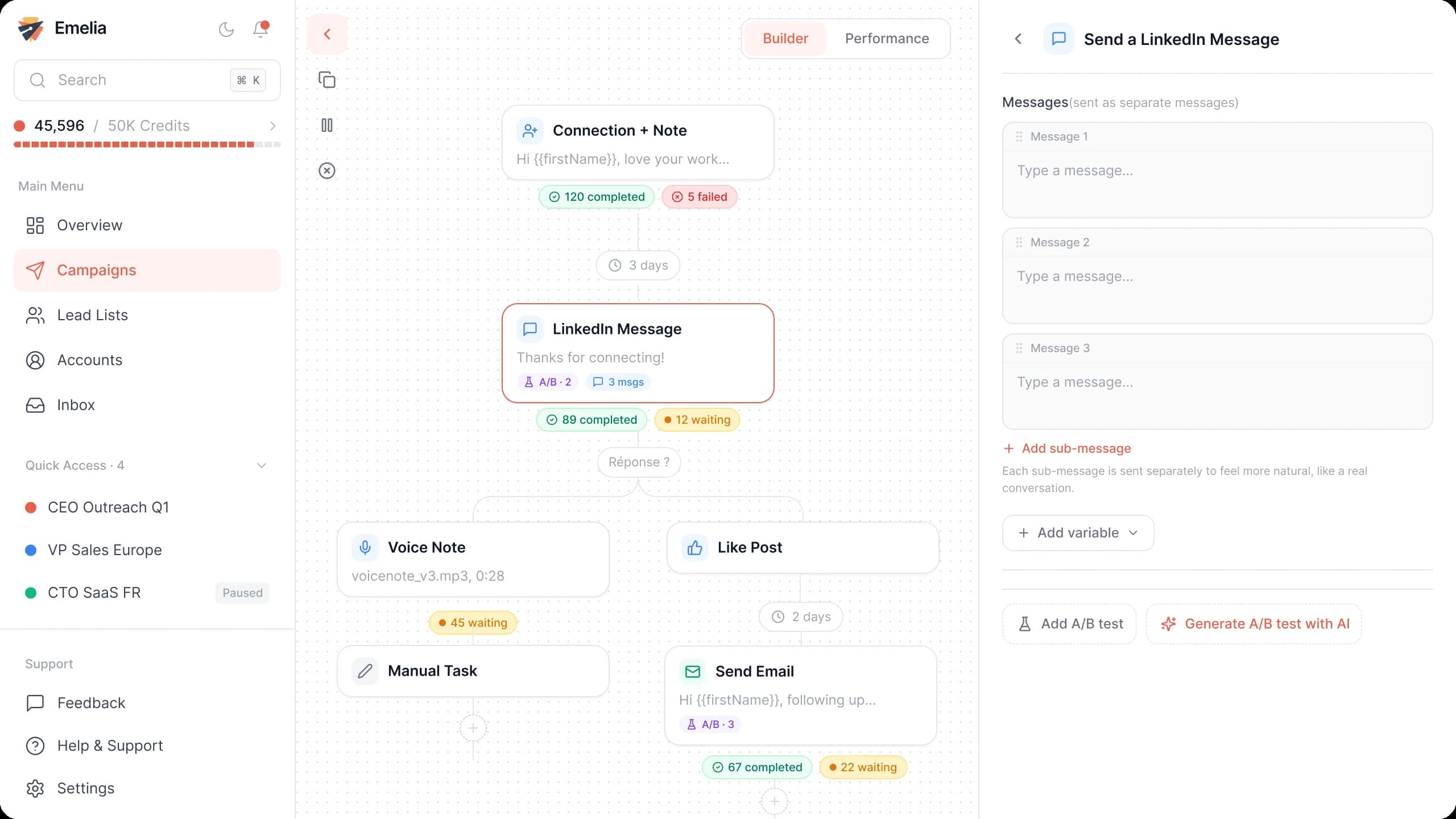
The Emelia sequence builder: emails and LinkedIn steps in the same campaign. - Step 3
Attach the list of directors
In Settings, choose the sending accounts, tick your list in Lead list and save. Keep managing directors and non-executives in separate campaigns.
Emelia: attach one or more lead lists to the campaign, then launch it. - Step 4
Launch or schedule
Launch now or schedule the start. A list of directors is short and every contact counts: warm up your mailboxes first with email warmup, so a burst of bounces does not send your first emails to spam.
A short email for a managing director
A director thinks in revenue, margin, risk and time. Four lines, one concrete result, and a question that lets them point you to the right person.
Subject: {{companyName}} and [your topic in three words]
Hi {{firstName}},
I saw [a specific trigger: a new site, a recent appointment, an acquisition] at {{companyName}}.
We help [type of company] in [region] [measurable result] in [time frame], without [the pain it avoids].
Is this something you look after yourself, or should I speak to another director?
Replace the brackets with your own facts. Before using {{jobTitle}}, check the column: a title like "Director | Helping firms grow" reads badly. A new appointment filed at Companies House makes a good first line.
Mistakes to avoid
Ticking "Director" as a seniority level
It brings in functional heads, like an IT Director, who do not sit on the board. Use Owner and CXO together with director titles.
Writing to directors who have resigned
Companies House keeps resigned officers on the company page, and LinkedIn profiles lag behind. Keep current officers only.
Searching with the legal name only
A holding name has no website of its own. Add the domain of the brand and keep the legal name as a second chance.
Emailing the whole board at once
Four directors receiving the same email will forward it around and ignore it. Start with the one who owns your topic.
Buying an "email list of UK company directors"
Directors change every month, and you rarely know how a bought file was collected. Build your own, right before the campaign.