The short answer
- 1In Sales Navigator, filter on the Human Resources function, the CXO, VP and Director seniority levels (plus Manager in mid-size companies) and the headcount your offer serves.
- 2Exclude the Staffing and Recruiting industry, or agency recruiters will fill your list.
- 3Send the search to Emelia with Export with Emelia, then run Find email on the list: 1 credit per email found, given back when no address is found.
- 4For a few named HR leaders, use the Emelia Chrome extension on their LinkedIn profile. For HR contacts you already have (trade show, webinar), import the CSV.
- 5Write to the person who owns the problem you solve, never to hr@ or careers@: those inboxes are built for candidates.
Who exactly are you trying to reach in HR?
HR is not one buyer. The CHRO or HR Director decides on company-wide HR platforms, the Talent Acquisition Manager on recruiting tools and agencies, the Total Rewards lead on benefits, the Learning & Development lead on training, and an HRIS manager often runs the technical side.
Size changes the picture. Below about 50 employees there is often no HR person at all. Between 50 and 200, one HR Manager or Head of People does everything and decides alone. Above that, a specialist champions the purchase and the HR Director signs.
If you are looking for an HR email to send a job application, this guide is not for you: it is written for companies that sell to HR teams.
The titles to search for
Job titles to include
Job titles to leave out
Agency recruiters are the biggest source of noise: LinkedIn files them under Human Resources, but they sell hiring. An HR Business Partner in a large group opens doors but rarely signs.
Where HR leaders show up online
- LinkedIn: HR teams use it daily to recruit, so their profiles are usually complete and current. Your main source of names.
- Job postings: many LinkedIn job ads show a Meet the hiring team block with the recruiter or hiring manager.
- Appointment announcements: a new Chief People Officer or HR Director often reviews tools and suppliers. A good moment to write.
- HR events and associations: conference speaker lists, local SHRM chapters (US) and CIPD branches (UK) give names and exact titles.
- The company website: the Leadership page names the CHRO in larger companies only.
Why HR emails are harder to get right than they look
- The public HR addresses are made for candidates. hr@, careers@ and jobs@ often feed the applicant tracking system, where a sales email sits among resumes.
- The same job has many names. People, Talent, Culture, Employee Experience: a Head of People and an HR Director can do the same work. One title misses most of the market.
- The Human Resources function is full of non-buyers. Agency recruiters, consultants, assistants: without exclusions they fill your list, and each email found costs a credit.
- HR rarely buys alone in larger companies: IT reviews HR software, Finance signs off on benefits. Reach more than one person per account.
Which method should you use?
It depends on your starting point: a market to cover, a few key accounts, or a list you already own. Each ends with HR decision makers and their work email.
Build the list in Sales Navigator
Filter HR leaders by function, seniority and company size, remove the agencies, then send the search to Emelia.
Best for: covering a market, from dozens to thousands of HR leaders.
See the stepsOne profile at a time
On a LinkedIn profile, the Emelia extension finds the HR leader's email and adds them to a campaign.
Best for: account-based outreach to a few named HR leaders.
See the stepsYou already have a file
Import a CSV or sync HubSpot or Pipedrive, then find the missing work emails.
Best for: trade show contacts, webinar sign-ups or CRM contacts.
See the stepsMethod 2: find one HR leader's email from their LinkedIn profile
In account-based outreach, you know exactly who you want: the new Chief People Officer of a target account, the Head of Talent who just posted about hiring. The extension works from the profile.
- Step 1
Open the HR leader's LinkedIn profile
With the Emelia extension installed and connected to your account, a button appears on every LinkedIn profile. Check the current position first: HR leaders change companies often, and the search uses the company shown on the profile.
- Step 2
Click Find email
Emelia reads the name, the company and its website on the profile and looks for the work email. Find phone looks for a number from the same profile, and Find email & phone does both.
The Emelia extension on a LinkedIn profile: find the email, then add the contact to a campaign. - Step 3
Add them to a campaign
Choose a campaign in Add to the campaign. The HR leader joins it directly, with the email just found.
Without the extension: unitary searches
The Unitary searches button at the top of the Lists page finds one email from a full name, a company and a domain: handy for a conference speaker or a new CHRO you read about. Always fill in the country, as the search uses it.
Method 3: you already have a list of HR contacts
HR trade show badge scans, webinar sign-ups, a CRM segment: if you have names and companies, Emelia finds the missing work emails in one run.
| Column | Required | What it is for |
|---|---|---|
| First name + Last name (or Full name) | Yes | No name, no search. A company list alone is not enough: find the HR names first. |
| Company website or domain | Optional | The most reliable starting point. Use the main website, not a careers site. |
| Company name | Optional | Needed without a website, and a second chance when the domain finds nothing. You need at least one of the three. |
| Job title | Optional | Not used by the search, but it becomes {{jobTitle}} in your emails and helps you remove non-buyers first. |
| LinkedIn profile URL | Optional | Needed for LinkedIn steps in the campaign and to look for a phone number. |
Required
What it is for
Required
What it is for
Required
What it is for
Required
What it is for
Required
What it is for
- Step 1
Import the file
Go to Lists, New List, then CSV File (or HubSpot or Pipedrive). The file must be a .csv, not an .xlsx, and you can fix the column mapping. Webinar sign-ups can hold personal Gmail or Outlook addresses, or a shared hr@ inbox: do not map them to the email column, because a lead that already has an email is skipped.
Emelia: create a new list from a CSV file, Sales Navigator, HubSpot or Pipedrive. - Step 2
Launch Find email on the list
Emelia shows the entries without an email, the credits needed and the leads missing a name or company. Pick the domain or company column if needed, choose the country, and launch. The country applies to the whole batch: split the file of an international HR event by country first. It runs even if you close the tab.
Emelia: find the missing emails of a whole list in one run. - Step 3
Review the results
Leads that already had an email are not charged. Found addresses land in the email column with their qualification. Keep the valid ones, and if in doubt, use the email verifier.
Keep the company name, even with a website
Lists built from job boards or event badges often carry the wrong website: a careers page hosted by a recruiting platform, a subsidiary site. When the domain returns nothing and the lead has a company name, Emelia automatically searches again with the name. Keep both columns.
Doing it by API
Developers can run the same search by API, for example to enrich the HR contacts of a webinar form as they come in: one call to submit, one to read the result. The country is required, and each email found costs 1 credit.
POST https://api.emelia.io/tools/find/email
Authorization: <API_KEY>

{
  "fullname": "Ethan Park",
  "companyName": "Quillby Analytics",
  "country": "US",
  "companyWebsite": "quillby.io"
}

→ { "success": true, "jobId": "…" }
GET https://api.emelia.io/tools/find/email/{jobId}The free methods, for one or two HR leaders
For a single contact, you can often do it by hand. It is slower, and you still need to verify the address.
1.The company job postings
Recruiters sometimes sign job ads with their work address. Even if it is not your contact, it reveals the company format.
2.A Google search on the domain
Search for "@companydomain.com" with HR, people or careers. Event pages and press releases often show an address.
3.Appointment news
Search the company name with "Chief People Officer" or "HR Director" in the news. HR titles change hands often: a recent announcement confirms who holds the role today.
4.The LinkedIn contact info
Some HR leaders show their email in the Contact info section of their profile, usually once you are connected.
5.Guess, then verify
Try the formats below and check them with an email verifier before sending. Bounces from unchecked guesses hurt your deliverability.
The email formats you will see most for HR teams
HR buyers mostly work in companies of 50 people or more, where addresses follow one rule. Know one employee's format and you know the HR leader's.
| Pattern | Example | Where you see it |
|---|---|---|
| firstname.lastname@ | rachel.nguyen@brightmoorfreight.com | The most common format in mid-size and large companies. |
| f.lastname@ / flastname@ | j.whitfield@harrowvantry.co.uk | Frequent in long-established companies. |
| firstname@ | maya@pellwood.io | Typical of startups where the Head of People joined early. |
| firstname_lastname@ | lena_hughes@marrowfieldhealth.com | Less common, but it exists. |
| hr@ / people@ / careers@ | careers@kestrelbyfoods.co.uk | Shared inboxes for candidates, often tied to the applicant tracking system. |
Example
Where you see it
Example
Where you see it
Example
Where you see it
Example
Where you see it
Example
Where you see it
Then email them: the campaign in Emelia
A list of HR emails pays off once it becomes a campaign. Here is how, without exporting anything.
- Step 1
Create the campaign
In Campaigns, create a campaign from scratch or from a template such as LinkedIn then Email. HR leaders live on LinkedIn: a profile visit before the first email makes your name familiar.
- Step 2
Write the sequence
In the Campaign tab, add emails, LinkedIn visits, invitations and messages, with delays. Use
{{firstName}},{{companyName}}and{{jobTitle}}to fit each message to the person and their role.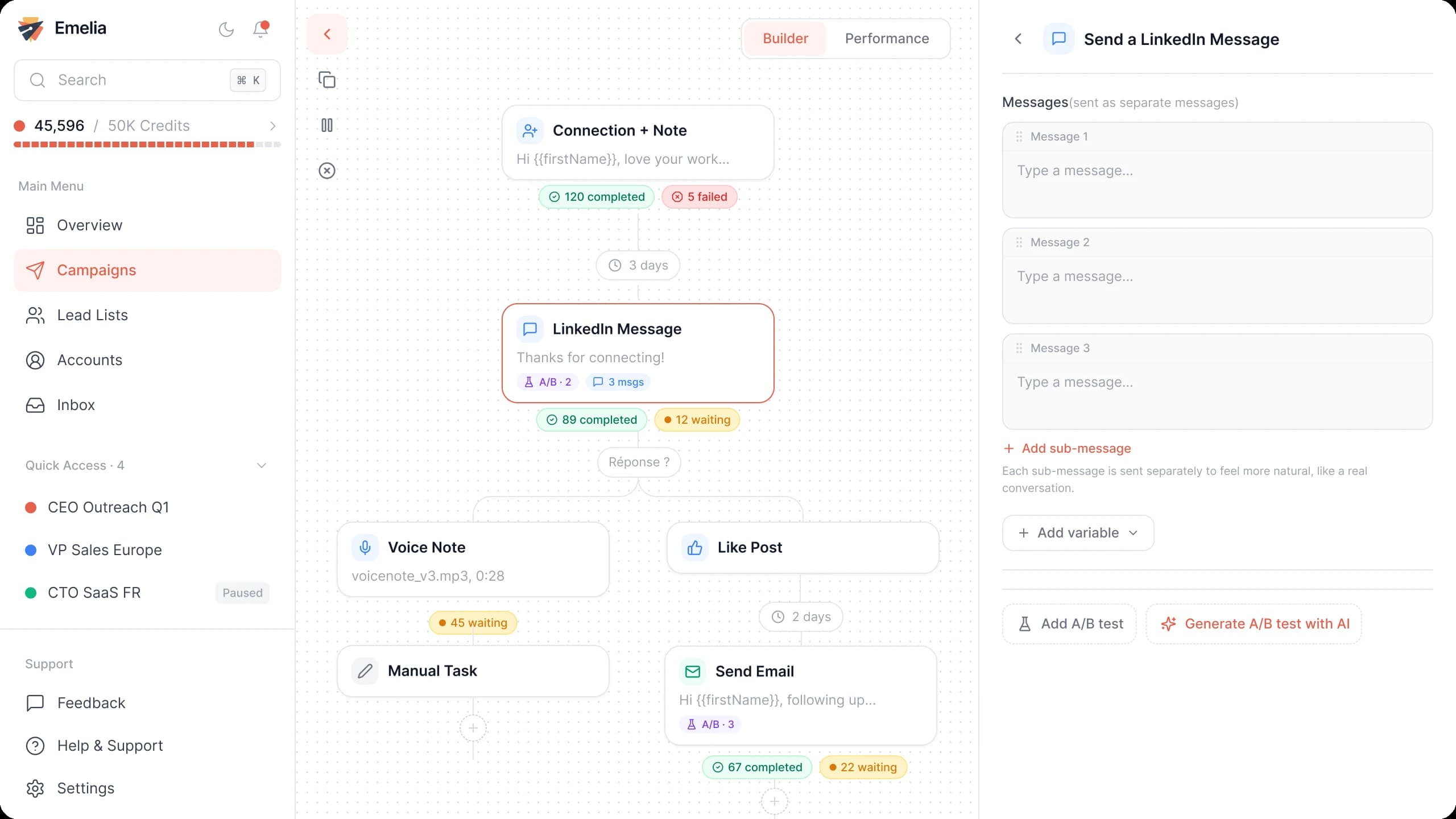
The Emelia sequence builder: emails and LinkedIn steps in the same campaign. - Step 3
Attach the HR list
In Settings, choose the sending accounts, then tick your enriched list in Lead list. Save.
Emelia: attach one or more lead lists to the campaign, then launch it. - Step 4
Launch or schedule
Launch now or schedule the start, away from the busiest HR weeks (payroll close at month end, annual reviews, open enrollment in the US).
A short email HR leaders actually answer
HR leaders hear from software vendors, benefits brokers, trainers and agencies every week. One process they own, one proof, one easy question.
Subject: [Onboarding] at {{companyName}}
Hi {{firstName}},
When a company like {{companyName}} [hires in a new country], HR usually ends up [chasing paperwork by email for weeks].
We helped [a similar company in your industry] [cut onboarding from X to Y days] without extra work for managers.
Is [onboarding] on your list as {{jobTitle}} this year, or is someone else on your team the right person?
Replace the brackets with your own facts. The last question checks the need, and in a large HR team it gets you to the right specialist.
Mistakes to avoid
Pitching the CHRO about a tool they will never use
In a company of several hundred people, the CHRO rarely picks the applicant tracking system. Write to the specialist who owns the process.
Leaving agency recruiters in the list
The most common false positive of the Human Resources function. Exclude the Staffing and Recruiting industry before exporting.
Sending your pitch to hr@ or careers@
These inboxes are built for applications and often feed the applicant tracking system. Find the named HR leader instead.
Targeting companies with no HR team
Under about 50 employees, the founder or an office manager handles HR. Raise the headcount filter, or write to the founder instead.
Emailing an HR list built months ago
HR leaders change companies often, so an old list bounces. Find the emails right before the campaign and keep the valid ones: a burst of bounces on a new domain sends your next emails to spam.