The short answer
- 1"Founder" is not a seniority level in Sales Navigator: type Founder OR Co-founder in Current job title, then set Company headcount to 1-10 and 11-50 and pick your industry.
- 2Export with Emelia turns the search into a lead list. Run Find email on it: 1 credit per email found, given back when no address is found.
- 3For one founder spotted in a launch or funding post, use the Emelia Chrome extension on their LinkedIn profile. For a list you already have, import the CSV.
- 4Founders mostly use firstname@. The hard part is the domain: startups love .io, .ai and prefixes like get- or try-.
- 5Then send a short email tied to their stage, from an Emelia campaign.
Who counts as a "founder" in your search?
A founder started the company and, in a young startup, still runs a big part of it: the CEO sells and raises money, the CTO builds the product. Below 50 people, founders approve almost every purchase. That is why software vendors, agencies, recruiters and investors all want a list of startup or SaaS founders.
The word is a trap: LinkedIn is full of "founders" running a one-person consultancy or a side project, while many real founders drop the word as the company grows and just write CEO or CTO. Define the startups first (industry, headcount, age), then search the titles below.
The titles founders actually use
Job titles to include
Job titles to leave out
"CEO" and "CTO" alone only belong in the search with a 1-10 headcount, where they are very often founders. "Founder in Residence" and "Founder Relations" are jobs at funds and accelerators, and a "Founding Engineer" is an early employee.
Where founders show up online
- LinkedIn: most founders have a profile linked to the company page, whose Website field gives you the real domain.
- Accelerator and fund portfolios: Y Combinator, Techstars and many venture funds list the startups they backed, sometimes with the founders.
- Launch platforms: Product Hunt lists the makers of each launch, and "Show HN" posts on Hacker News are usually written by a founder.
- Startup databases and job boards: Crunchbase and Wellfound show the founders and the website of many startups.
- The founder's own content: build-in-public posts on X and LinkedIn, the company blog, podcast appearances, the product newsletter.
Why founder emails are tricky
- The domain rarely matches the name. Startups use .io, .ai or .co, or add a prefix because the .com was taken (get, try, use). "Veltmoor" can live on veltmoor.io or getveltmoor.com: take the domain from the website, never guess it.
- Stealth startups have nothing to search. A company that reads "Stealth startup" on LinkedIn has no public domain yet. Keep the lead aside and come back after the launch.
- Founders hold several current positions (an old company never closed, angel investing, advisor seats). Check that your list has the company they run today.
- Pivots and rebrands are frequent, so the LinkedIn name, the website and the email domain may not match. When the search by domain finds nothing, Emelia retries with the company name.
- Their inbox is under siege from investors, recruiters and vendors: finding the address is the easy part, being worth reading is the real work.
Which method fits your starting point?
Whatever your starting point, the three methods end in the same place: founders with a work email, ready for a campaign.
Build the list in Sales Navigator
Filter founders by title, headcount, industry and country, then send the search to Emelia.
Best for: a new list of founders in one sector.
See the stepsOne founder at a time
On a founder's LinkedIn profile, the Emelia extension finds the email and adds them to a campaign.
Best for: founders spotted in a launch, a funding post or at an event.
See the stepsStart from a list of startups
Import a CSV or sync HubSpot or Pipedrive, then find every missing email in one run.
Best for: a demo day lineup, an event list or a CRM segment.
See the stepsMethod 2: find one founder's email from their LinkedIn profile
A funding announcement, a launch post, a podcast: when one founder is the perfect fit, skip the list and find the email from their profile while the timing is good.
- Step 1
Open the founder's LinkedIn profile
Once the Emelia extension is installed and connected to your account, a button appears on every LinkedIn profile. Glance at the Experience section: serial founders often list several current positions.
- Step 2
Click Find email
Emelia reads the name, the company and its website on the profile and looks for the work email. Find email & phone also searches for a number from the same profile, at 50 credits per number found: keep it for the founders you really plan to call.
The Emelia extension on a LinkedIn profile: find the email, then add the contact to a campaign. - Step 3
Add the founder to a campaign
Pick a campaign in Add to the campaign: the founder joins it directly, with the email you just found. Keep one campaign for founders spotted in the news, so each email can open on the launch or the round that caught your eye.
No extension? Use unitary searches
In Emelia, the Unitary searches button at the top of the Lists page finds one email from a full name, a company and a domain. Paste the domain from the startup's website rather than guessing it, and always fill in the country: the search uses it.
Method 3: you already have a list of startups
A demo day lineup, a startup event attendee list, a CRM segment tagged "early stage": import the names and companies, and Emelia finds the missing emails in one run.
| Column | Required | What it is for |
|---|---|---|
| First name + Last name (or Full name) | Yes | The founder, not the company: without a name, no search. |
| Company website or domain | Optional | The key column for startups, whose domain rarely matches their name. |
| Company name | Optional | Used without a website, and as a second chance when the domain finds nothing. You need at least a website, a domain or a name. |
| LinkedIn profile URL | Optional | Needed for LinkedIn steps in the campaign and for a phone number search. |
Required
What it is for
Required
What it is for
Required
What it is for
Required
What it is for
- Step 1
Import the file
In Lists, click New list and choose CSV file, or connect HubSpot or Pipedrive. Demo day lineups and event lists usually come as spreadsheets: save them as .csv first, since .xlsx is not accepted. The columns are recognized automatically, and you can fix the mapping before importing.
Emelia: create a new list from a CSV file, Sales Navigator, HubSpot or Pipedrive. - Step 2
Run Find email on the list
The panel shows the entries without an email, the credits needed and the leads missing a name or a company. Point it to the domain or company name column if needed, choose the country, and launch. It keeps running if you close the tab.
Emelia: find the missing emails of a whole list in one run. - Step 3
Review the results
Leads that already had an email are skipped and not charged. Keep the addresses qualified valid, and run any doubtful one through the email verifier. No result often means a stealth company or a changed domain: check the website.
Why the company name column matters for startups
When the domain finds nothing, Emelia automatically searches again with the company name. For startups, this catches files holding the product domain or an old one while the team emails from another. Keep both columns.
Doing it by API
Tracking new startups automatically, from a feed of launches or funding rounds? The API finds each founder's email as the companies come in: one call to submit the search, one to read the result. The country is required, and each email found costs 1 credit. An MCP server is also available for AI agents.
POST https://api.emelia.io/tools/find/email
Authorization: <API_KEY>

{
  "fullname": "Chloe Whitfield",
  "companyName": "Brightmoss Health",
  "country": "US",
  "companyWebsite": "brightmosshealth.com"
}

→ { "success": true, "jobId": "…" }
GET https://api.emelia.io/tools/find/email/{jobId}The free ways to find a founder, for one or two addresses
Startup directories give names, companies and websites, not emails: use them to identify the founders and confirm the real domain.
1.Accelerator directories
The Y Combinator company directory and the Techstars portfolio list the startups they backed. On Y Combinator, each company page shows its active founders with links to their LinkedIn and X profiles.
2.Product Hunt and launch posts
On Product Hunt, each launch lists its makers, and the first comment usually comes from a founder. "Show HN" posts on Hacker News and launch threads on Indie Hackers work the same way.
3.Crunchbase and Wellfound
The free version of Crunchbase often shows a startup's founders and website. On Wellfound, where startups post their jobs, company profiles often list the founders.
4.The startup's own site and product
Check the About or Team page and the blog, then sign up for the product: at many early-stage startups, the welcome email comes from a founder and reveals the address format.
5.Funding filings and company registers
In the US, a startup raising a round often files a Form D with the SEC, naming its executive officers and directors. In the UK, Companies House lists every company's directors. No emails, but the right names.
6.Guess, then verify
Try firstname@ on the real domain, then the formats below, and check the address with an email verifier before writing. A bounce hurts your sender reputation far more than a credit costs.
The email formats founders use
Founders created the first mailboxes themselves and kept them short. Try these formats in this order.
| Pattern | Example | Where you see it |
|---|---|---|
| firstname@ | maya@veltmoor.io | The most common at early-stage startups. |
| firstname.lastname@ | ravi.menon@parcelbird.co | Appears as the team grows and first names start to collide. |
| flastname@ / firstnamel@ | enovak@gantrybay.dev | A fallback when two people share a first name. |
| firstname@ on another domain | jordan@getecholark.com | Product on a .ai, mailboxes on an older domain: if the website domain fails, look for another. |
| founders@ / team@ | founders@tallyfern.app | Reaches all the co-founders, but loses the personal touch. |
| hello@ / hi@ | hello@brewlinelabs.com | Read by a founder at first, then by support. |
Example
Where you see it
Example
Where you see it
Example
Where you see it
Example
Where you see it
Example
Where you see it
Example
Where you see it
Then email them: the campaign in Emelia
Founders answer emails that respect their time and fit their stage. Here is how to turn the list into a campaign in Emelia, without exporting anything.
- Step 1
Create the campaign
In Campaigns, create a campaign and start from scratch or from a multichannel template such as LinkedIn then Email: a profile visit before the first email makes your name familiar.
- Step 2
Write the sequence
In the Campaign tab, lay out emails, LinkedIn visits, invitations and messages, with delays. Personalize with
{{firstName}}and{{companyName}}. For an icebreaker per founder, add an AI column to the list beforehand (1 credit per action) and insert it by its column name.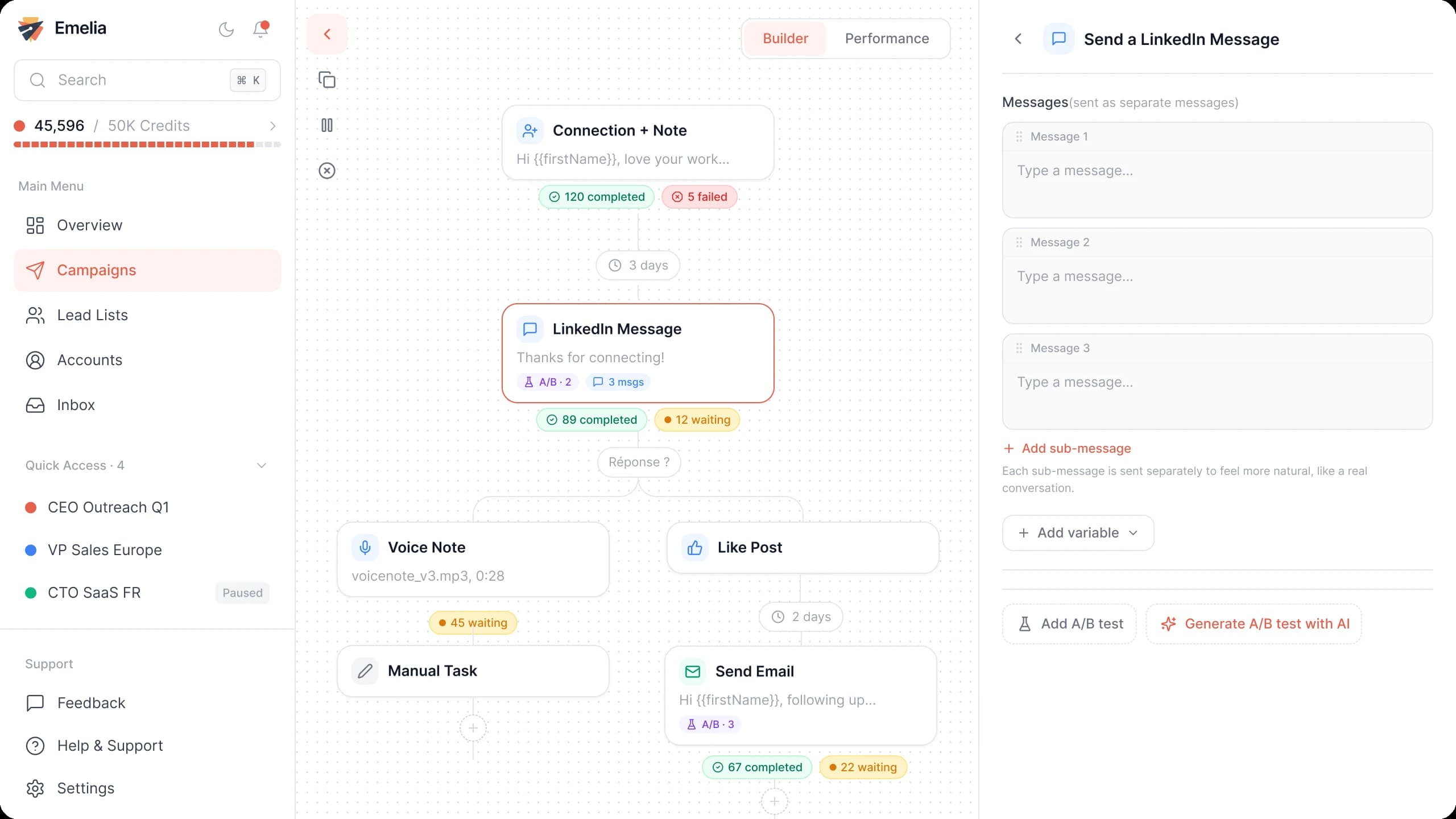
The Emelia sequence builder: emails and LinkedIn steps in the same campaign. - Step 3
Attach the list of founders
In Settings, pick the sending accounts, tick the enriched list in Lead list, and save. One list per segment (US SaaS founders, UK fintech founders) keeps each message precise.
Emelia: attach one or more lead lists to the campaign, then launch it. - Step 4
Launch or schedule
Launch now or schedule the start for the founders' time zone.
A short email founders actually answer
A founder reads your email on a phone between two meetings: one real fact about their company, one result, one question answered in a line.
Subject: Idea for {{companyName}}
Hi {{firstName}},
Saw that {{companyName}} [recent trigger: just launched X / is hiring its first Y].
We help founders at that stage [result] without [the hire or cost it avoids]: [similar startup] got [concrete result] in [time frame].
Want a two-minute video showing how, or is it not a priority before [their next milestone]?
Replace the brackets with facts you can check. The trigger (a launch, a hire, a round) earns the reply, and a short video is easier to accept than a call with a stranger.
Mistakes to avoid
Taking every "Founder" title at face value
Without a headcount filter, your list fills up with consultants, coaches and side projects. Leave Self-employed out and read a sample of profiles before exporting.
Guessing the domain from the company name
veltmoor.com may belong to another company. Take the domain from the startup website or its LinkedIn page, and keep the company name so Emelia can retry with it.
Mixing countries in one batch
Emelia uses one country per list when it looks for the emails. Build one list for US founders and another for UK founders.
Emailing every co-founder the same day
Co-founders talk to each other daily. Write to the one who owns your topic (the CTO for a developer tool, the CEO for sales or finance), and to the other only if the first stays silent.
Buying a "startup founders email list"
Startups pivot, rebrand, shut down and get acquired all year long. A list built from your own search, right before the campaign, bounces less than a file bought months ago.