The short answer
- 1Start from the story: find who wrote about your topic recently. The byline tells you the beat, the job title does not.
- 2To build a media list, search Sales Navigator with Current job title (Reporter, Editor, Correspondent), the Media and Communication function and a media Industry, which keeps in-house comms teams out.
- 3Send the search to Emelia with Export with Emelia, then run Find email on the list: 1 credit per email found, given back when no address is found.
- 4For a single journalist, use the Emelia Chrome extension on their LinkedIn profile. For a media list you already have, import the CSV.
- 5Pitch one beat at a time, open with their recent article, and follow up once at most.
Which journalist should you pitch?
"Journalist" covers very different jobs. A reporter covers a beat (tech, health, retail) and writes the news. An editor runs a section and decides what gets covered; at magazines, a commissioning editor assigns stories to freelancers. A producer books guests for radio, TV and podcasts, a columnist writes opinion, and a freelancer sells story ideas to several outlets.
Who to pitch depends on what you offer. News (a launch, a funding round, new data) goes to the reporter on that beat, an expert for interviews to a producer, an opinion piece to the opinion editor, a feature idea to the features editor. The editor-in-chief rarely helps: they forward, or they delete.
The titles to search for
Job titles to include
Job titles to leave out
"Editor" is the most ambiguous title on LinkedIn (video, content, technical editors): always pair it with a media industry. Copy editors and sub-editors work in newsrooms but do not pick stories.
Where journalists show up online
- Bylines and author pages: the author page lists their latest stories, often with an email or a social handle. It is the only source that tells you what they cover right now.
- The masthead and the "Contact us" page: editors by section, the desk addresses, and sometimes direct ones.
- LinkedIn: staff reporters show their current outlet, freelancers list the titles they write for. The best source to build a list by beat and region.
- X, Bluesky and Threads: many reporters put their email or "DMs open" in their bio.
- Newsletters and personal sites: columnists and freelancers often run their own, with a contact page meant for readers and editors.
Why journalists are harder to reach than they look
- The title does not tell you the beat. "Reporter at The Quillmoor Ledger" could cover courts, sports or AI: read their recent articles.
- Freelancers have no outlet domain. They write for five titles and work for none: their address is on a personal domain, or a Gmail no professional email finder can guess.
- The email domain is not always the website's. Titles owned by a media group often give their staff an address on the group's domain. Emelia works around part of it (see the retry tip below).
- Newsrooms put shared inboxes forward. tips@, newsdesk@ and letters@ are read by whoever is on shift, and are made for breaking news, not for a tailored pitch.
- People move all the time. Layoffs, closures, reporters who go freelance or switch beats: rebuild your media list right before each announcement.
Which method fits your pitch?
It depends on how many journalists you need. All three methods end in the same place: reporters with their work email, ready for your pitch.
Build a media list in Sales Navigator
Filter reporters and editors by title, media industry and region, then send the search to Emelia.
Best for: a few dozen to a few hundred journalists on one beat.
See the stepsOne journalist at a time
On a reporter's LinkedIn profile, the extension finds the email and adds them to your pitch campaign.
Best for: your top-tier targets, picked by hand.
See the stepsYou already have a media list
Import your spreadsheet of names and outlets, then find the missing emails in one run.
Best for: an agency media list, or bylines you collected yourself.
See the stepsMethod 2: find one journalist's email from their LinkedIn profile
Good pitches often start with an article: you read a reporter's piece on your subject and want to reach them. For a few top targets, skip the list and work from the profile.
- Step 1
Open the journalist's LinkedIn profile
Once the Emelia extension is installed and connected, a button appears on every profile. Check Experience first: the top outlet must be the one they write for today.
- Step 2
Click Find email
Emelia reads the name, the outlet and its website on the profile, and looks for the work email. Find phone exists too, but most reporters prefer a first contact by email.
The Emelia extension on a LinkedIn profile: find the email, then add the contact to a campaign. - Step 3
Add them to your pitch campaign
Pick the campaign for this story in Add to the campaign: the journalist is added directly, with the email you just found.
No extension? Use unitary searches
In Emelia, the Unitary searches button at the top of the Lists page finds one email from a full name, a company (the outlet) and a domain: use the one their colleagues have in published addresses. Always fill in the country: the search uses it.
Method 3: you already have a media list
An agency's media list, bylines you saved over the year, the reporters who covered a competitor's launch: import the names and outlets, and let Emelia find the missing emails in one run.
| Column | Required | What it is for |
|---|---|---|
| First name + Last name (or Full name) | Yes | Without a name, no email can be searched. |
| Outlet website or domain | Optional | Prefer the domain of the staff addresses: for group-owned titles, it is often not the website. |
| Outlet name | Optional | Used without a website, and as a second chance when the domain finds nothing. You need at least one of the three. |
| LinkedIn profile URL | Optional | For LinkedIn steps in the campaign, and to look for a phone number. |
| Recent article (custom column) | Optional | Not used by the search. Name it recent_article and it becomes the variable for the first line of your pitch. |
Required
What it is for
Required
What it is for
Required
What it is for
Required
What it is for
Required
What it is for
- Step 1
Import the file
Open Lists, then New List, and choose CSV File (or HubSpot or Pipedrive). Save the spreadsheet as .csv: .xlsx is not accepted. Columns are recognized automatically; check that the outlet lands in the company column.
Emelia: create a new list from a CSV file, Sales Navigator, HubSpot or Pipedrive. - Step 2
Launch Find email on the list
Emelia shows the entries without an email and the credits to be used. Point it to the domain or outlet column if needed, choose the country of the batch, and launch: it keeps running if you close the tab.
Emelia: find the missing emails of a whole list in one run. - Step 3
Check the results
Leads that already have an email are skipped and not charged, so old addresses stay as they are: run an old list through the email verifier too. Keep the addresses qualified valid for the pitch.
When the outlet's website is not its email domain
Many titles belong to a media group whose staff write from the group's domain. When the search on the website's domain returns nothing and the lead has an outlet name, Emelia automatically runs a second search with the name. Keep both columns, and if you know the group's domain, put it in the website column.
Doing it by API
If your PR team keeps its media list in its own tool, a developer can run the same search from there: one call submits it, a second reads the result. The country is required; 1 credit per email found, as in the app.
POST https://api.emelia.io/tools/find/email
Authorization: <API_KEY>

{
  "fullname": "Chloe Barrett",
  "companyName": "The Quillmoor Ledger",
  "country": "US",
  "companyWebsite": "quillmoorledger.com"
}

→ { "success": true, "jobId": "…" }
GET https://api.emelia.io/tools/find/email/{jobId}The free methods, for a handful of journalists
For a few top targets, you can often find the address by hand. Journalists are easier than most people here: tips and sources are part of the job, so many publish a way to reach them.
1.The byline and the author page
Click the journalist's name on a recent article: author pages often show an email or a social handle.
2.The masthead and the contact page
The masthead or the "Our team" page gives you the right editor's name, and often one published address that reveals the format of the whole newsroom.
3.Social bios and #journorequest
Check their X, Bluesky or Threads bio. The #journorequest hashtag shows journalists looking for sources right now, with the way they want to be contacted.
4.Their newsletter or personal site
Freelancers and columnists often have a contact page there, because editors need to reach them: it is the address they want you to use.
5.Guess, then verify
Apply the outlet's format to the name (see below), or search "@outlet-domain.com" with their name on Google. Check it with an email verifier: a bounced pitch hurts your deliverability.
The email formats you will see in newsrooms
A newsroom usually gives everyone the same format, so one published address tells you the rest. Watch the domain: it is not always the website.
| Pattern | Example | Where you see it |
|---|---|---|
| firstname.lastname@ | chloe.barrett@quillmoorledger.com | Very common at newspapers and broadcasters. |
| flastname@ | mwebb@tinmouthgazette.com | Frequent at regional papers. |
| firstname@ | daniel@circuitbaynews.com | Small digital outlets and trade newsletters. |
| firstname.lastname@ (group domain) | nora.lindqvist@wrenmoormedia.com | Titles owned by a media group use the group's domain. |
| tips@ / newsdesk@ / letters@ | newsdesk@brackenfieldpost.co.uk | A shared desk inbox, made for breaking news tips. |
| name@own-domain | imogen@imogenashcroft.co.uk | Freelancers with a portfolio site. Many use Gmail instead, which no finder can guess. |
Example
Where you see it
Example
Where you see it
Example
Where you see it
Example
Where you see it
Example
Where you see it
Example
Where you see it
Then send your pitch: the campaign in Emelia
A pitch is not a sales sequence: one email, one follow-up, one beat at a time. Here is how to send it from Emelia, without exporting anything.
- Step 1
Create one campaign per story
In Campaigns, create a campaign named after the story and the beat ("Pricing study · fintech reporters"). Start from scratch for an email-only pitch, or from LinkedIn then Email to add a LinkedIn step first.
- Step 2
Write the pitch and one follow-up
In the Campaign tab, add the pitch, a delay of a few days, then one short follow-up. Personalize with
{{firstName}},{{companyName}}(the outlet) and your own columns, such as{{recent_article}}.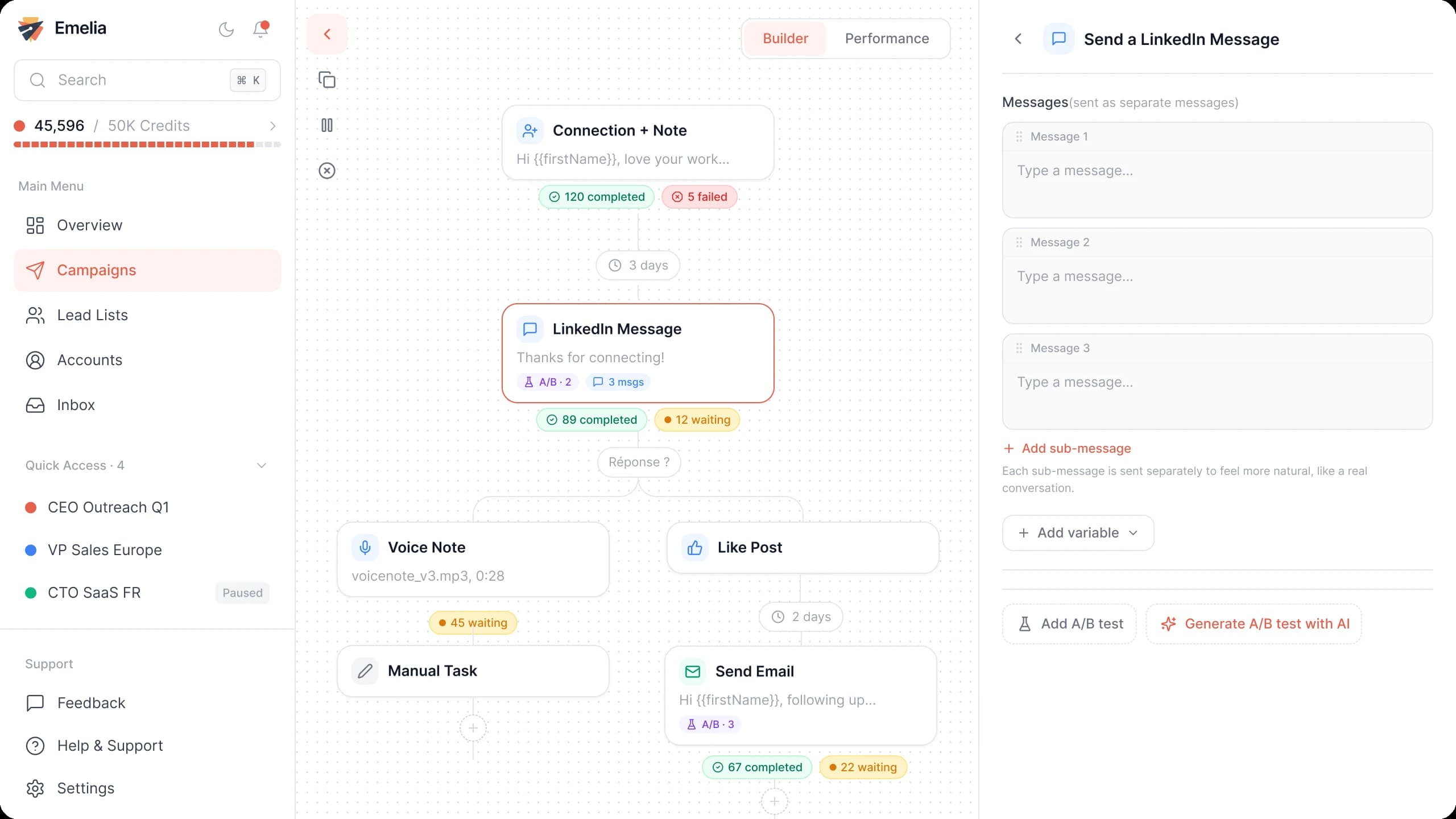
The Emelia sequence builder: emails and LinkedIn steps in the same campaign. - Step 3
Attach the media list
In Settings, choose the sending accounts, then tick your list of journalists in Lead list. Save.
Emelia: attach one or more lead lists to the campaign, then launch it. - Step 4
Launch or schedule
Schedule the start for the morning in the journalists' time zone, before the news is public if you offer an embargo.
A pitch that journalists actually read
Reporters decide in two lines whether a pitch is for them. Show you read their work, give the news in one sentence, offer something concrete, and stop.
Subject: Story idea: [the news in a few words]
Hi {{firstName}},
I read your piece on {{recent_article}} for {{companyName}}, and [what it made you think of, in one sentence].
[Your company] is [the news: new data, a launch], which shows [the angle that matters to your readers].
I can share [the full data / an interview with our CEO] before [date, if embargoed]. Would it fit a story you are working on?
Replace the brackets with your own facts. {{recent_article}} is a custom column of your list (see Method 3): fill it for every journalist, or rewrite that line.
Mistakes that get pitches ignored
Pitching the wrong beat
A reporter who covered your sector two years ago may cover courts today: read their last three articles first.
One pitch for the whole list
A pitch that could go to anyone gets deleted by everyone. Split the list by beat, and make the first line about their own work.
Attaching the press release
Attachments from an unknown sender are rarely opened. Put the key facts in the email, and link to the release and the images.
Following up three times
One follow-up is enough. A reminder sequence built for sales annoys a reporter you want to pitch again next quarter.
Adding journalists to your newsletter
A journalist you pitched has not subscribed to anything. Keep your media list out of your marketing lists.