Back to hub
Software

Evaboot Pricing 2026: credits, plans and real cost

Niels
Niels Co-founder
Published on Sep 2, 2026Updated on Sep 4, 2026

What Evaboot actually is

Evaboot est un outil de scrape de données sur LinkedIn Sales Navigator

Disclosure. This article is published by the company behind Emelia and Basile, two of the tools covered below. The other vendors' pricing tables were taken from their official pages, and the calculations are laid out so you can redo them.

Before talking money, you need to know what the tool does, because its scope is narrower than that of most products it gets compared with.

Evaboot exports LinkedIn Sales Navigator searches. That is its one job and its reason for existing. You build a search in Sales Navigator, using LinkedIn's filters, then Evaboot turns the result into a usable file: a cleaned CSV with the profiles, the companies, and the email addresses found and verified along the way.

What it adds to a plain export. Data cleaning, which fixes names in all caps, emojis in job titles and badly filled fields. False positive filtering, because Sales Navigator regularly returns profiles that do not match the filters you asked for. An email finder with built-in verification. And enrichment from nothing more than a LinkedIn URL.

How you use it. A Chrome extension that sits on top of Sales Navigator, a dashboard to launch and retrieve exports, an API and soon a CLI, with documentation designed to be driven by an AI agent. Exports go to a CSV, to a CRM or to a webhook.

Who it is for. Teams that run outreach from LinkedIn and already have a tool to send with. Evaboot claims more than 200,000 users and presents itself as a complement to Sales Navigator, not a replacement for it.

What it is not. Evaboot sends no messages, neither email nor LinkedIn. It does no email warmup. It provides no phone numbers. And it does not work without an active Sales Navigator subscription, which you pay for separately. It is one building block, not a full chain.

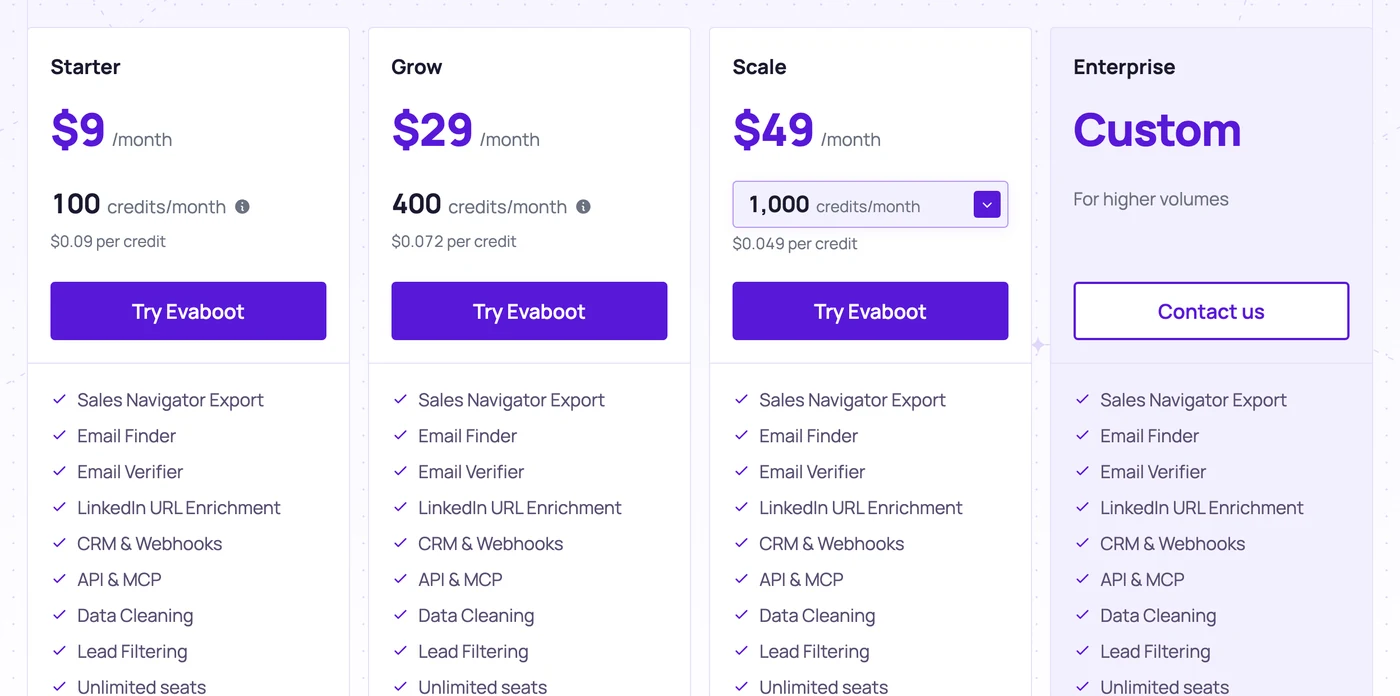
There is a single plan, ten possible volumes, and a price that runs from $9 per month for 100 credits to $1,699 for 200,000. Every feature is included at every tier, including the smallest, and seats are unlimited. It is one of the simplest pricing tables in this market, and that simplicity is a deliberate selling point: "Pay per lead. Not per seat, not per feature."

So the question is not which plan to pick, but what a credit actually buys. And one rule changes everything: an exported lead costs one credit, its email costs a second one. A usable contact therefore costs two credits, not one.

We recorded the ten tiers one by one on September 2, 2026, along with the vendor's entire FAQ, which documents credit rollover, pausing, cancellation and two structural limits the pricing table does not show.

One plan, ten tiers: the full pricing table

Here are the ten volume slider positions, recorded one by one from the official page.

Credits per month

Monthly price

Cost per credit

100

$9

$0.090

500

$29

$0.058

1,500

$49

$0.033

4,000

$99

$0.025

8,000

$149

$0.019

20,000

$299

$0.015

50,000

$499

$0.010

100,000

$899

$0.009

200,000

$1,699

$0.0085

Above 200,000

Quote only

-

The cost per credit is divided by more than ten between the first tier and the last. The volume discount is steep and regular, with no odd tier along the way.

A monthly or annual switch is offered, with the annual option presented as "two months free," a discount of roughly 17%. One caveat, though: as we will see below, the annual commitment comes with a constraint that the monthly plan does not have.

Prix Scraper Evaboot

How the Evaboot credit works

The vendor publishes its metering rule in three lines, and it is unusually clear for this market.

What you consume

Cost

A lead or an account exported

1 credit

An email found and verified

1 credit

An email we cannot find

Free

So a lead exported with its email

2 credits

Evaboot takes transparency as far as publishing a worked example: on an export of 1,000 leads where 800 emails are found, the bill is 1,000 credits for the leads, 800 for the emails and zero for the 200 without an email, or 1,800 credits in total.

Two practical consequences.

The match rate costs you nothing. You do not pay for unsuccessful searches, which puts the vendor's interests and yours in line.

But the export itself is billed. That is the fundamental difference with a plain email finder, where only the address found is metered. With Evaboot, pulling the row out of Sales Navigator already costs a credit, whether you want the email or not. If you export for pure LinkedIn work, without ever looking for an address, you still pay one credit per profile.

Exporting a row should cost nothing

Emelia's Sales Navigator scraping is unlimited and spends no credit. You only pay for the email found, 0,019 €.

Create a free account

The real cost of an enriched lead

The cost per credit means nothing on its own, since a usable contact eats two of them. Here is what that becomes as a cost per lead exported with its email.

Tier

Monthly price

Enriched leads possible

Cost per enriched lead

100 credits

$9

50

$0.180

500 credits

$29

250

$0.116

1,500 credits

$49

750

$0.065

4,000 credits

$99

2,000

$0.050

8,000 credits

$149

4,000

$0.037

20,000 credits

$299

10,000

$0.030

50,000 credits

$499

25,000

$0.020

200,000 credits

$1,699

100,000

$0.017

These figures assume that every exported lead yields its email, which never happens. Take the vendor's own example again, which is more realistic: 1,000 leads exported, 800 emails found, 1,800 credits consumed. On the 4,000-credit tier, that comes to $45 for 800 enriched contacts, or $0.056 per usable contact.

The sweet spot in the pricing table sits around the 4,000-credit tier, at $99 per month. That is where the cost per enriched lead drops below five cents, and the next tier up buys only one more cent for $50 extra.

Sales Navigator is mandatory, and it is not in the price

Logo Linkedin Sales navigator

This is the cost the pricing table does not show, and the vendor makes no secret of it. Its FAQ answers straight out: yes, an active Sales Navigator subscription is required, since Evaboot exports the results of your own searches.

That dependency has a direct budget consequence. A Sales Navigator seat runs around $99 per month depending on LinkedIn's current offer, which means that Evaboot's real entry ticket is not $9 but a little over $100.

Setup

Evaboot

Sales Navigator

Monthly total

Testing, 100 credits

$9

about $99

about $108

Regular use, 4,000 credits

$99

about $99

about $198

High volume, 20,000 credits

$299

about $99

about $398

Evaboot offsets that constraint with real generosity on another front: you can connect as many Sales Navigator seats as you like, at no extra cost, and Evaboot seats themselves are unlimited, on a shared credit balance. A team of five sales reps therefore buys a single Evaboot subscription, which is the opposite of the per-seat model that dominates this market.

Alternative

Same Sales Navigator seat, no extra cost

Emelia plugs into your Sales Navigator account and scrapes with no cap and no credits, for 37 € per month.

Try it free

What is included in every tier

This is the pricing table's strongest argument, and it deserves spelling out: the feature list is identical from the $9 tier to the $1,699 one.

Included in every tier

Sales Navigator export

Email finder

Email verification

Enrichment from a LinkedIn URL

CRM and webhooks

API

MCP and CLI (announced)

Data cleaning

Lead filtering

Unlimited seats

Unlimited Sales Navigator accounts

Credit rollover

No feature is reserved for high volumes, no option is billed as an add-on, and there is no per-user pricing. In a market where the API, webhooks and teamwork are almost always kept for the upper tiers, that is a stance against the grain.

API access deserves a special mention: the vendor explicitly documents its use by an AI agent, providing the documentation and a key so the agent can run the exports and the email searches itself.

Rollover, pause and cancellation: what the FAQ says

Three official answers to know before choosing between monthly and annual.

Unused credits roll over to the next billing period, as long as the subscription stays active. There is no monthly reset.

The subscription can be paused for one, two or three months, from the billing page. Credits stay usable during the pause and billing resumes on its own at the end. That is a rare and useful piece of flexibility for a seasonal business.

Cancellation depends on the plan, and this is the point to remember. A monthly subscription can be canceled at any time, and you keep the use of your credits until the end of the period you paid for. An annual subscription, on the other hand, cannot be canceled or scaled down before the end of the contract. Only an upgrade stays possible, by contacting support.

So the two free months on the annual plan are paid for with a firm twelve-month commitment. For a need you are not sure about, monthly costs 17% more and lets you walk away.

One last trick appears in the FAQ, and the vendor explicitly encourages it: to buy credits only once, subscribe to a plan then cancel immediately. You then have a month to use up your credits. It is a one-off purchase in disguise, and the vendor owns it.

Recommended

Extract, enrich and send in one place

Emelia adds cold email and email warmup to the extraction, with no second tool to pay for.

Start for free

What Evaboot does not do

No phone numbers. The vendor's answer is a flat no, paired with a recommendation to a third-party partner and a discount code. If your outreach runs through calls, Evaboot does not cover that need.

No sending. No email, no LinkedIn message, no sequence. Evaboot produces a file, and you load it into another tool.

No email warmup. The deliverability of your sends is not its concern, which is consistent with its scope.

No database of its own. Evaboot has no directory to query: it works off your Sales Navigator search. Without LinkedIn, it has nothing to work with.

In a full outreach chain, Evaboot is therefore one block out of three or four. The real budget covers Sales Navigator, Evaboot, a sending tool and email warmup.

Export done, the work has not started

Emelia chains scraping, enrichment and sending, with unlimited emails from 37 € per month.

Create a free account

Five alternatives that scrape and send

The five tools that follow have one thing in common: they cover at least two links in the chain, where extraction alone covers one. The scope used here is the cheapest plan that lets you build a list from LinkedIn and contact the prospects, at list price, brought back to a single user.

Tool

Plan used

Price

Scrapes

Sends

Warms up

Evaboot

4,000 credits

$99 / month

Yes

No

No

Emelia

Start

37 € / month

Yes

Yes

Yes

Waalaxy

Business

69 € / user

Yes

Yes

No

Lemlist

Multichannel

$87 / user

Yes

Yes

Yes

PhantomBuster

Start

56 € / month

Yes

No

No

Wiza

Email (annual)

$83 / user

Yes

No

No

Prices recorded from the vendors' official pages on September 2, 2026, in their billing currency and without conversion: the dollar and euro amounts are therefore not directly comparable.

Emelia: 37 € per month, the whole chain in a single subscription

Logo Emelia

Emelia opens this list because it covers the widest scope of the five: Sales Navigator scraping, contact lookup, cold email, LinkedIn automation and email warmup in a single product.

Plan

Price

Mailboxes

LinkedIn accounts

Included credits

Start

37 €

3

1

500

Grow

97 €

50

5

1,000

Scale

297 €

Unlimited

20

5,000

The mailboxes counted here are connected sending addresses, not users: Emelia does not bill per seat and has no team mode. A Grow plan with 50 mailboxes is not a plan for 50 sales reps.

Sales Navigator scraping is included and consumes no credits, whatever the volume. The segmented scraping on the Grow plan automatically splits searches of more than 2,500 results across several days, which spares you from rebuilding the query by hand to get around Sales Navigator's pagination.

To scrape like a pro, watch this video.

Credits, at 19 € per 1,000, therefore go to enrichment only: an email found costs 1 credit, or roughly 0,019 €, a verification 0.25 credit and a phone number 50 credits. That is the only variable line on the invoice, since extraction and sending are covered by the subscription.

Emelia Pricing

The limit is the starting point. Emelia has no searchable database: targeting runs through LinkedIn and Sales Navigator, very current on people and their job changes, patchier on organizations with little presence on the network. And phone numbers are expensive, around 0,95 € each: this is not the tool for a team that calls at volume.

A team sending from three mailboxes and enriching 1,000 contacts a month pays 37 € plus 19 €, or 56 € a month, extraction, sending and warmup included, cancellable at the end of the current month. Emelia speaks to anyone who wants a single invoice for the whole chain.

Waalaxy: 69 € per user for multichannel

Logo de l'outil Waalaxy

Waalaxy is a French vendor built around LinkedIn automation, with an email component bolted on at its top tier. The product installs as a browser extension and works from your own LinkedIn account.

Plan

Price per user

LinkedIn invitations

What the tier adds

Pro

19 €

300 / month

Unlimited campaigns, sequences, follow-ups, CRM

Advanced

49 €

800 / month

API, Make, Zapier, n8n, chat support

Business

69 €

800 / month

Cold email, multichannel, 500 email credits

Only the Business plan can send emails: the two tiers below it stay LinkedIn tools. It is therefore the sole meaningful point of comparison as soon as you want a full chain, and it puts Waalaxy at 69 € per user with 500 email credits included.

The discount structure is the most aggressive in this comparison: 20% on a quarterly plan and 50% on a yearly one. With an annual commitment, the Business plan lands a long way below its list price, and that is the first calculation to run before comparing anything at all. A 14-day free trial lets you measure the returns before you commit.

Two things to watch. API access only shows up on the Advanced plan, at 49 € per user, which rules the entry plan out for any automated use. And the LinkedIn invitation quota, 300 then 800 a month, is the product's real ceiling: it caps volume well before price does.

Three sales reps on the Business plan add up to 207 € a month at list price. Waalaxy is aimed at teams whose outreach is LinkedIn first, with email as a complement; it is a poor match for anyone building large files. The vendor claims more than 200,000 users. Tier by tier detail in our article on Waalaxy pricing.

Lemlist: $87 per user for full multichannel

Logo Lemlist

Lemlist is a sending platform that has added data and LinkedIn automation to its lineup. It is now the tool on this list that covers the most links of the chain inside a single subscription.

Plan

Annual

Monthly

Unit

Email

$55

$69

Per account, unlimited users, 50,000 emails / month

Multichannel

$87

$109

Per user, 5 senders per user

Enterprise

Quote only

N/A

From 5 users up

The fine print of the Email plan is what makes the comparison interesting. For $55 a month on the annual plan, it gives you unlimited users, 50,000 monthly emails, a database of more than 650 million contacts, email and phone number lookup, a deliverability hub that includes warmup, a unified inbox, AI agents, CRM integrations and the API. As soon as the team goes past two people, it is the best value in this comparison.

Multichannel switches models. LinkedIn, SMS and the dialer only become available from the Multichannel plan, billed at $87 per user instead of per account, with five senders per user. The gap between the two formulas is not a price gap, then, it is a change of billing unit.

Contact lookup is then paid for in rechargeable credits, one credit being worth one cent and a verified email address costing five credits, or $0.05. A 14-day trial lets you assess the whole package.

Three sales reps on Multichannel work out to $261 a month, while the Email plan stays at $55 whatever the size of the team. Lemlist targets teams that want one dense, single platform; the flip side is a longer ramp-up than with a tool that does one thing. Tier by tier detail in our article on Lemlist pricing.

PhantomBuster: 56 € per month for programmable extraction

Phantombuster Logo

PhantomBuster is a general-purpose automation tool where LinkedIn extraction is only one use among many. It strings together building blocks called automations, on LinkedIn as well as across the rest of the web.

Plan

Annual

Monthly

Execution time

Email credits

Trial

Free

N/A

2 h in total

50

Start

56 €

69 €

20 h / month

500 / month

Grow

128 €

159 €

80 h / month

2,500 / month

Scale

352 €

439 €

300 h / month

10,000 / month

The model has nothing in common with the others on this list: you buy neither rows nor seats, but machine execution time and automation slots, with email credits alongside. Users are unlimited on every plan, which leaves the machine hour as the only variable to keep an eye on.

That is also the product's main difficulty. An hour of execution does not map to a number of results you can know in advance: the yield depends on the automation you launch, on the size of the search and on the built-in delays. A PhantomBuster budget is therefore worked out after a first month of use, not before.

The tiers climb to 5, then 15, then 50 automation slots, with unlimited exports and URL lookup credits running from 1,000 to 20,000 a month. An MCP server ships with every plan, which opens the way to control by an AI agent. The free trial plan gives two hours of execution time, five slots and 50 email credits, but caps exports at ten rows: enough to validate a chain of steps, not a volume.

An entire team still costs 56 € a month on Start, since users are unlimited. PhantomBuster is aimed at technical profiles who want to chain automations and accept a longer setup. Tier by tier detail in our article on PhantomBuster pricing.

Wiza: $83 per user, unlimited emails and phone numbers

Purple logo with “Wiza” written in dark blue on a white background

Wiza turns a Sales Navigator search into a file of verified emails, and adds phone numbers on its top tier. It is the product on this list with the narrowest remit, and the only one that supplies direct dials.

Plan

Annual

Monthly

Volume

Free

$0

$0

20 emails, 5 phone numbers

Starter

N/A

$49

100 emails, 100 phone numbers

Email

$83

$99

Unlimited emails, 2,500 exports / month

Email + Phone

$166

$199

Unlimited emails and phone numbers

Billing is per user, which completely changes the math from the second person onwards: the Email plan advertised at $83 on the annual rate becomes $249 for three sales reps.

The word "unlimited" calls for close reading. On the annual plans it is capped at 2,500 exports a month, a figure that matches Sales Navigator's pagination limit exactly. The offer is thus less generous than it looks as soon as you handle several searches a month.

Second thing to know before you sign: overage on the monthly plans is billed at $0.15 per email and $0.35 per additional phone number, and it kicks in automatically once the quota runs out. There is no safeguard: the invoice can go past the expected amount without any approval from you.

The free plan, 20 emails and 5 phone numbers, is enough to measure the match rate on your target before you pick a tier. Wiza becomes the obvious choice the moment the phone enters the equation; it fits large teams badly, since its per seat billing penalizes them. Tier by tier detail in our article on Wiza pricing.

No commitment

37 € a month, cancel this month

Unlimited emails and contacts, email warmup included, and no seat billed on top.

Start now

Which Evaboot tier to choose

You are testing the tool. The 100 credit tier, $9, lets you export 50 leads with their emails. That is enough to judge the quality of the cleaning and the match rate on your target.

You want to buy once and only once. Subscribe, then cancel straight away: you keep a month to spend the credits. The method is recommended by the vendor itself.

You prospect regularly, on your own or in a small group. The 4,000 credit tier, $99, is the balance point of the pricing table: 2,000 enriched leads a month at five cents apiece.

You are building large files. From 20,000 credits up, the cost per enriched lead drops below three cents. Do budget the time to split your searches into batches of 2,500, though.

You are unsure how long you will need it. Stay on the monthly plan. The two free months of the annual plan are paid for with a firm commitment, with no way to cancel or move down a tier before the term ends.

You call your prospects. Evaboot supplies no phone numbers at all. Look elsewhere, or plan for a second tool.

You do not have Sales Navigator. Evaboot will not work. Count on roughly another hundred dollars a month, or change your approach.

Conclusion

Evaboot is one of the most honest products in this series of articles, and that deserves saying. A single plan, ten tiers displayed all the way to the highest, a credit rule published in three lines with a worked example, failures that are not billed, credits that roll over, the option to pause, unlimited seats and a shared balance. Almost everything the others hide, this one writes down.

The real cost is therefore easy to work out, as long as you keep the two credit rule in mind: on the $99 tier, a contact exported with their email works out at around five to six cents. That is a good price for what it is.

What it is, though, remains narrow. Evaboot produces a file, nothing more. It needs Sales Navigator upstream, which you pay for, and a sending tool downstream, which you also pay for. Across a full chain, the Evaboot subscription often accounts for less than a third of the spend.

That is where the trade-off is settled. If you already have Sales Navigator and a sending tool that suits you, Evaboot is probably the best export on the market at that price. If you are starting from scratch, add up the three lines before comparing with a platform that scrapes and sends in the same place: the total often changes the conclusion.

Frequently asked questions about Evaboot pricing in 2026

How much does Evaboot cost in 2026?+

Evaboot has a single plan whose price depends on the volume you pick: from $9 per month for 100 credits to $1,699 for 200,000 credits, with ten tiers in between. Above 200,000 credits, pricing becomes quote only. An annual commitment gives you two months free.

What is an Evaboot credit?+

A lead or an account exported costs 1 credit, an email found and verified costs 1 credit, and an email that is not found is free. A lead exported with its email therefore comes to 2 credits.

How much does an enriched lead cost with Evaboot?+

From $0.18 on the smallest tier to $0.017 on the largest. On the $99 tier for 4,000 credits, a lead with its email works out to $0.05 in theory, and around $0.056 once you account for the emails that are not found.

Do Evaboot credits roll over?+

Yes, unused credits are carried over to the next billing period as long as the subscription stays active.

Do you need a Sales Navigator subscription to use Evaboot?+

Yes, and the vendor states it explicitly: Evaboot exports the results of your own Sales Navigator searches, so an active seat is required. It is not included in the price. You can, however, connect as many Sales Navigator accounts as you want at no extra cost.

How many leads can you export from a single search?+

Up to 2,500 leads or 1,000 companies. That ceiling comes from LinkedIn, not from Evaboot, since Sales Navigator stops paginating beyond it. To go further, you have to break the search into narrower segments.

Does Evaboot bill per user?+

No. Seats are unlimited and the whole team draws on the same credit balance, which means a single subscription is enough whatever the size of the team.

Can you cancel Evaboot at any time?+

A monthly subscription can be canceled at any time, and you keep the use of your credits until the end of the period you paid for. An annual subscription, on the other hand, cannot be canceled or scaled down before the end of the contract. A pause of one to three months is also possible.

Does Evaboot find phone numbers?+

No. The vendor answers in the negative and points to a third-party partner for that.

Which alternative to Evaboot scrapes and sends in one place?+

Emelia, from 37 € per month, brings together Sales Navigator scraping without credit consumption, contact detail lookup, cold email, LinkedIn automation and email warmup. Waalaxy from 69 € per user and Lemlist from $87 per user also cover sending, with different scopes.


logo emelia

Discover Emelia, your all-in-one prospecting tool.

logo emelia

Clear, transparent prices without hidden fees

No commitment, prices to help you increase your prospecting.

Start

€37

/month

Unlimited email sending

Connect 1 LinkedIn Accounts

Unlimited LinkedIn Actions

Email Warmup Included

Unlimited Scraping

Unlimited contacts

Grow

Best seller
arrow-right
€97

/month

Unlimited email sending

Up to 5 LinkedIn Accounts

Unlimited LinkedIn Actions

Unlimited Warmup

Unlimited contacts

1 CRM Integration

Scale

€297

/month

Unlimited email sending

Up to 20 LinkedIn Accounts

Unlimited LinkedIn Actions

Unlimited Warmup

Unlimited contacts

Multi CRM Integrations

Unlimited API Calls

Credits(optional)

You don't need credits if you just want to send emails or do actions on LinkedIn

May use it for :

Find Emails

AI Action

Phone Finder

Verify Emails

1,000
5,000
10,000
50,000
100,000
1,000 Emails found
1,000 AI Actions
20 Number
4,000 Verify
19per month

Discover other articles that might interest you !

See all articles
NielsNiels Co-founder
Read more
NielsNiels Co-founder
Read more
Tips and training
Published on Apr 9, 2025

Top 5 No-Code Web Scraping Tools for 2026

NielsNiels Co-founder
Read more
Tips and training
Published on Dec 5, 2022

Few things to avoid in your campaigns

NielsNiels Co-founder
Read more
NielsNiels Co-founder
Read more
MathieuMathieu Co-founder
Read more
Made with ❤ for Growth Marketers by Growth Marketers
Copyright © 2026 Emelia All Rights Reserved