Free, Starter, Pro, Premium and Scale, month by month
In US dollars, excluding taxes, for the whole account (not per licence). The yearly price is shown per month and paid upfront, 25% below the monthly one. Pro and Premium are sold on a slider: the price below is the first step.
Free
$0/month
no card
- 40 credits a month
- 1 licence
- Extension, CRM integrations, email sequences
- API with strict limits (pricing page), MCP
Starter
$49.90/month
$37.45/month billed yearly ($449.10)
- 400 credits a month
- 1 licence
- Lookalikes, bulk enrichment, AI assistant
- 5 intent topics, no rollover
Pro
$69.90/month
$52.45/month billed yearly ($629.10)
- 600 to 3,200 credits a month
- 2 licences included, up to 10
- CSV enrichment, signals, webhooks, team groups
- Monthly rollover up to ×2 (pricing page)
Premium
$399.90/month
$299.95/month billed yearly ($3,599.10)
- 3,400 to 10,000 credits a month
- 5 licences included, up to 25
- Advanced API, credit limits per user (pricing page)
- 5 intent topics with unlimited results
Scale
Quote
yearly agreement
- “50%+ off” the price per credit
- Unlimited licences, SSO
- 25 intent topics
- Do Not Call lists, dedicated success team
Taxes come on top (Lusha adds VAT depending on the country), and payment is by card. Lusha’s plan data calls Pro “Professional”. Lusha contradicts itself on the API: open to every plan in its pricing table and its API documentation (strictly limited on Free and Starter), reserved for Scale (“Scale plan only”) in another help-centre article.
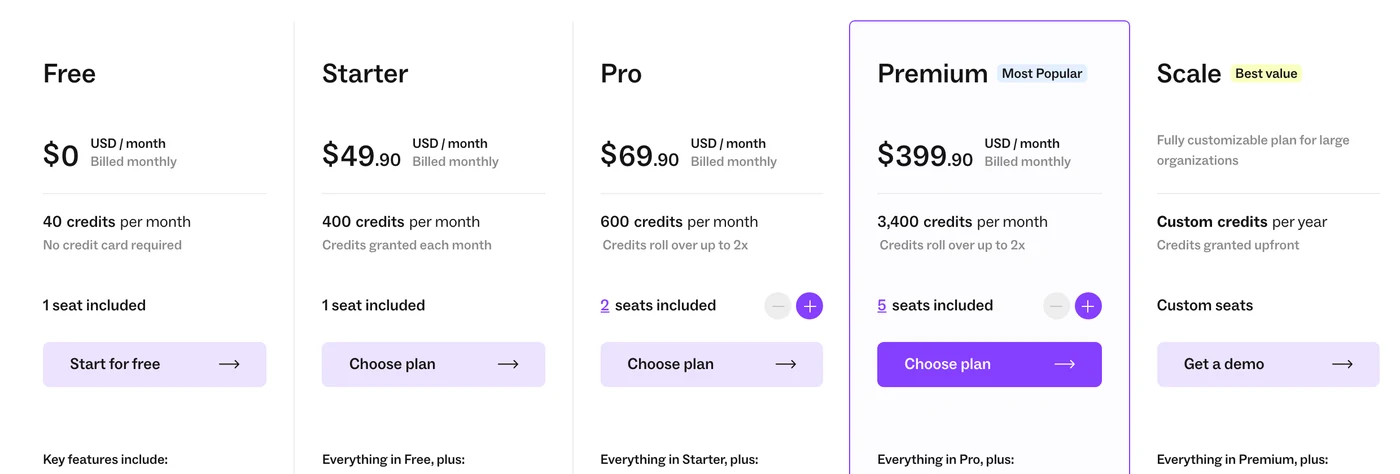
Lusha pricing 2025 vs 2026: Starter added, phone numbers at half the credits, a smaller free plan
Lusha loads its prices with JavaScript, so archived copies of its pricing page do not always show them; the plans and credit costs do appear. What moved, from the Wayback Machine:
- Free plan credits: 50 a month (February 12, 2025), then 70 (from June 11, 2025), now 40 (seen on April 22, 2026).
- Phone numbers: 10 credits each → 5, between February 10, 2026 and April 22, 2026.
- Starter: added in the same window, below Pro, with one licence and 400 credits a month.
- Database: “285M+ business profiles” in November 2025, “515M+ verified contacts” today.
- Yearly discount: 25% today; 35% during a promotion seen on July 9, 2026. Monthly prices from before April 2026 could not be read in the archives.
Discounts: no public code, but annual-plan sales
Lusha does not hand out public promo codes. The lever is yearly billing (25% off, paid upfront), and Lusha runs sales on it: a “July 35% promotion” seen on July 9, 2026 and a “November Sale” for annual plans only, seen on November 22, 2025.
Its terms say a renewal is billed at the price in force then, without the promotional discount of the first term. The affiliate programme pays partners a commission but gives no discount to their audience.
The free plan: 40 credits a month, no card, no trial of paid plans
Lusha’s free plan is permanent: 40 credits a month (40 emails or 8 phone numbers), one licence, the extension, CRM integrations, email sequences and the API with strict limits. Credits do not roll over. Lusha calls it “a plan, not a trial”; we found no trial of the paid plans.
Sign-up needs a work email, and some new accounts are held by fraud checks. On Free only, the community programme adds 200 credits once and 150 a month if you connect your work mailbox and share its headers and signatures with Lusha’s database. Emelia, for its part, gives 20 free credits at sign-up with a work email, and a 7-day free trial without a card.
1 credit per email, 5 per phone number, and everything else that spends credits
All the credits of an account sit in one balance, shared by every licence and every API key. Searching and filtering cost nothing; revealing does. A contact already revealed can be viewed again for free, but exporting it to a CSV file still costs credits.
How many Lusha credits each action uses
Platform, extension, API or CSV enrichment
Up to 6 for the email and phone of one contact
Including one credit for the request
One at least per request
Even for contacts already revealed
6 outside providers queried when Lusha has nothing; charged only if found
Lusha’s own pages disagree on a few points: its billing FAQ says credit costs “vary depending on your specific plan” while its price data uses the same costs on every plan; its FAQ says a lookup that finds nothing is free while its help centre charges one credit at least per API request; and the Data Waterfall is described either from Pro or on every paid plan.
From 400 to 10,000 credits a month: the per-credit price at each step
Pro and Premium are sold on a slider, in steps of 200 credits a month (2,400 a year). The price per credit falls slowly, from $0.125 on Starter to $0.098 at 10,000 credits a month, and from $0.094 to $0.079 on yearly billing.
Two things to know before moving the slider. Premium’s first step costs more per credit than Pro’s last ($399.90 for 3,400 credits against $362.40 for 3,200), but it comes with 3 more licences. And the yearly price gives the year’s credits at once, upfront; they are lost at the end of the term, even if you renew.
Price by number of credits (monthly, then yearly)
- 400 credits a month (Starter)
- $49.90 a month ($0.125 per credit) · $449.10 a year for 4,800 ($0.094)
- 600 credits a month (Pro)
- $69.90 a month ($0.117 per credit) · $629.10 a year for 7,200 ($0.087)
- 1,000 credits a month (Pro)
- $114.90 a month ($0.115 per credit) · $1,049.10 a year for 12,000 ($0.087)
- 2,000 credits a month (Pro)
- $227.40 a month ($0.114 per credit) · $2,099.10 a year for 24,000 ($0.087)
- 3,200 credits a month (Pro)
- $362.40 a month ($0.113 per credit) · $3,359.10 a year for 38,400 ($0.087)
- 3,400 credits a month (Premium)
- $399.90 a month ($0.118 per credit) · $3,599.10 a year for 40,800 ($0.088)
- 5,000 credits a month (Premium)
- $549.90 a month ($0.110 per credit) · $5,039.10 a year for 60,000 ($0.084)
- 10,000 credits a month (Premium)
- $977.40 a month ($0.098 per credit) · $9,539.10 a year for 120,000 ($0.079)
Extra licences, rollover and top-ups
Extra licences
Every person who logs in needs a licence. Beyond those included (1 on Starter, 2 on Pro, 5 on Premium), each one costs $49.90 a month or $449.10 a year, without any credits: Pro goes up to 10 licences, Premium to 25. A licence added mid-cycle is charged in full at once, without proration, and the included licences cannot be removed.
Rollover
Lusha’s pricing page lets unused credits roll over on monthly Pro and Premium plans (its help centre also names Scale), up to 2 times the monthly allowance; its terms say credits not used by the end of the term expire and do not roll over. On yearly billing, credits are lost at the end of the term; on any plan, they are lost when you cancel, and when you move to a higher plan.
Top-ups
When the balance runs low, you can buy credits once or set up an automatic top-up (Starter, Pro and Premium; 200 credits at least, 12 hours between two). Their price is shown only inside the dashboard: we could not check it.
Same credits, two bills: Lusha against Emelia for emails and phone numbers
Same need on both sides, billed monthly, one person: Lusha’s cheapest plan that gives the credits, against the smallest monthly pack of Emelia’s credit subscription, which you can buy without any plan. An email costs 1 credit at both; a phone number 5 credits at Lusha, 50 at Emelia, which looks it up across several providers in a waterfall and gives the credits back when none is found.


Emails found a month
400 emails
1,000 emails
5,000 emails
10,000 emails
Phone numbers found a month
100 numbers
200 numbers
400 numbers
1,000 numbers
2,000 numbers
Credits left over at the end of the month
Unused credits
Lusha only invoices in US dollars; Emelia’s column follows your currency, at the same figure in euros or dollars. In this table, Emelia is cheaper on every price line except 400 numbers a month. For 400 emails and 400 numbers, Emelia’s pack holds more credits than the month uses, and the surplus carries into the following months.
Your credit volume, priced at Lusha and at Emelia
Set the emails and phone numbers you need each month and the number of people who reveal them: the calculator picks the cheapest Lusha step that covers both, and the Emelia pack that does.
Pro · 1,600 credits a month · licences included: 210,000-credit pack ($99)Credits subscription alone, not billed per userYou save $83.40 per month with Emelia ($1,000.80 per year).
How each tool charges
Lusha charges a plan per number of credits: $49.90 for 400 on Starter, then from $69.90 (Pro, 2 licences) and $399.90 (Premium, 5 licences) up the slider. Each extra licence costs $49.90 a month. On yearly billing, the year’s credits arrive at once and expire at the end of the term.
Emelia does not bill per user, and its credits need no sending plan: all that counts is the monthly pack that covers your volume, from $19 for 1,000 credits, valid for 12 months. An email found costs 1 credit, a phone number 50, and nothing is charged when nothing is found. Packs are monthly only, so the yearly view uses the same price.
Excluding taxes. Lusha: the step that covers the credits, 1 per email and 5 per phone number; beyond 10,000 credits a month or 25 licences, Scale on quote. Emelia: its credit subscription and nothing else, a monthly pack even when Lusha is paid yearly, with no plan to add and no charge per user.
Cancelling or freezing a subscription
An admin cancels in the settings; the plan runs to the end of the paid term, then the account goes back to Free with its data, and the stored credits are reset. Exports cost credits, so export before cancelling. Notice before renewal: at least 14 days according to Lusha’s terms and FAQ, 24 hours according to its help centre.
Monthly plans can also be frozen for 1 or 2 months, 2 times a year at most, 3 months apart: no invoice, and the remaining credits stay usable. Lusha’s terms say all payments are non-refundable; its help centre says refund requests are reviewed case by case.
Intent topics, tax and currency on a Lusha bill
Topics a company is researching (from intent data), used to find accounts that are in the market. Starter includes 5, Premium 5 with unlimited results, Scale 25.
Yes. The prices on the pricing page exclude taxes, and VAT is added depending on the country.
No price list in euros or pounds exists: even the French site sends you to the English pricing page, and the terms say all fees are in US dollars. Its help centre still says pricing “may vary depending on your region”, and payment is by card.
Emelia features: Email finder · Emelia pricing
Emelia is a Lusha competitor. We have tried to stay fair: every figure about Lusha comes from its own website or public review sites.


