The short answer
- 1In Sales Navigator, combine the Real Estate function and industry with agent titles (Realtor, Real Estate Agent, or Estate Agent in the UK), one local market per search.
- 2Send the search to Emelia with Export with Emelia, then run Find email on the list: 1 credit per email found, given back when no address is found.
- 3For agents barely on LinkedIn, copy names and websites from the "Our agents" pages of local brokerages into a CSV, and enrich it the same way.
- 4Keep the brokerage name next to the website: agents in franchise offices often use the network's domain, and Emelia retries with the company name when the domain finds nothing.
- 5Then write a short email about their listings or clients. Agents are pitched every day: be specific.
Who exactly are you trying to reach?
A real estate agent is licensed to help people buy, sell or rent property. In the US, most agents work under a broker, who holds the higher license and runs the brokerage, usually as independent contractors who pay for their own marketing, tools and leads. That is why lenders, title companies, inspectors, photographers, software vendors and recruiting brokerages target them: each agent is a small business.
The words change by country. "Realtor" is a US trademark reserved for members of the National Association of Realtors. In the UK, the estate agent sells, the letting agent rents, and sales staff are called "negotiators". Decide first who you want: the agent, who buys for their own business, or the broker-owner or branch manager, who buys for the whole office.
The titles to search for
Job titles to include
Job titles to leave out
On LinkedIn, "real estate" also covers finance, law, lending and corporate property teams. "Branch Manager" only works with the Real Estate industry filter, or you get bank branches. In Canada and Australia, add "Sales Representative" and "Principal".
Where real estate agents show up online
- The brokerage website: the "Our agents" page usually has a profile per agent, often with a direct email, a contact button or a vCard.
- Listings and portals: every listing names the listing agent and the brokerage. Portal profiles add the areas covered and recent sales, but contact goes through a form.
- LinkedIn: coverage is uneven. Brokers, team leads, commercial agents and UK agency staff keep a profile, while many residential agents have a thin one or none.
- Instagram and Facebook: many agents market themselves there, with an email in the bio or a contact button.
- License lookups: US state real estate commissions publish them. They confirm the license and, in many states, the brokerage the agent works under, rarely an email.
Why agents are harder to reach than they look
- Many solo agents use a personal address (Gmail, Yahoo, Outlook). No professional email finder can guess it.
- The domain is not always the office's. In a franchise office, the email is often on the national network's domain, sometimes on the office's or on a personal-brand domain. The agent's own page tells you which.
- The LinkedIn company is not always the brokerage: a team name, a franchise brand or "Self-employed". Emelia makes up for part of this (see the automatic retry below).
- Portals hide the email behind a contact form.
- Agents move a lot. They switch brokerages, join teams, and many leave the business in their first years. Build your list right before the campaign.
Which method should you use?
It depends on whether your agents are active on LinkedIn. All three methods end with a list of agents and their work email, ready for a campaign.
Build the list in Sales Navigator
Filter agents and brokers by market, title and brokerage size, then send the search to Emelia.
Best for: brokers, team leads, commercial agents and UK agencies.
See the stepsOne agent at a time
On a LinkedIn profile, the Emelia extension finds the email and adds the agent to a campaign.
Best for: the listing agent of one property, or a few top producers.
See the stepsStart from rosters or a file
Import the names and brokerages you collected, or sync HubSpot or Pipedrive, then find the missing emails.
Best for: residential agents barely on LinkedIn, and lists you already have.
See the stepsMethod 2: find one agent's email from their LinkedIn profile
Sometimes you need one agent: the listing agent of a property your client wants, or the top producer of a neighborhood you serve. The extension works from the profile.
- Step 1
Open the agent's LinkedIn profile
Once the Emelia extension is installed and connected, a button appears on every LinkedIn profile. Check the current position: agents do not always update it when they change brokerage.
- Step 2
Click Find email
Emelia reads the name, the company and its website on the profile and looks for the work email. Agents live on their phone: you can also look for the number (Find phone) or both at once.
The Emelia extension on a LinkedIn profile: find the email, then add the contact to a campaign. - Step 3
Add the agent to a campaign
Pick one of your campaigns in Add to the campaign. The agent is added with the email you just found.
Without the extension: unitary searches
Found the agent on a brokerage roster? The Unitary searches button at the top of the Lists page finds one email from a full name, a company and a domain (take it from the agent's own page). Always fill in the country: it is used by the search.
Method 3: start from brokerage rosters or a file
Many residential agents are easier to find on their brokerage's website than on LinkedIn. Copy the names from the "Our agents" pages of your market into a spreadsheet, or start from a file you have: event attendees, agents you closed deals with, a CRM segment.
| Column | Required | What it is for |
|---|---|---|
| First name + Last name (or Full name) | Yes | Without the license number or the "Realtor" mark some agents add after their name. |
| Brokerage website or domain | Optional | Take it from the agent's own page: it can be the network's domain rather than the office's. |
| Brokerage or team name | Optional | Needed without a website, and a second chance when the domain finds nothing. You need at least the website, the domain or the name. |
| LinkedIn profile URL | Optional | Needed for LinkedIn steps and to look for a phone number. |
Required
What it is for
Required
What it is for
Required
What it is for
Required
What it is for
- Step 1
Import the file
In Emelia, go to Lists, then New List, and choose CSV File (or HubSpot or Pipedrive). The file must be a .csv, not an .xlsx. Columns are recognized automatically, and you can fix the mapping.
Emelia: create a new list from a CSV file, Sales Navigator, HubSpot or Pipedrive. - Step 2
Launch Find email on the list
Emelia shows the entries without an email, the credits to be used and the leads missing a name or a company. Choose the column with the domain or the brokerage name if needed, pick the country, and launch. It keeps running if you close the tab.
Emelia: find the missing emails of a whole list in one run. - Step 3
Check the results
Leads that already had an email are skipped and not charged. Keep the addresses qualified valid, and if in doubt, use the email verifier. For one agent added later, click their empty email cell to search just that lead.
Why the brokerage name matters for agents
When the search by domain finds nothing and the lead has a company name, Emelia automatically searches again with the name alone. Useful for agents, whose team or franchise office often does not match the website you have. URL shorteners such as bit.ly or lnkd.in are ignored as a website: then the brokerage name carries the search.
Doing it by API
Syncing a brokerage roster automatically? POST /tools/find/email takes the agent's full name, the brokerage name and the country (required), plus the website if you have it; a second call reads the result. 1 credit per email found, like in the app.
POST https://api.emelia.io/tools/find/email
Authorization: <API_KEY>

{
  "fullname": "Hannah Price",
  "companyName": "Marlow & Reed",
  "country": "US",
  "companyWebsite": "marlowandreed.co.uk"
}

→ { "success": true, "jobId": "…" }
GET https://api.emelia.io/tools/find/email/{jobId}The free methods, for one or two agents
Agents want to be reachable, so many contact details are public. For an address or two, these sources are often enough. Check the address before writing.
1.The agent's page on the brokerage site
Open "Our agents" or "Meet the team" and click the agent's profile. Look for an email link, a contact button or a vCard, which often holds the direct address.
2.The listing on the brokerage site
Find the property on the brokerage's own website rather than on a portal: the listing page there often shows the agent's direct email or phone.
3.Instagram and Facebook
Many agents put an email in their Instagram bio or a contact button on their Facebook business page. Make sure it is a work address.
4.License lookups and agency directories
ARELLO lists the real estate regulators of each US state, most with a public license lookup. In the UK, the Propertymark directory lists member agencies. No email, but the right brokerage, so the right domain.
5.Guess, then verify
Search Google for "@brokerage-domain.com" with the agent's name, try the formats below, and check any guess with an email verifier. Bounces hurt your deliverability.
The email formats you will see at brokerages and agencies
An agent's address follows the brokerage, the team or their own brand. Start with the domain of the agent's own page.
| Pattern | Example | Where you see it |
|---|---|---|
| firstname@ | tasha@reedandroost.com | Boutique brokerages and broker-owners. |
| firstname.lastname@ | jordan.ellis@kestrelpeakrealty.com | Larger brokerages and franchise offices. |
| f.lastname@ / flastname@ | dmorales@quarryandpinerealty.com | Frequent at established brokerages. |
| firstname@ on a team domain | alyssa@bluestemhometeam.com | Teams and top producers often buy their own domain. |
| branch@ (UK agencies) | clifton@marlowandreed.co.uk | Reaches the branch team, not one negotiator. |
| info@ / lettings@ | lettings@marlowandreed.co.uk | A shared inbox, read by the front desk first. |
Example
Where you see it
Example
Where you see it
Example
Where you see it
Example
Where you see it
Example
Where you see it
Example
Where you see it
Then email them: the campaign in Emelia
Agents get pitched every week. Here is how to turn the list into a campaign in Emelia, without exporting anything.
- Step 1
Create the campaign
In Campaigns, click create, name it, and start from scratch or from a template such as Email then LinkedIn, a good default when part of your agents rarely use LinkedIn.
- Step 2
Write the sequence
In the Campaign tab, add emails, LinkedIn visits, invitations and messages, with delays. Personalize with
{{firstName}}and{{companyName}}, and name the market yourself: each list covers one.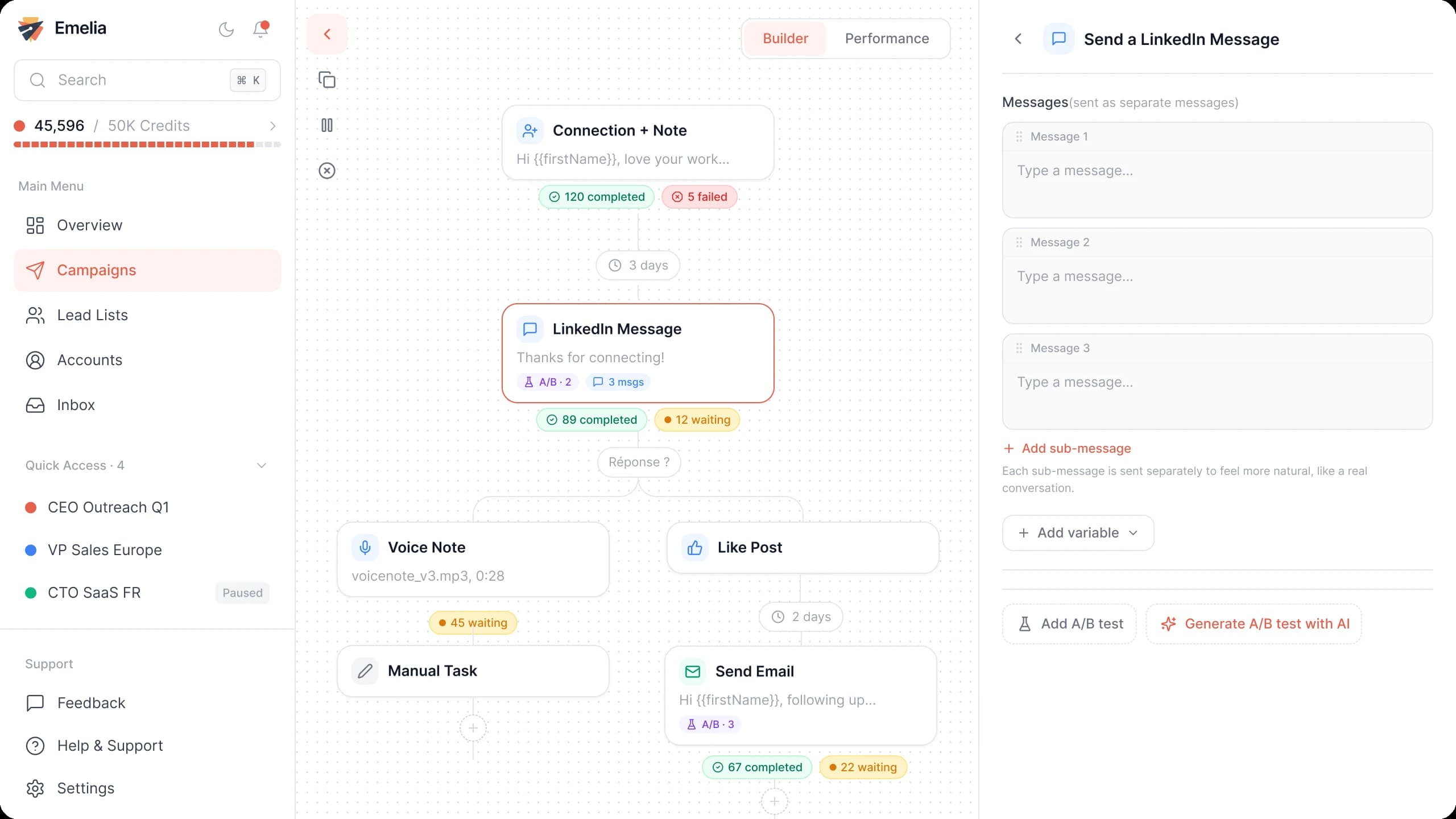
The Emelia sequence builder: emails and LinkedIn steps in the same campaign. - Step 3
Attach the list of agents
In Settings, choose the sending accounts, then in Lead list tick the list you just enriched. Save.
Emelia: attach one or more lead lists to the campaign, then launch it. - Step 4
Launch or schedule
Launch now or schedule the start.
A short email agents actually answer
Agents read email on their phone, between two showings. A few lines, one benefit tied to their listings or clients, a one-word question.
Subject: Your next listing in [city]
Hi {{firstName}},
I help agents in [city] [your result, e.g. get listing photos the next morning] without [the pain it avoids].
[A similar agent or team] at a brokerage like {{companyName}} [concrete result] in [time frame].
Worth a quick call before your next listing goes live?
Replace the brackets with your own facts. Agents hear "more leads" every day: a result on their listings or closings works better than a promise of volume. Recruiting for a brokerage? Lead with what changes for them (split, support, leads).
Mistakes to avoid
Using the Real Estate function alone
It brings in analysts, investors, leasing and corporate property teams. Combine it with the industry and the agent titles.
Mixing agents and broker-owners
An agent buys for their own business, a broker-owner for the whole office. Two lists, two messages.
Guessing on the office's domain
In a franchise office, the email is often on the network's domain. Check the agent's own page before guessing.
Pitching through a listing's contact form
Those forms are for buyers and sellers. Your pitch lands among real client inquiries, and it annoys more than it converts.
Reusing last year's list
Agents change brokerage and leave the business all the time. A burst of bounces on a new domain can send your next emails to spam.