How many LinkedIn connection requests can you send per day?
LinkedIn enforces caps it never publishes. Here are the volumes we recommend for each action, what Emelia enforces on its side, and what happens when you push too far.
| Connection requests per day, free account | 20 |
| Connection requests per day, Premium or Sales Navigator | 40 at most, stay around 30 |
| Requests with a note, free account | 5 to 10 per month |
| Length of a connection note | 200 characters, 180 with variables |
| Messages to connections | fewer than 50 per day |
| InMail credits (Sales Navigator) | 50 per month, rolling over up to 150 |
| InMails to Open Profiles | 40 per day at most, no credit used |
| Profiles exported from Sales Navigator | 2,500 per 24 h per account |
| Emelia cap per campaign | 40 new contacts per day with a connection request, 80 without |
Where these numbers come from
LinkedIn does limit what an account can do each day, but it publishes no official figures, and its thresholds vary from one account to the next: an older Premium account with a real network can take more than a recent one. The numbers on this page are therefore recommendations, drawn from what we see in support, not a guarantee from LinkedIn.
Emelia adds its own safeguards, deliberately set below the point where LinkedIn starts reacting. They protect you from a slip of the finger, but they do not replace your own judgement, especially when several campaigns share an account.
Used within these limits, a genuine account runs little risk. And when LinkedIn feels an account is going too far, it warns you first: connection requests temporarily refused, or a message that explicitly mentions automation tools. That is the moment to slow down, see below.
Connection requests: the most closely watched number
This is the action LinkedIn monitors most. On a free account, stay around 20 connection requests a day. With Premium or Sales Navigator, LinkedIn tolerates more: 40 a day at most, and we advise staying around 30. Our own cruising speed, on our accounts, is about twenty a day.
The connection note is the other trap. Without a Premium subscription, LinkedIn only allows 5 to 10 requests with a note per month. Beyond that, requests are refused with a temporary limit error. And when you do add one, it is capped at 200 characters: aim for 180 if you use variables, since one long first name is enough to tip you over.
- A request without a note, then a first message as soon as the person accepts.
- 20 a day on a free account, 30 with Premium or Sales Navigator.
- On an account that has never been automated, starting low and increasing week by week.
- Connection notes on a free account.
- Loading people you already invited who never answered: LinkedIn refuses a second request.
- Pushing a free account to 40 a day just because the setting allows it.
Do not be surprised to see 17 or 18 requests sent instead of the 20 you set: a little randomness is built in so the pace does not look like a machine. And someone who is already a connection does not get a request: the step is skipped and the sequence carries on.
What about a weekly limit?
You will often read that there is also a weekly limit. On LinkedIn's side, the real threshold exists, but it is neither public nor fixed: there is no weekly number that holds for every account.
On Emelia's side, on the other hand, there is no weekly counter. The cap is daily, and it applies to every active day of the campaign. With business days ticked by default, 40 requests a day gives at most 200 requests a week. If you add Saturday and Sunday to the Active days, the same cap applies on those two days as well: you can reach 280, and nothing will stop you.
Turning on Saturday and Sunday means 40% more volume over the week. It is not forbidden, but if you do it, lower the daily number so the weekly total stays the same.
Messages
Writing to someone already in your network is watched less closely than inviting a stranger, but it is not unlimited. Stay under fifty or so messages a day per account, follow-ups included.
Within a day, Emelia handles connection requests and profile visits first, then messages. If your messages are falling behind, removing the visit step at the start of the sequence frees up room for them.
InMails and InMail credits
An InMail lets you write to someone outside your network without waiting for them to accept a request. You need Sales Navigator, or a Premium subscription that includes InMail credits. Emelia charges nothing extra: it is your LinkedIn credits that get used.
Those credits are managed by LinkedIn: 50 a month with Sales Navigator, rolling over up to 150. An InMail that gets no reply is lost, but if the person answers within 90 days, LinkedIn gives you the credit back. Open Profiles can receive InMails without using a credit, even without Sales Navigator, up to 40 a day.
- A subject line is mandatory: an InMail without one blocks the step, and every contact behind it.
- Never to a first-degree connection: LinkedIn does not allow it, and Emelia does not turn the InMail into a message. Put it in the “Not accepted” branch of a connection condition.
- The “insufficient_credits” error simply means your LinkedIn account has run out of InMail credits.
Profile visits and likes
Visiting a profile or liking a post are the lightest actions. A sequence with no connection request can therefore reach more people: Emelia allows up to 80 new contacts a day in that case, versus 40 as soon as a connection request is part of the sequence.
Two behaviours sometimes surprise people. A visit may show up as anonymous on the prospect's side: LinkedIn decides that, at random. And the like always goes on the person's latest post: if they have never posted, the step is simply skipped.
What Emelia enforces in your campaigns
The setting that matters is New contacts / day (Linkedin), in the Campaign Settings, under Sending cadence. It sets how many new prospects enter the LinkedIn part of the sequence each day, and therefore the maximum number of connection requests sent. It defaults to 20.
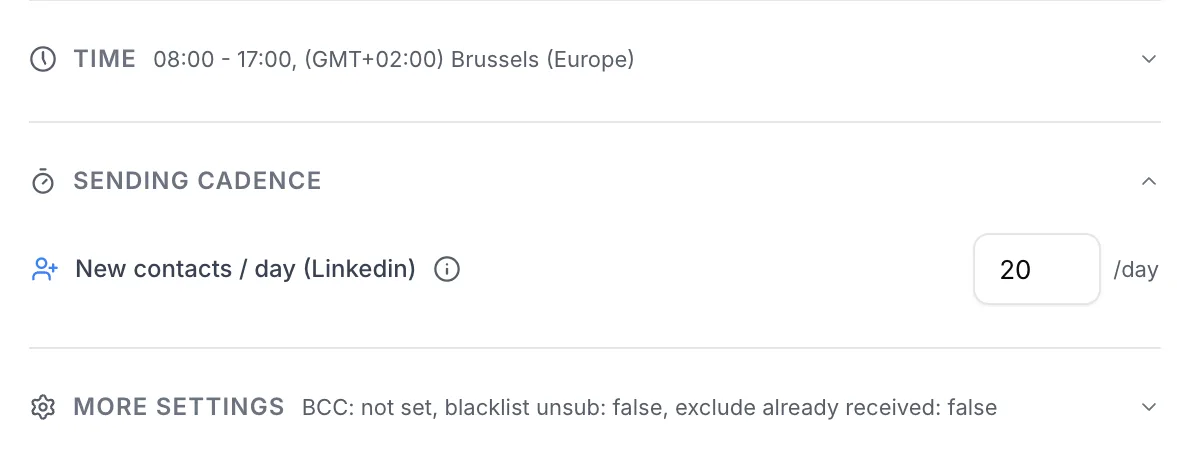 123
123- 1Time: the hours and Active days over which actions are spread.
- 2New contacts / day (Linkedin): this campaign's daily cap.
- 3The number to enter: 20 by default.
Actions do not all go out at once: Emelia spreads them across your Time window, leaving several minutes between two actions from the same account, often ten or fifteen. In practice, a delay of 0, 1 or 5 minutes between two LinkedIn steps will not be honoured to the letter.
The cap applies per LinkedIn account connected to the campaign: if a campaign uses two accounts, each one can bring in its own 20 new contacts a day.
What the interface tells you depending on the number
| What you enter | What Emelia does |
|---|---|
| Up to 20 | Nothing to report: this is the recommended range for a free account. |
| 21 to 40, with a connection request in the sequence | A warning: “20 to 40 invitations, only if you have LinkedIn Premium”. |
| More than 40, with a connection request | Refused when saving: “You cannot add more than 40 LinkedIn contacts per day when your sequence contains a connection request.” |
| 41 to 80, with no connection request | Accepted: “Up to 80 actions allowed: your sequence contains no connection request.” |
| More than 80 | Refused: “Not possible for security reasons”. |
Several campaigns on the same account: the caps add up
This is the most common mistake, and it triggers no alert. The cap of 40 is checked campaign by campaign, not at account level. Three campaigns set to 20 on the same LinkedIn account will send up to 60 connection requests a day, and Emelia will not stop you.
Before launching one more campaign on an account that is already busy, add up the New contacts / day (Linkedin) of every active campaign using it. The total should stay within the account's limits: 20 without Premium, 30 to 40 with it. The simplest approach: one or two campaigns per account, with the cadence split between them.
When LinkedIn says stop
When an account hits LinkedIn's ceiling, its connection requests are refused with a temporary limit error, which you will sometimes see as “temporary provider limit” or “cannot_resend_yet”. It is not Emelia blocking you, and support cannot lift it.
Emelia reacts on its own: it suspends that account's connection requests for 24 hours, then reschedules them, spread over the following days. Messages, visits and other actions keep running in the meantime. The campaign is not stuck for good, it slows down. To help it get going again:
- Notes on a free account: remove the note.
- Contacts already invited or already connected: take them out of the list.
- Too much volume: lower the cadence, and add up all your campaigns on that account.
A LinkedIn window that explicitly mentions automation tools is a real warning. Pause everything for a few days, make sure no other tool is running on the account, turn on two-step verification, then restart gently, around 10 to 12 connection requests a day. A plain “new sign-in” email right after you plugged in the account, on the other hand, is normal.
Running a second tool on the same account multiplies the automation signals, and adds up the volumes without either tool knowing. It is the surest way to trigger a warning.
Disconnections come with the territory
Being asked to reconnect every three to six weeks is normal: LinkedIn sessions expire, as they do everywhere. Much more often than that, there is a cause to find.
Frequently asked questions
The questions we get asked on this topic, answered briefly.
How many LinkedIn connection requests can you send per day?
On a free account, stay around 20 a day. With Premium or Sales Navigator, 40 at most, and we advise staying around 30. LinkedIn does not publish its thresholds and adjusts them per account: these are safe benchmarks, not a guarantee.
Is there a weekly limit on connection requests?
LinkedIn has a real threshold, which it does not publish. Emelia only enforces a daily cap, on the campaign's active days: 40 a day over five business days gives 200 a week at most. If you turn on weekends, the same cap applies over seven days, so 280.
Do two campaigns on the same account share one quota?
No, they add up. Each campaign has its own cap: two campaigns at 20 on the same account send up to 40 connection requests a day. Add them up before launching another one.
Why were 17 requests sent instead of 20?
That is deliberate: Emelia adds a little randomness so the pace is not perfectly regular. If the gap is much bigger, look at the other causes: contacts already connected (the request is skipped), a LinkedIn limit error, or a disconnected account.
What does the “temporary provider limit” error mean?
LinkedIn is temporarily refusing your connection requests: too much volume, notes on a free account, or contacts already invited. Emelia suspends the account's requests for 24 hours, then resumes them gradually. Remove the note and the contacts already invited, and lower the cadence.
Do you need Premium or Sales Navigator for LinkedIn outreach?
No. A free account is enough to visit, invite and write to your connections. Premium or Sales Navigator raise the connection request ceiling, make connection notes usable and come with InMail credits. Sales Navigator is, however, required to export lists of prospects.