Connecting your LinkedIn account to an outreach tool
Three methods, and the choice boils down to two questions: is the account yours, and are you on Google Chrome? If in doubt, use email and password: it is the most stable connection.
Step 1: open the connection window
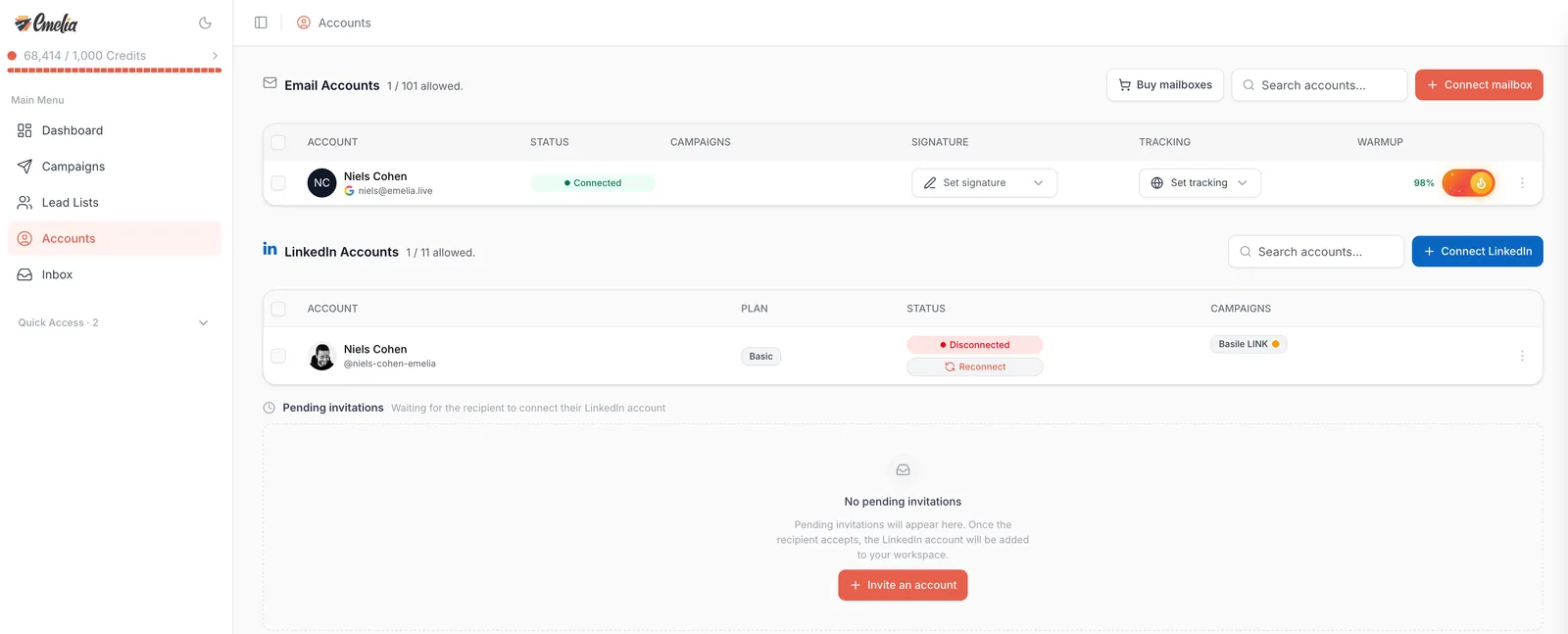
In the left-hand menu, go to Accounts. The LinkedIn Accounts block sits below the mailboxes: click Connect LinkedIn, on the right. The counter next to the title, for example “1 / 3 allowed.”, shows how many accounts your plan lets you connect.
 12
12- 1Open Accounts in the left-hand menu.
- 2Click Connect LinkedIn, in the LinkedIn block and not the email one.
Step 2: choose a method
The Connect LinkedIn Account window offers three routes. The right one depends on who owns the account, and on the browser you use.
Which one to pick
| Method | When to use it | What you need |
|---|---|---|
| With email and password | Your own account, on any browser. This is what we recommend. | Your LinkedIn credentials, and your phone if LinkedIn asks for a code. |
| With the extension | Your own account, on Google Chrome, with LinkedIn already open. | The extension installed, and an active LinkedIn session in the same Chrome. |
| With email invitation | A client's, a colleague's or an executive's account. | Their email address: they get a link and sign in themselves. |
The extension copies your browser's session cookie. That cookie can drop or expire, and it is the number one cause of repeated disconnections we see in support. With your credentials, the session no longer depends on your browser and lasts better over time.
With email and password, step by step
Click With email and password. Enter the account's LinkedIn email and LinkedIn password, then click Connect. Keep the window open for the few seconds the connection takes.
LinkedIn may then ask you to prove it is really you. Two cases: a security code sent by email or text message, to type in before clicking Verify; or a notification on your phone, to approve in the LinkedIn app. In that second case there is nothing to type: Emelia picks up the approval on its own. The account then shows up in the list with the Connected status.
As the window says, your credentials are encrypted and only used to establish the LinkedIn session. They are not displayed anywhere in the interface.
Then your LinkedIn account has no password, and the connection fails with an invalid credentials message. Set a password in LinkedIn first (Settings, then Sign in & security), then come back.
If the connection fails
The message on screen almost always tells you what to do. The most common ones:
| Message | What to do |
|---|---|
| Invalid credentials | Check the address: it is the one you use to sign in to LinkedIn, not necessarily your work email. Account created with Google or Apple: set a LinkedIn password first. |
| LinkedIn is temporarily refusing new connections | Your credentials are not the problem. Wait a few minutes, then try again. |
| Too many connection attempts | Wait an hour before trying again, so LinkedIn does not block the account. |
| Security check (captcha) | It cannot be completed from Emelia. Try again later, or connect the account with the Chrome extension. |
| LinkedIn asks you to add a phone number | Add one on linkedin.com, then start the connection again. |
| Code not accepted, or verification timed out | Start the connection again to get a new code, and enter it straight away. |
If you have several accounts to connect
With email and password, or by invitation, nothing special: connect the accounts one after the other.
With the extension, this is where people lose an evening. The connection relies on the session open in your browser: chaining “I sign in to account A, plug it in, sign out, sign in to account B” breaks the first one with every new account. Either you keep one Chrome profile per LinkedIn account, or you use credentials, which do not depend on your browser.
Once the account is connected
The account appears under LinkedIn Accounts, with its type in the Plan column (Basic, Premium, Sales Navigator or Recruiter) and the Connected status. All that is left is to pick it in the Connected accounts block of your campaign settings.
LinkedIn may send you a “new sign-in” alert: that is normal when a session opens from a new place, it is not a warning. Campaigns run from our servers: you can close the browser and shut down your computer.
Frequently asked questions
The questions we get asked on this topic, answered briefly.
How many LinkedIn accounts can I connect?
It depends on your plan, and the “X / Y allowed.” counter at the top of the LinkedIn Accounts block tells you. On current plans: 1 account on Start, 3 on Grow, 10 on Scale. An older subscription may include more: the counter is what counts.
Can I connect the same LinkedIn account to two Emelia workspaces?
No. For security reasons, a LinkedIn account can only be plugged into one Emelia account. If you have a special case, write to support.
Do I need Premium or Sales Navigator?
Not for outreach: a free account works. Premium or Sales Navigator raise the connection request limits and come with InMail credits, and Sales Navigator is required to export lists of prospects. The account type shows in the Plan column.
Can I change the LinkedIn account of a running campaign?
Not while it runs. Pause it or end it first, then change the account in the Connected accounts block of the campaign settings.
LinkedIn sent me a sign-in alert, is that serious?
No. LinkedIn sends one for every new session opened from an unusual place. A real warning is a window that explicitly mentions automation tools: in that case, see the LinkedIn limits.
Do I have to leave my computer on?
No. Once the account is connected, sequences run from our servers. You can close the browser and shut the machine down.