Back to hub
Emelia tutorials

Using variables

Niels
Niels Co-founder
Published on Mar 1, 2022

Using variables is of course the foundation for driving conversion. It's not just about adding a "Hi {firstname}", even though obviously everyone sees things their own way, and depending on what you sell, who your target is, the time you have for your cold mailing and your goals, some keep things very simple in their prospecting copywriting and lean a bit more on volume to make up for it. No problem with that!

That said, the more you personalize your emails, the more you increase your reply rates. The goal in cold mailing is to do everything you can so your prospect believes the email was written specifically for them.

Adding variables in Emelia

Selecting your variables when importing the CSV and matching your columns

Once you have selected the file to import, you will see the screen below.
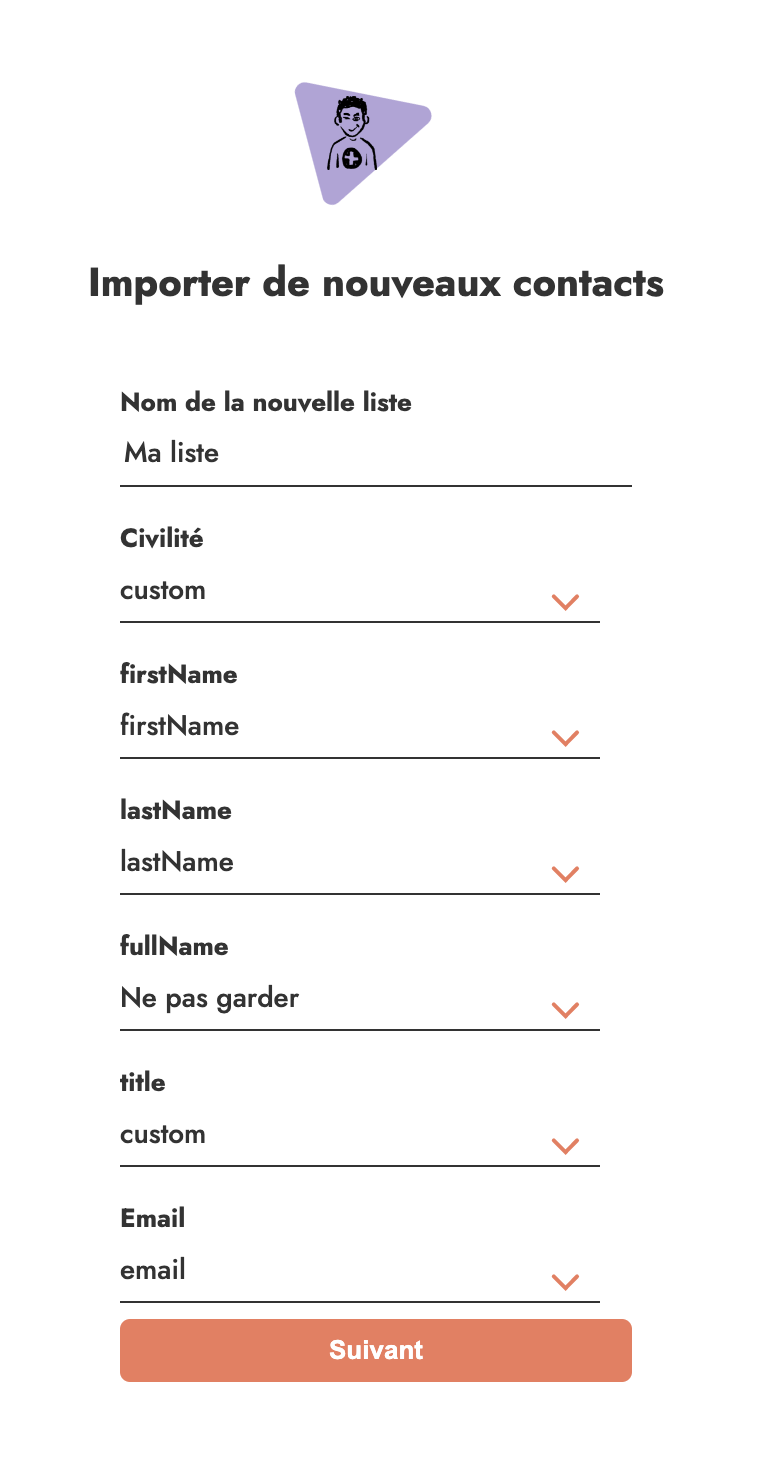
Capture d'écran de l'import de contact dans Emelia

3 options:

  • The first name, last name and email variables match automatically with FirstName, lastName and email.

  • The specific variables you want to use, you select them as "custom".

  • Otherwise, if you have data you don't need, feel free to leave it as "Do not keep" to avoid loading data for nothing.

Adding your variables to your email

Once the import is done, all you have to do is edit your email and use the "add variable" button to pick the variable you want and place it wherever you'd like.
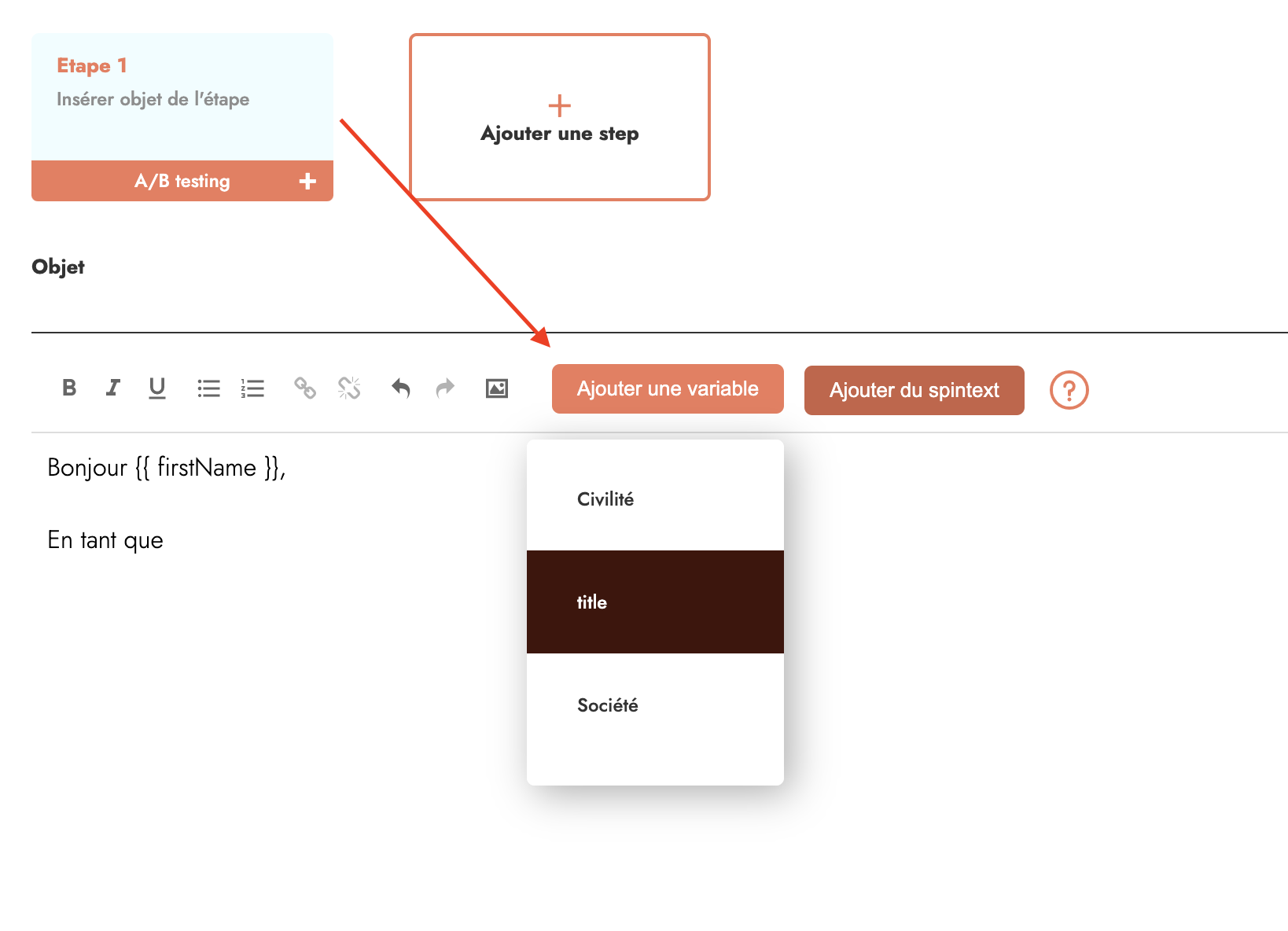
Ajouter variable dans votre cld-mail emelia

AND YES, YOU CAN THEN COPY-PASTE THE VARIABLE INTO YOUR SUBJECT LINE AND IT WORKS!

logo emelia

Discover Emelia, your all-in-one prospecting tool.

logo emelia

Clear, transparent prices without hidden fees

No commitment, prices to help you increase your prospecting.

Start

€37

/month

Unlimited email sending

Connect 1 LinkedIn Accounts

Unlimited LinkedIn Actions

Email Warmup Included

Unlimited Scraping

Unlimited contacts

Grow

Best seller
arrow-right
€97

/month

Unlimited email sending

Up to 5 LinkedIn Accounts

Unlimited LinkedIn Actions

Unlimited Warmup

Unlimited contacts

1 CRM Integration

Scale

€297

/month

Unlimited email sending

Up to 20 LinkedIn Accounts

Unlimited LinkedIn Actions

Unlimited Warmup

Unlimited contacts

Multi CRM Integrations

Unlimited API Calls

Credits(optional)

You don't need credits if you just want to send emails or do actions on LinkedIn

May use it for :

Find Emails

AI Action

Phone Finder

Verify Emails

1,000
5,000
10,000
50,000
100,000
1,000 Emails found
1,000 AI Actions
20 Number
4,000 Verify
19per month

Discover other articles that might interest you !

See all articles
B2B Prospecting
Published on Jun 1, 2025

What is Emelia?Discover a French B2B prospecting Tool

NielsNiels Co-founder
Read more
B2B Prospecting
Published on Jun 24, 2025

How to use spinText in your cold-mailing campaign

NielsNiels Co-founder
Read more
Software
Published on Feb 1, 2024

LinkedIn Sales Navigator Scraper

NielsNiels Co-founder
Read more
MathieuMathieu Co-founder
Read more
Tips and training
Published on May 18, 2025

LinkedIn URL in a Flash: Quick Guide to Your Profile

NielsNiels Co-founder
Read more
Tips and training
Published on Jun 9, 2025

Top 7 Live Chat Apps 2026: Support and B2B Conversion

MathieuMathieu Co-founder
Read more
Made with ❤ for Growth Marketers by Growth Marketers
Copyright © 2026 Emelia All Rights Reserved