PhantomBuster Pricing 2026: The Real Cost Per Execution Hour
PhantomBuster publishes its prices in the open, which already puts it ahead of most of this market: $69, $159 or $439 per month, with 20% off on annual billing. That is not where the trouble starts. It starts with the billing unit, which is not a seat, not a contact and not a message sent, but execution time. You are not buying software, you are buying machine hours, and nobody knows how many hours they burn until they have already started burning them.
This article gives you the complete pricing grid as recorded in August 2026, then the single number that lets you compare PhantomBuster with anything else on this market: the real cost of one execution hour. From there we cover the three independent caps that can freeze your month, what actually happens when you run out, what the full stack costs once you bolt on the missing pieces, and which alternatives are worth their price.
One piece of framing before the numbers. PhantomBuster is an extraction and automation tool: it runs scripts, called Phantoms, on LinkedIn, Sales Navigator, Google Maps, Instagram or X, and hands you back a file. It does not send sequences, it does not warm up a sending inbox and it has no database of its own. Emelia, which we compare it to further down, is an execution platform: it scrapes Sales Navigator, finds and verifies addresses, warms up inboxes and runs cold email and LinkedIn sequences. The overlap between the two products stops at data extraction. That is the only place where a price comparison means anything.
How much does PhantomBuster cost in 2026? The official grid
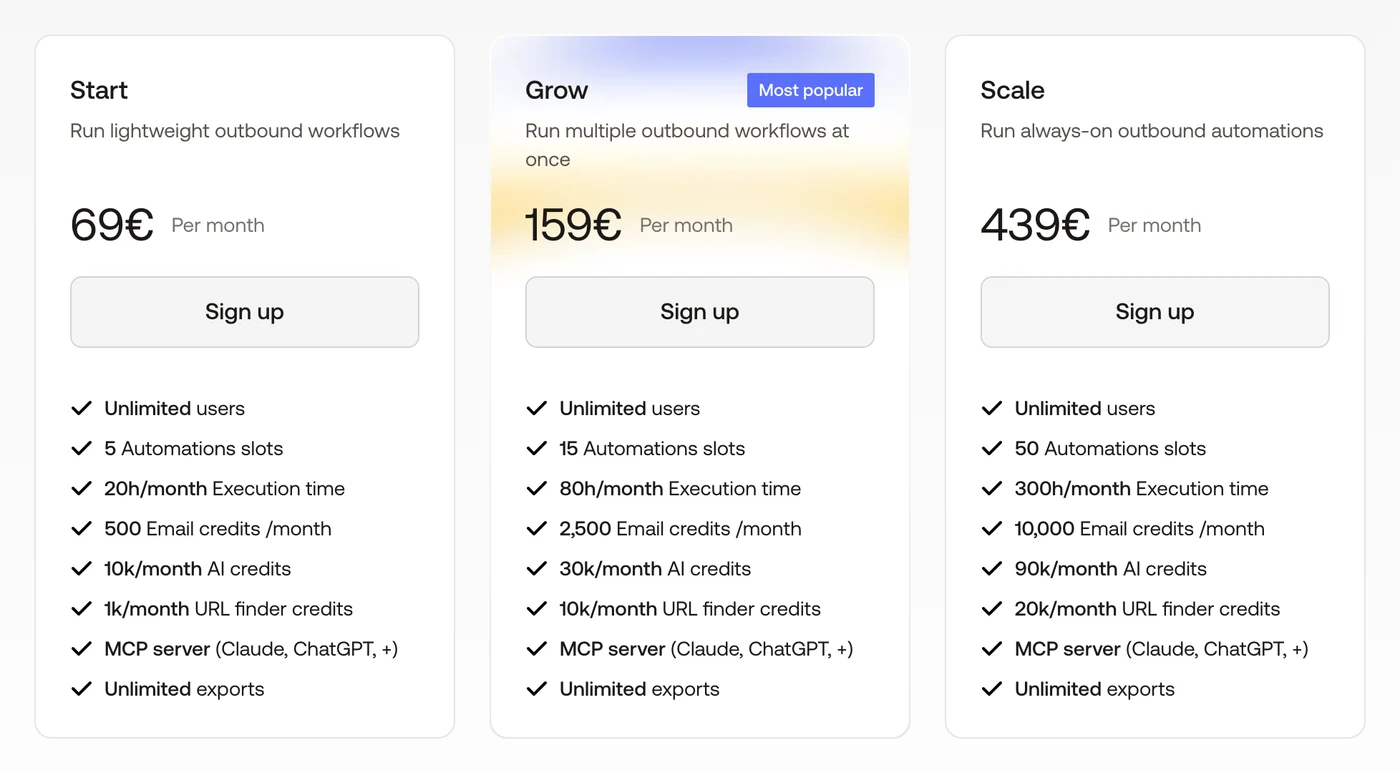
Here are the amounts exactly as they appear on the pricing page, recorded in August 2026. Prices show in euros from France, and at the same nominal figure in dollars elsewhere. The credit allowances come from the vendor's own documentation.
Plan | Monthly price | Annual, per month | Execution time | Slots | AI credits | Email credits |
|---|---|---|---|---|---|---|
Trial, 14 days | $0 | - | 2 hrs total | 5 | 1,000 total | 50 total |
Free, after the trial | $0 | - | 30 min per month | 1 | None | None |
Start, formerly Starter | $69 | $56 | 20 hrs per month | 5 | 10,000 per month | 500 per month |
Grow, formerly Pro | $159 | $128 | 80 hrs per month | 15 | 30,000 per month | 2,500 per month |
Scale, formerly Team | $439 | $352 | 300 hrs per month | 50 | 90,000 per month | 10,000 per month |
Three things jump out before we go deeper. The grid is public and readable, which is rarer than it should be in this category. The spread between tiers is enormous, a factor of six from entry level to top end. And most importantly, every single row carries three separate caps that have nothing to do with each other: hours, slots and credits. That triple constraint is what makes the budget hard to predict, far more than the headline price.
Scrape Sales Navigator without an hour counter
Emelia bundles the LinkedIn scraper, the email finder and the sending in one subscription, from $37/month.
What the 14-day free trial actually gets you
The trial runs for fourteen days, asks for no credit card and unlocks every feature, including the ones normally reserved for higher tiers. You get 2 hours of execution time in total, 5 slots, 1,000 AI credits, 50 email credits and 100 URL Finder credits.
None of those is the limit that matters, though. During the trial, exports are capped at ten rows per file. You can test the mechanics and confirm that a Phantom runs end to end, but you will not walk away with a usable list. It is a technical validation trial, not a production trial, and you need to treat it that way if you do not want to waste the two hours you were given.
The free plan after the trial: 30 minutes per month
This is the least known line in the grid, and the one that surprises people most. When the fourteen days are up, the account drops automatically onto a free plan that costs nothing but is not really usable either: 30 minutes of execution per month, a single slot, 50 MB of storage, no email or AI credits at all, and the ten-row export cap still in force.
Thirty minutes a month buys you one or two runs of a lightweight Phantom. Your automations and your data stay accessible, which is genuinely useful, but the free plan exists to keep an account alive, not to get work done. Do not count it as an option for real prospecting, not even occasional prospecting.
Start, formerly Starter, at $69 per month: 20 hours and 5 slots
The first paid tier is $69 per month, or $56 per month on annual billing. It gives you 20 hours of execution per month, 5 slots for your Phantoms, 10,000 AI credits, 500 email credits, 1,000 URL Finder credits, 1,000 captcha-solving credits, 1 GB of storage and, above all, unlimited exports, which is the real difference with the trial.
This plan targets a freelancer or a solo growth operator. It holds up as long as you fire off a handful of extractions per week on reasonable volumes. It gets tight the moment you automate daily LinkedIn actions, because that type of Phantom runs continuously rather than in bursts.
Grow, formerly Pro, at $159 per month: the reference plan
The middle tier costs $159 per month, or $128 on annual billing. It multiplies execution time by four with 80 hours per month, triples the slots with 15 of them, and climbs to 30,000 AI credits, 2,500 email credits, 10,000 URL Finder credits, 5,000 captchas and 10 GB of storage. Priority support comes with it.
This is the plan PhantomBuster pushes and the one where most serious users end up. It is also the one with the best hours-per-euro ratio once you break it down to the unit, as we will see below.
Scale, formerly Team, at $439 per month: volume
The top tier is $439 per month, or $352 on annual billing. It gives you 300 hours of execution, 50 slots, 90,000 AI credits, 10,000 email credits, 20,000 URL Finder credits, 30,000 captchas and 50 GB of storage, plus a dedicated consultant.
The step up is brutal: the price is multiplied by 2.8 versus Grow for an hour allowance multiplied by 3.75. The math looks favourable on paper, but it assumes you genuinely consume 300 hours a month, which means ten hours of machine time every single day. Few teams get there without running continuous LinkedIn automations across several accounts.
The 20% annual discount
PhantomBuster applies a 20% discount on annual commitments, which brings Start down to $56, Grow to $128 and Scale to $352 per month. That is a middle-of-the-road discount for this market, clearly less aggressive than the 50% some European competitors put on the table.
The arithmetic is easy: committing for a year saves you $156 on Start, $372 on Grow and $1,044 on Scale, provided you are certain you will stay twelve months. On a tool whose consumption is hard to forecast before you begin, running month to month for one or two cycles remains the prudent call.
Start, Grow, Scale: the plans were renamed
One detail worth knowing before you compare quotes or read other articles, because it causes a lot of confusion. PhantomBuster renamed its plans in 2026: Starter became Start, Pro became Grow and Team became Scale. Prices and allowances did not change during the rename, only the labels moved.
Former name | Current name | Monthly price | Execution time |
|---|---|---|---|
Starter | Start | $69 | 20 hrs per month |
Pro | Grow | $159 | 80 hrs per month |
Team | Scale | $439 | 300 hrs per month |
The vast majority of comparison articles still floating around use the old naming, as do any screenshots of the pricing page taken before 2026. If a piece of content talks to you about Starter, Pro and Team, it is not wrong about the amounts, it is simply using the previous labels. For the rest of this article we use the current names.
Execution time: the real billing unit
This is the heart of the matter. With most prospecting tools you pay for a seat, a revealed contact or an email sent. With PhantomBuster you pay for the time a machine spends working on your behalf. A Phantom that takes twenty minutes to extract a thousand profiles eats twenty minutes of your quota, whether it brings back a thousand rows or none at all.
That unit has a direct consequence that is routinely misunderstood: your bill does not depend on the volume of data you obtain, it depends on how slow the sites you query happen to be. A Sales Navigator scrape over a sluggish connection, a page that loads badly, a profile that takes its time responding, and the meter keeps running without the result getting any better.
What one execution hour really costs
This is the only metric that lets you compare the three plans against each other, and PhantomBuster against the rest of the market. The calculation is straightforward: plan price divided by hours included.
Plan | Hourly cost, monthly | Hourly cost, annual | Hours included | Daily equivalent |
|---|---|---|---|---|
Start | $3.45 | $2.80 | 20 hrs per month | about 40 minutes |
Grow | $1.99 | $1.60 | 80 hrs per month | about 2 hrs 40 min |
Scale | $1.46 | $1.17 | 300 hrs per month | about 10 hours |
The reading is unambiguous. An execution hour costs two and a half times more on Start than on Scale. In other words, the entry plan is by far the worst value per unit, which is a classic pricing mechanic but rarely this pronounced. If you know you will burn more than 35 hours a month, Grow becomes cheaper in absolute terms than Start plus overage, except that PhantomBuster has no overage at all, which brings us to the next point.
20 hours a month is 40 minutes a day
Converting the allowances to a daily basis changes how the whole grid reads. Twenty hours a month is roughly forty minutes a day. Eighty hours is two hours forty. Three hundred hours is ten hours, which means a machine working almost a full business day, every day.
Forty minutes a day is enough for a few targeted extractions. It is not enough to run a profile-visiting automation, an invitation campaign and a list extraction in parallel. That gap between what the entry plan suggests and what it actually delivers is the main source of disappointment, and the number one reason people get pushed onto the next tier.
No execution hours to keep an eye on
Unlimited sending, unlimited scraping and warmup included from $37/month. Your quota never runs out mid-month.
The three caps that can freeze your month
The subtlety of this model is that the caps do not compensate for each other. You have three of them, they are independent, and the first one you hit stops everything.
Slots limit how many Phantoms and workflows you can have installed at once, 5, 15 or 50 depending on the plan. This is not a usage cap but an installation cap: beyond it, you have to uninstall something to install something else.
Execution time limits the machine's actual work, 20, 80 or 300 hours per month. This is the cap that breaks first for most active users.
Credits limit the side functions, with separate counters for AI, email discovery, URL Finder and captcha solving.
The most frustrating scenario is a team that still has free slots and thousands of unspent email credits, but not a single minute of execution left. Credits do not buy hours, and hours do not buy credits. Every counter lives its own life, and one of them is enough to lock the account down.
What happens when you run out
This is the question that determines whether your budget is genuinely predictable, and the answer is blunt: when the hour allowance is exhausted, active automations stop. There is no on-demand top-up of hours, no billed overage, no one-off recharge option. The only way out is to upgrade to the next plan, immediately and for the full month.
That creates a staircase rather than a gentle slope. With a tool that bills for overage, consuming 10% more costs 10% more. Here, consuming one hour more than the twenty included takes your bill from $69 to $159, a 130% increase for a single extra hour.
Second rule to know: credits do not roll over from one month to the next. A team with seasonal activity, quiet months and peaks, therefore pays twice. It wastes its allowance in the slow months and gets blocked in the busy ones, with no way to smooth the curve. This is the criticism users raise most consistently, and it is structural rather than anecdotal.
Email, AI, URL Finder and captcha credits
Beyond the hours, PhantomBuster runs four side counters you need to understand before sizing your plan.
Email credits fund professional address discovery, at 500, 2,500 or 10,000 per month. Measured against the plan price, that puts a discovered address at around $0.14 on Start, $0.06 on Grow and $0.04 on Scale, which is decent but still above what tools specialised purely in address discovery charge.
AI credits, from 10,000 to 90,000 per month, power the enrichment and assisted generation features. URL Finder credits, from 1,000 to 20,000, are used to recover LinkedIn profile URLs from a name and a company. Captcha credits, from 1,000 to 30,000, pay for automatically solving the blocks your Phantoms run into.
That last point deserves emphasis because it says a lot about the nature of the product: a captcha-solving budget is built into the pricing. That means blocks are part of normal operation, which is consistent with how session-cookie automation works, and it should feed into your assessment of the risk.
What PhantomBuster delivers for the price
It would be unfair to reduce the tool to its billing mechanics, because what it does, it does well and often without competition.
A library of several dozen ready-made Phantoms covering LinkedIn and Sales Navigator, but also Google Maps, Instagram, X, Slack and company pages, which makes it a Swiss army knife where most competitors stop at LinkedIn.
Workflows that chain several Phantoms together automatically, with triggers and data passed from one step to the next.
Cloud execution, so no machine left running on your desk, plus fine-grained scheduling of every launch.
Full API access on every paid plan, so extractions can feed an existing system, along with native connections to automation tools.
Built-in professional address discovery and AI enrichment, so no third-party tool is needed for the discovery layer.
An active community and thorough documentation, which counts for a lot on a product where configuration takes real time.
That multi-platform versatility is what justifies the positioning. No other mainstream tool covers this many sources with this many maintained scripts. If your need extends beyond LinkedIn, PhantomBuster has very few equivalents.
The limits to know before you pay
The exercise would be incomplete without an honest list of the weak spots.
There is no native cold email. PhantomBuster extracts and enriches, then hands you a file. Sending the sequences, handling replies and protecting deliverability all happen elsewhere, with a tool you have to buy on top.
There is no inbox warmup, which is logical since there is no sending, but it weighs on the total budget calculation.
There is no phone number lookup, even though that has become standard among competitors positioned on data.
There is no B2B database. You are not buying a catalogue of contacts, you are buying the ability to go and get them yourself, which assumes you already know where to look.
The learning curve is real. Assembling Phantoms, managing session cookies, tuning the pacing and debugging failed runs all take time and a minimum of technical appetite.
Finally, the account restriction risk exists. PhantomBuster works from a session cookie on cloud infrastructure, a pattern LinkedIn detects. Users regularly report account limitations, and the captcha budget baked into the product confirms that the issue is structural.
What the complete stack really costs
The price of PhantomBuster is not the price of your outbound, because the tool covers only one link in the chain. Here is what you need to add to get a campaign that actually runs, with the ranges observed on the market.
Component | PhantomBuster | Cost to add |
|---|---|---|
Extraction and enrichment | Included | - |
Cold email sequencer | No | $30 to $100 per month |
Inbox warmup | No | included in some sequencers, otherwise $15 to $40 |
Address verification | Partial | $15 to $25 per month |
Phone number lookup | No | per credit, depending on the provider |
Automation between tools | Not native | $20 to $50 per month for Zapier or Make |
B2B database | No | depending on the provider |
The result changes the comparison entirely. A $69 Start easily becomes $130 to $180 per month once you add the sequencer, the verification and the connector. A $159 Grow goes past $250. This is not a criticism of PhantomBuster, which never claimed to be a full suite, but it is the number you have to put next to integrated platforms when you compare.
Who PhantomBuster pays off for, and who it does not
PhantomBuster is excellent in one specific case: a growth or ops profile, technically comfortable, who needs to extract data from several different sources and already owns the rest of the stack. If you scrape Google Maps on Monday, Sales Navigator on Tuesday and Instagram on Wednesday, no LinkedIn-only tool will do the same job for you, and the price justifies itself without argument.
It becomes questionable in the most common case: a sales rep or a founder who wants to find prospects and write to them. There you pay for a versatile extraction engine of which you will use a single script, you discover that sending is not included, and you add a second subscription to do the thing you thought you had already bought.
The middle case is a team automating LinkedIn continuously. That profile gets caught out by hourly billing more than any other, because action automations run in the background and eat machine time far faster than one-off extractions. A team like that lands on Grow within weeks, sometimes on Scale.
What PhantomBuster genuinely replaces, and what it does not
Before comparing prices, you have to be honest about what you are comparing, because most comparison pieces line up tools that do fundamentally different jobs. PhantomBuster does three distinct things, and no single competitor covers all three the same way.
The first is multi-source extraction: LinkedIn and Sales Navigator, but also Google Maps, Instagram, X or Slack, through a library of maintained scripts. This is where it is hardest to replace, because almost every competitor stops at LinkedIn.
The second is LinkedIn action automation: profile visits, invitations, messages. On that specific ground it competes head-on with dedicated tools that do the same thing more simply and on a fixed budget.
The third is enrichment: address discovery, URL Finder, AI processing. This is the most commoditised layer on the market, and the one where the price gap with specialised tools is widest.
What it does not do bears repeating, because it is what distorts comparisons most: it does not send, it does not warm up an inbox, it does not look up phone numbers and it has no database whatsoever. A tool selling a contact database is therefore not an alternative to PhantomBuster, it is a different product. Comparing the two makes no sense, and we will not do it here.
Six PhantomBuster alternatives and their prices
Here are six tools, sorted by the layer they genuinely replace, with prices recorded in August 2026. Two of them replace Sales Navigator extraction, two replace LinkedIn action automation, one addresses orchestration at scale and one covers the entire chain. The billing model is stated every time, because that is where these products diverge most. These grids move fast, so check the vendor page before you sign.
Evaboot
Evaboot is the most narrowly focused tool on this list: it does one thing, exporting and cleaning Sales Navigator lists, but it does it per credit and with no seat cap. It is the direct alternative if your use of PhantomBuster comes down to Sales Navigator scraping.
Evaboot pricing
Credit-based billing, starting at around $9 per month for 100 credits
One exported lead or account costs 1 credit, one found email costs 1 credit, so a lead with its email costs 2 credits
Unlimited seats and unlimited Sales Navigator accounts included
Unused credits roll over from one month to the next, which PhantomBuster does not offer
Two months free on annual billing
Wiza
Wiza starts from the same need as Evaboot, extracting and enriching lists from LinkedIn and Sales Navigator, but switches to unlimited reveals as soon as you commit annually. The constraint then shifts to the monthly export quota.
Wiza pricing
Free: $0, 20 valid emails and 5 phone numbers
Starter: $49 per user per month, monthly billing only, 100 emails and 100 numbers per month
Email: $99 per user per month, or $990 per year with unlimited email reveals and 2,500 exports per month
Email + Phone: $199 per user per month, or $1,990 per year with unlimited emails and numbers
Team: custom quote, from three users, annual billing only
Waalaxy
Waalaxy is the best known French alternative, and the exact counter-model to PhantomBuster on billing: you pay per user per month, with quotas for LinkedIn invitations and credits, and you never count an hour. That is far more predictable, but the scope stops at LinkedIn and email, without the multi-source versatility.
Waalaxy pricing
Freemium: $0, 80 LinkedIn invitations per month
Pro: $19 per user per month, 300 invitations, 25 email finder credits
Advanced: $49 per user per month, 800 invitations, API access and integrations, still 25 email finder credits
Business: $69 per user per month, the first plan to unlock cold email and multichannel, 500 email finder credits
Inbox add-on: around $20 per user per month, essential for handling replies
Discounts of 20% quarterly and up to 50% annually
Expandi
Expandi is the LinkedIn automation tool positioned on account safety: a dedicated IP address per country, gradual ramp-up and human-like pacing. It bills per LinkedIn account, with no hour counter.
Expandi pricing
Business: $99 per month per LinkedIn account
7-day free trial
Two months free on annual billing
Agency: custom quote, from ten seats, with white labelling
Unlimited campaigns on every plan
Captain Data
Captain Data was historically the closest competitor to PhantomBuster on large-scale extraction automation. The product has repositioned itself around data and intent-signal APIs for technical teams, which makes it much less relevant for classic prospecting but very relevant if you want to pipe data into a product.
Captain Data pricing
POC: $99 per month, 2,500 credits per month, 25 identities included
Launch: $399 per month on annual billing, 10,000 credits per month, 100 identities
Enterprise: custom quote, from $30,000 per year, 250,000 credits per month and unlimited identities
Billing per credit and per identity, with no execution time counter
La Growth Machine
La Growth Machine plays on different ground: orchestrated multichannel, with LinkedIn, email, calls and X inside a single sequence. Billing is per identity, meaning per sending persona, which is an unusual unit but a readable one.
La Growth Machine pricing
Basic: $70 per identity per month, LinkedIn and email, unlimited enrichment, 3 team members
Pro: $135 per identity per month, adds calls, LinkedIn intent signals and up to 6 active campaigns
Ultimate: $195 per identity per month, adds X, unlimited campaigns, Hubspot and Pipedrive sync
Agency: custom quote, from six identities
Two months free on annual billing
Billing units compared
Tool | Paid entry point | Billing unit | What it replaces in PhantomBuster |
|---|---|---|---|
PhantomBuster | $69 per month | Execution time, slots and credits | - |
Evaboot | around $9 per month | Credit, with rollover | Sales Navigator extraction only |
Wiza | $49 per user per month | User and exports | LinkedIn extraction and enrichment |
Waalaxy | $19 per user per month | User and action quotas | LinkedIn action automation |
Expandi | $99 per account per month | LinkedIn account | LinkedIn action automation |
Captain Data | $99 per month | Credit and identity | Multi-source orchestration at scale |
La Growth Machine | $60 per identity per month | Sending identity | LinkedIn automation and enrichment |
Emelia | $37 per month | Account, unlimited sending | LinkedIn extraction, automation and enrichment |
Two lessons come out of that table. The first is that PhantomBuster is the only tool in the panel billing machine time. Every other one bills a unit you control directly, a user, an identity, an account or a credit, whereas here the unit depends on how fast the sites you query respond, a variable entirely outside your hands.
The second matters more for your decision: not one line in that table replaces PhantomBuster in full. Each covers a portion of it, often better and cheaper, but never all of it. That is exactly why the question is not which substitute is best, but which of the three layers you genuinely use. If you use only one, a dedicated tool will be cheaper and simpler. If you use all three across multiple sources, PhantomBuster has no equivalent.
PhantomBuster or Emelia: what actually compares
Let us be clear from the start: Emelia is not a multi-source tool and will not replace PhantomBuster if you scrape Google Maps, Instagram or X. The shared scope covers two of the three layers described above, extraction from LinkedIn and Sales Navigator plus LinkedIn action automation, along with part of the enrichment. It excludes the other sources entirely. That scope, and only that scope, is where the comparison holds.
Within it, the two approaches are opposites. PhantomBuster sells you machine time that you spread across whichever scripts you choose. Emelia sells you Sales Navigator scraping with no counter, capable of going past the 2,500-result limit LinkedIn imposes, then everything PhantomBuster does not do: address verification, phone number lookup, email warmup, uncapped cold email sending and LinkedIn automation inside the same interface.
Emelia goes past the 2,500 result cap Sales Navigator imposes, as this walkthrough shows.
Emelia pricing
Emelia publishes a three-tier grid at $37, $97 and $297 per month, with no commitment and two months free on annual billing. The tiers differ by the number of connected sending inboxes and the number of LinkedIn accounts. Email sending is unlimited across the whole range, scraping is unlimited from the first tier, warmup is active from $37, and contacts are never capped. These tiers describe sending capacity, not headcount: a connected mailbox is not a user, and Emelia does not offer a team mode yet.
Credits are used only for the email finder, phone number lookup, AI actions and email verification. They are optional and can be topped up on demand, starting at $19 per month for 1,000 credits, which is 1,000 emails found, 1,000 AI actions, 20 phone numbers or 4,000 verifications.
Criterion | PhantomBuster | Emelia |
|---|---|---|
Billing unit | Execution time, slots and credits | Account, no hour counter |
Entry point | $69 per month, no commitment | $37 per month, no commitment |
Sales Navigator scraping | Included, consumes hours | Unlimited, goes past 2,500 results |
Sources covered | LinkedIn, Sales Navigator, Google Maps, Instagram, X and others | LinkedIn and Sales Navigator |
Cold email | Not offered | Included, unlimited sending |
Inbox warmup | Not offered | Included on every inbox |
LinkedIn automation | Yes, through Phantoms, consumes hours | Included, native sequences, no counter |
Phone number lookup | Not offered | Dedicated credits |
Address discovery | Included, 500 to 10,000 credits per month | Included, per credit |
Address verification | Not offered | Included, per credit |
Quota rollover | No | Credits topped up on demand |
Support | English, community-driven | Chat in French, team based in France |
PhantomBuster wins on source versatility and on the depth of its technical automation. Emelia wins on budget predictability and on covering the whole chain. If your bottleneck is extracting data from six different platforms, no $37 tool will solve it. If your bottleneck is finding LinkedIn prospects and then writing to them properly, buying machine hours and then buying a sequencer on top is an expensive detour.
The all-in-one alternative to PhantomBuster
Sales Navigator scraping past the 2,500 result cap, email finder, phone finder and sequences, from $37/month.
How to cut your PhantomBuster bill
If PhantomBuster is still the right tool for you, here are the levers that genuinely reduce consumption, ranked by impact.
Watch how long each Phantom takes, not how many you run. The dashboard shows the time consumed per execution. A single badly configured script, one that waits too long between actions or retries endlessly on unreachable profiles, can swallow half your monthly allowance without you noticing.
Lower the frequency rather than the volume. A Phantom launched every hour consumes far more than a Phantom launched twice a day on an equivalent volume, because every launch carries an unavoidable startup cost.
Clean your lists upstream. Every invalid or duplicate row burns machine time to produce nothing. A few minutes of sorting in a spreadsheet saves hours of billed execution.
Do not buy annual before you have measured two months of real consumption. On this particular product that is the advice that saves the most money, because consumption is impossible to estimate before you start and moving between plans is a staircase, not a slope.
Consider pulling Sales Navigator scraping out of PhantomBuster entirely. It is often the heaviest line in machine time, and it is the one with alternatives available for a few euros, billed per credit or with no limit at all.
Is PhantomBuster worth paying for in 2026?
The answer comes down to a single question: do you need to extract data from several different platforms? If yes, PhantomBuster remains the best product in its category, its script library has no mainstream equivalent, and the listed price is honest for what it covers.
If the answer is no, if your need is LinkedIn and then sending, the math gets hard to defend. You pay for versatility you use a fraction of, you are exposed to a billing unit you do not control, you cannot buy hours when you run dry, your unused credits vanish every month, and you still do not have a sequencer.
The market has also moved in a direction that does this model no favours. Buyers now compare on predictability as much as on headline price, and integrated platforms cover the full chain for the price of a single link. So the real question for the coming months is not whether PhantomBuster is worth its $69, but whether billing machine time still makes sense when every competitor bills something the user can actually control.
Pay for what you use, not for machine hours
Public pricing, free trial, cancel anytime. From $37/month.
Frequently asked questions about PhantomBuster pricing
How much does PhantomBuster cost per month?+
PhantomBuster has three paid plans in 2026: Start at $69 per month, Grow at $159 per month and Scale at $439 per month. Annual billing takes 20% off, which brings them to $56, $128 and $352 per month. Each plan includes a different allowance of execution time: 20 hours on Start, 80 hours on Grow and 300 hours on Scale. Slots and credits differ too, with 5, 15 or 50 slots and 500, 2,500 or 10,000 email credits per month.
Does PhantomBuster have a free plan?+
Yes, but it is barely usable. The 14-day trial requires no credit card and unlocks every feature with 2 hours of execution time, 5 slots, 1,000 AI credits and 50 email credits, though exports are capped at ten rows per file. When the trial ends the account drops to a permanent free plan with 30 minutes of execution per month, one slot, 50 MB of storage and no AI or email credits, and the ten-row export cap stays in force. That is enough to keep an account and its data alive, not to run real prospecting.
How does PhantomBuster execution time work?+
PhantomBuster bills the time its cloud machines spend running your Phantoms, not the number of contacts, rows or messages produced. A Phantom that takes twenty minutes to extract a list consumes twenty minutes of your monthly allowance whether it returns a thousand rows or none. That means the bill depends on how fast the sites you query respond, a variable you do not control. Divided by the hours included, one execution hour costs $3.45 on Start, $1.99 on Grow and $1.46 on Scale, so the entry plan is two and a half times more expensive per hour than the top one.
What happens when you run out of execution hours on PhantomBuster?+
When the hour allowance is exhausted, active automations simply stop. PhantomBuster offers no on-demand top-up, no billed overage and no one-off recharge, so the only way to keep working is to upgrade to the next plan immediately and for the whole month. That turns pricing into a staircase: one hour beyond the twenty included on Start takes the bill from 69 to $159, a 130% jump for a single extra hour. Credits do not roll over either, so a quiet month wastes the allowance rather than banking it for a busy one.
Does PhantomBuster send cold emails?+
No. PhantomBuster extracts and enriches data, then hands you a file, so sending sequences, handling replies and protecting deliverability all happen in a separate tool you have to buy on top. It also has no inbox warmup, no phone number lookup and no B2B database of its own. In practice, a $69 Start plan becomes 130 to $180 per month once you add a sequencer at 30 to $100, address verification at 15 to $25 and a connector at 20 to $50. A $159 Grow plan crosses $250 on the same basis.
What is the best PhantomBuster alternative?+
It depends on which of the three layers you actually use. For Sales Navigator extraction alone, Evaboot starts around 9 dollars per month per credit bundle with rollover, and Wiza runs from 49 dollars per user per month. For LinkedIn action automation, Waalaxy starts at $19 per user per month and Expandi at 99 dollars per LinkedIn account. For the full chain, Emelia starts at $37 per month with unlimited sending, unlimited Sales Navigator scraping past the 2,500-result limit, warmup and LinkedIn automation included, and no hour counter anywhere.