Finding a prospect's work phone number
Emelia finds mobile numbers from your prospects' LinkedIn profile URL. Expect 50 credits per number found, nothing when the search comes back empty, and a success rate around 50% to 60%.
An email and a phone number are two different problems
- An email is a technology problem. Likely address formats, tests against the server, checks: this technology has matured, one good provider is enough.
- A phone number is a database problem. Either the provider has it or it doesn't. No database covers everyone, so Emelia queries several databases one after another until it finds one.
That explains the price gap: a number costs 50 credits, an email address just one.
What you need: the LinkedIn profile URL
The phone search starts only from the LinkedIn profile URL, in its full public form: https://www.linkedin.com/in/…. A name and a company are not enough, nor is a Sales Navigator link. A list extracted from LinkedIn or Sales Navigator by Emelia already holds the right URL.
If the URL sits in another column of your file, the launch panel asks which one to use. For an imported file, the best option is still to map it to the linkedinUrlProfile field at import.
The search skips leads whose phone field is already filled. If you imported the switchboard number into that field, those leads will never be searched: map that number to a custom variable (“switchboard”) at import instead.
Running the search
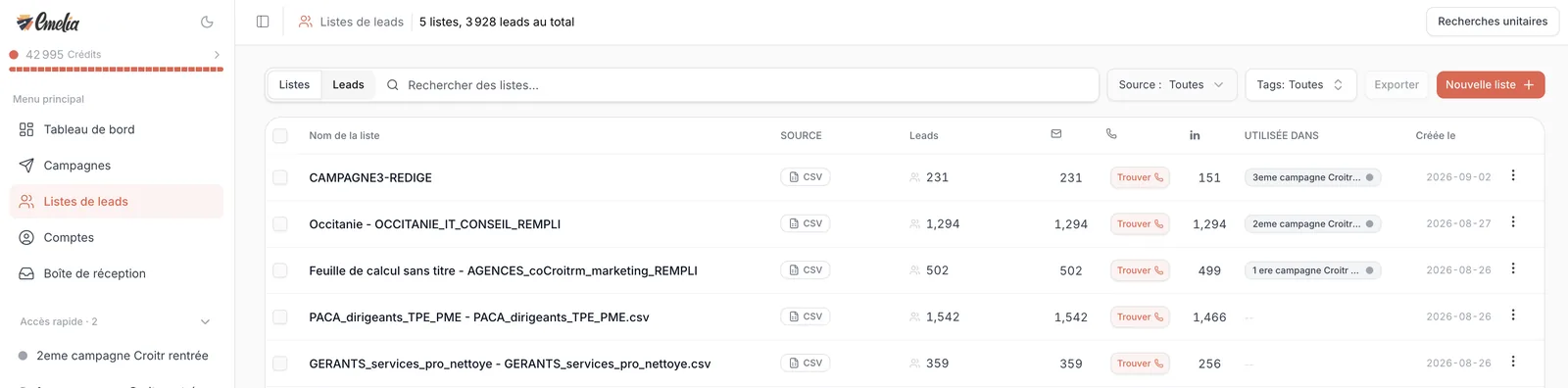
Open the list and click Find phone, after ticking the leads you care about if you want. For a list that has no number at all yet, a Find button also shows up right in the phone column of Lead Lists.
The panel shows the number of Entries without phone, the Credits to be used and, if any, the leads missing a LinkedIn URL. Click Run. As with emails, the maximum cost (50 credits per lead) is reserved at launch, and the credits of the contacts not found go back to your balance at the end.
 1
1- 1List with no numbers yet: the Find button in the phone column runs the search.
What you get
- Mobile numbers, work numbers first, personal ones otherwise. No company landlines.
- 50% to 60% success on average, more on some targets, with good coverage of the United States.
- No reverse lookup: you can't find a person from a number.
- A number already found in the last six months for the same profile is served again as is, and charged like a new search. Don't run the same list twice.
At 50 credits per number, 1,000 credits buy 20 numbers. Rather than enriching a whole list, filter it on the contacts who reacted (status “Email opened”, “Email reply”, “Invitation accepted”), select them, then run Find phone on that selection.
For a single prospect
In Lead Lists > Single Search, the Find Phone Numbers tab takes a LinkedIn URL and keeps the history of your searches. A single search does not show up in your lists, but it is recorded in that history and in your credit usage.
Frequently asked questions
The questions we get asked on this topic, answered briefly.
How much does a number cost in dollars?
50 credits, which is about $0.95 with the 1,000-credit subscription at $19 a month, $0.49 with the 5,000-credit one at $49, and around $0.25 with the 100,000-credit one at $499. Nothing is charged when no number is found.
Why don't I get the switchboard number?
The search only returns mobile numbers. For landlines of shops or small companies, a company database such as Basile or Google Maps listings are a better fit.
The search found nothing although my prospect has a mobile
The number is simply in none of the databases queried. No database covers everyone, hence the 50% to 60% average. You were not charged for that contact.
I was charged twice for the same number
A double click can start two searches, and a search run again on the same profile is charged again. Write to support with the list or contact name: we will look into it.
Can I search for a number without a LinkedIn URL?
No. If you only have names and companies, first run a LinkedIn extraction with Emelia to get the profiles, or fill in the column before launching.