My campaign sends nothing or shows a 0% open rate: what to check
Before you suspect spam, rule out the settings. A stalled campaign or switched-off tracking looks exactly like a deliverability problem in the stats, and it's one of the most common questions our support gets.
Start with the campaign status
In Campaigns, the Status column already answers half the question.
| Status | What it means | What to do |
|---|---|---|
| Draft | The campaign was never launched. | Open it and click Launch the campaign. |
| Scheduled | The launch is planned for a later date. | Wait for that date, or change the schedule. |
| Running with a small moon | The campaign is active but outside its scheduled window: it isn't sending anything right now. | Nothing, if it's night, the weekend or before the start time. Otherwise, check the schedule. |
| Paused | Paused by you, or automatically (failed payment, end of trial). | Fix the cause, then Resume. |
| Finished | The campaign has worked through its list. Contacts added afterwards won't be sent anything. | Reactivate the campaign, or tick Never-ending campaign if you keep adding leads. |
When something is missing, Emelia refuses the launch with an explicit message, such as "Add at least one contact to start the campaign", "Your sending email address is disconnected. Please reconnect it" or "You need a subscription to start a campaign". Read it before you look any further.
The causes, in the order to check them
Three campaign settings explain most cases. They live in the Campaign Settings panel, to the right of the editor. The other causes show up in Accounts and in your lists.
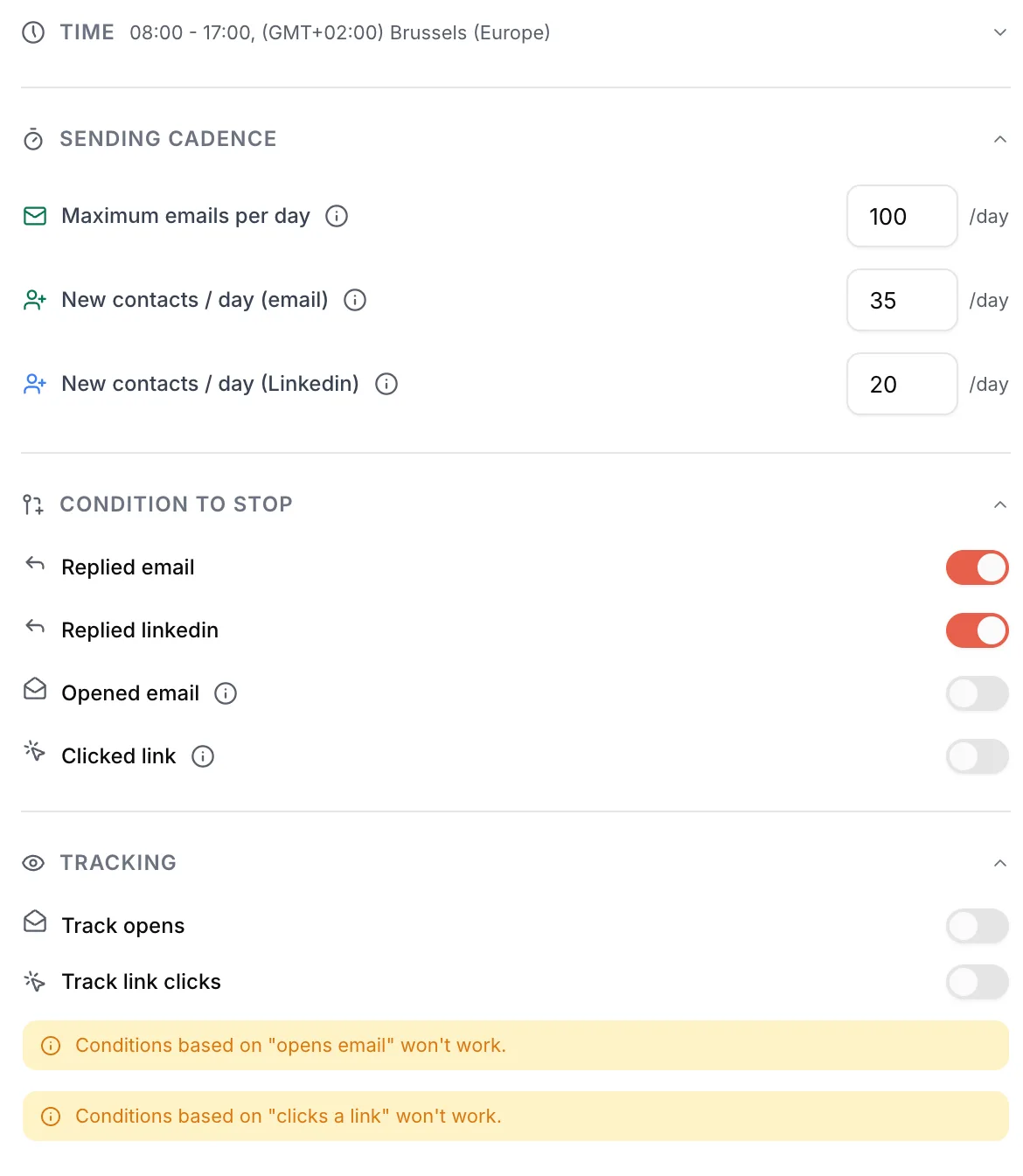 123
123- 1Time: active days, start time, end time and time zone.
- 2Sending cadence: Maximum emails per day must stay above New contacts / day (email).
- 3Tracking: Track opens is off by default.
1. Outside the sending hours or days
Emelia only sends within the window set under Time (marker 1): Active days, Start time, End time and Time zone. One unticked day, a very short window or the wrong time zone is enough to make a campaign look dead.
- How to spot it: in the campaign list, a small moon next to Running means the campaign is outside its window. Inside the campaign, the Time summary shows the window and the time zone.
- How to fix it: tick the working days and use a wide window, for example 8:30 am to 5:30 pm. The campaign's time zone is what counts, not your computer's.
- Good to know: sends are spread across the whole window. If you launch mid-day, only the remaining part of the day goes out.
2. A disconnected sending mailbox
Changed password, enforced two-factor authentication, expired Google or Microsoft licence, a temporary refusal from the provider: when a mailbox loses its connection, nothing leaves from it any more. A campaign even refuses to start while one of its mailboxes is disconnected.
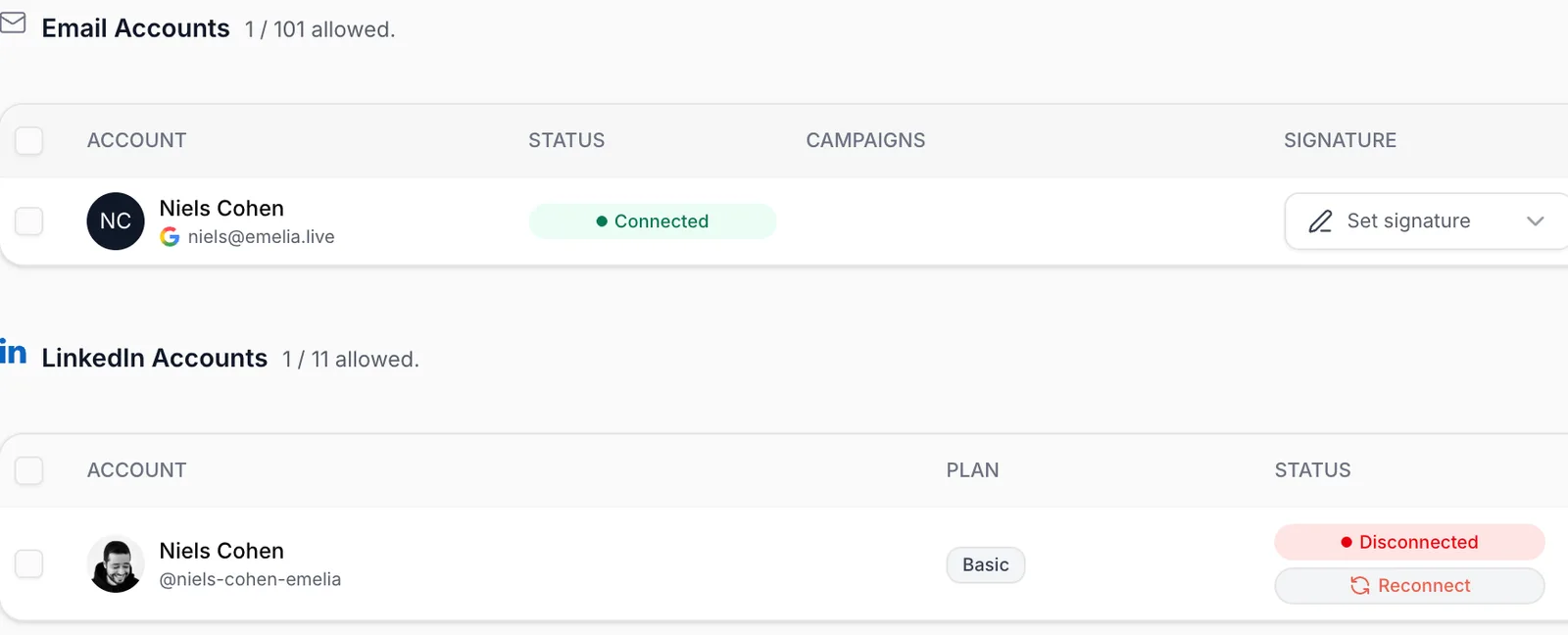 12
12- 1Status column: the mailbox must show Connected.
- 2A disconnected account shows Disconnected and a Reconnect button. This one is a LinkedIn account: an email mailbox looks the same.
How to spot it: Accounts page, Status column. The campaign list also shows an Account disconnected alert, and the Dashboard an Action Required card. Emelia also sends a reconnection email to the address you log in to Emelia with (not to the mailbox itself): check your spam folder.
How to fix it: click Reconnect.
OVH sometimes temporarily refuses a mailbox's connection even though the password hasn't changed. Reconnecting with the same credentials is then enough. Keep an eye on these mailboxes and reconnect them as soon as they drop, otherwise the campaign stops.
3. Expired subscription, ended trial or failed payment
A few hours after an unpaid due date, Emelia stops starting campaigns. After 48 hours, running campaigns are paused. The same happens at the end of the 7-day free trial if no plan has been chosen.
- How to spot it: an Unpaid invoice banner in the left menu, the message "Your trial has expired", or a mailbox with the Expired status ("This mailbox is disabled: your subscription no longer covers enough sending mailboxes").
- How to fix it: pay the invoice or pick a plan, then resume your campaigns. If you have more mailboxes than your plan covers (3 on Start, 50 on Grow), delete the extra ones or change plans.
A SEPA direct debit takes several days to arrive. On a monthly plan, the account is cut off at every renewal before the debit clears. SEPA only works with the annual plan.
4. An empty list, or contacts without an email address
A campaign with no contacts won't launch. Trickier: a list built from a LinkedIn extraction often contains profiles without an email. In a sequence that starts with an email, those contacts are set aside (Excluded status), counted as finished, and don't come back if you find their address later. The campaign then seems to stop as soon as the contacts with an address have been served.
- How to spot it: in Lead Lists, check how many contacts actually have an email address before attaching the list.
- How to fix it: run the email search before launching (find emails). For a campaign that mixes email and LinkedIn, put a Condition based on variables on the email field at the top of the sequence (is empty / is not empty) to route profiles without an address to the LinkedIn steps.
5. A new list added to a campaign that's already running
Adding contacts to a list that's already attached works normally. But if you attach a new list to a running campaign, its contacts can sit waiting, with no activity, at least until the next day.
- How to spot it: the contacts from the new list have no activity even though the daily limit hasn't been reached.
- How to fix it: Pause the campaign, then Resume it: resuming reschedules every contact.
The "already sent" check works per contact record, not per address. If the new list contains people already contacted under another record (a re-imported export, for example), they'll get the first email a second time. Remove them first, or put the old list in the exclusions.
6. Contacts set aside automatically
Emelia never writes to a contact on your blacklist, to someone who unsubscribed, or to an address that already bounced. If you reuse the same list in a new campaign, these contacts are skipped automatically. And a contact present in two lists of the same campaign only gets the sequence once. So a campaign can "stop" while the list still looks full.
- Classic trap: a generic domain (gmail.com, outlook.com…) added to the blacklist by mistake blocks every send to those addresses.
- Re-imported export: if you re-import an Emelia export, don't map the status column. Contacts would keep their old status (a "Bounced" contact would be skipped again).
- Out-of-office messages: a reply stops the contact's sequence, including an automatic one. Under More settings, tick Don't count automatic replies (out-of-office) as replies so the sequence carries on.
If a campaign stops while some contacts have received nothing, your mailboxes are connected and your subscription is active, write to support with the campaign name and the number of contacts left without activity. Don't keep duplicating it: a copy stops at the same point, because the same contacts are being set aside.
7. A cadence that blocks follow-ups
The Sending cadence block (marker 2) holds two separate settings: New contacts / day (email) counts first emails, Maximum emails per day counts everything, follow-ups included. Both apply per address connected to the campaign.
- If the maximum is equal to or lower than the new contacts, first emails take up all the room and follow-ups stop going out. The interface warns you: "With many contacts and several email steps, this cadence may stall your campaign".
- Reference setting: 35 new contacts and 100 emails per day per mailbox.
- A mailbox used in several campaigns adds up the limits of each: two campaigns at 100 means 200 emails a day from the same mailbox, and your provider will end up refusing. One mailbox, one campaign.
8. The volume is simply lower than you think
A campaign moves at the pace of the number of mailboxes times new contacts per day. A single mailbox at 35 new contacts a day needs more than 100 days to reach 4,000 people. That's not a fault: to go faster, add mailboxes on other domains, not more volume per mailbox.
To be sure, count actual sends day by day (Performance tab, or the activity export) and compare them with that ceiling, allowing for unticked days and partial days.
After a pause and a resume, the campaign reschedules all its contacts: the first day may go out more slowly than expected. If nothing restarts the next day while contacts are still waiting, contact support.
0% opens: measurement or deliverability?
Replies with 0% opens is impossible if tracking works: your emails are being read, it's the measurement that's broken. Follow this order.
Open tracking isn't switched on
On a new campaign, Track opens and Track link clicks are off by default (marker 3 in the screenshot above). The Performance tab reminds you: "You haven't enabled open tracking in your campaign settings".
To switch it on mid-campaign: Pause (settings are locked while sending), turn on Track opens in the Tracking block, then Resume. Emails already sent without tracking will never be counted.
Without open tracking, the If prospect opens Email condition and the Opened email stop condition don't work. The interface says so under the toggles.
The tracking domain no longer resolves
The open pixel and tracked links go through your tracking domain: a CNAME named tracking pointing to emelia.link.. Emelia checks it when you add it, then never again. If the record disappears from your DNS (zone rebuilt, provider changed, domain not renewed), Emelia keeps showing it as valid, but opens and clicks drop to zero.
- Check live that
tracking.yourdomain.comreally points toemelia.link, on dnschecker.org or with the Test DNS button of the tracking domain, in Accounts. - Recreate the CNAME if needed, reading the name letter by letter ("traking" instead of "tracking" is a mistake our support has seen). Wait one to two hours, then test again.
- A tracking domain that has been disabled isn't fixed by saving it again: correct the CNAME, delete the tracking domain in Emelia, then create it again.
The unsubscribe link goes through the same domain. If it no longer resolves, your prospects can't unsubscribe: fix it before any new campaign.
Your emails really are landing in spam
Tracking on, tracking domain valid, and still under 30% opens on a varied audience: now it really is a deliverability issue.
Read: My emails land in spam→The opposite: an open rate that's too good
An open rate close to 100% is almost never real. Company security filters open emails, and sometimes click links, to scan them before delivery: each scan counts as an open. A blind copy (BCC) to your CRM also counts as an open. And if you email one company in bulk, its security can react as a block: 0% or 100% opens, without a single bounce.
- Don't trigger important steps on opens alone: the interface itself says this setting "isn't 100% reliable".
- Click tracking is even less reliable, for the same reason: leave it off unless you have a specific need.
- Two or three contacts per company at most, and a shuffled list.
Frequently asked questions
The questions we get asked on this topic, answered briefly.
My campaign says "Running" but nothing has gone out since this morning. Is it a bug?
Almost never. Check for a small moon next to the status (outside the window), whether today is ticked in Active days, and whether your mailboxes show Connected in Accounts. Since sends are spread across the whole window, it's also normal to see only a few early in the morning.
When does the first email go out after launch?
The Launch the campaign window shows the date and time of the first send, in the campaign's time zone. The following sends are then spread across the sending window.
Will I be told when a mailbox disconnects?
Yes: a reconnection email goes to the address you log in to Emelia with, and the dashboard shows an Action Required card.
Why does my campaign send less than the limit I set?
Limits are ceilings, not targets. Fewer sends can come from a mid-day launch, a short window, contacts set aside (no email, unsubscribed, bounced), a disconnected mailbox or a provider refusing part of the sends. In that last case you'll see bounces appear: see I have too many bounces.
Can I switch on open tracking for a campaign that's already running?
Yes: pause it, turn on Track opens, then resume. Only emails sent after that will be measured.
I added contacts but they aren't being sent anything. Why?
Three common reasons: they're in a new list attached to the running campaign (pause, then resume), they have no email address, or the campaign is Finished (reactivate it, or use the Never-ending campaign option).