How many emails a day should you send in cold email?
The settings that set a campaign's sending pace: how many emails a day per mailbox, which days, at what times. Set well, they protect your mailboxes; set badly, they block follow-ups without warning.
Where these settings are
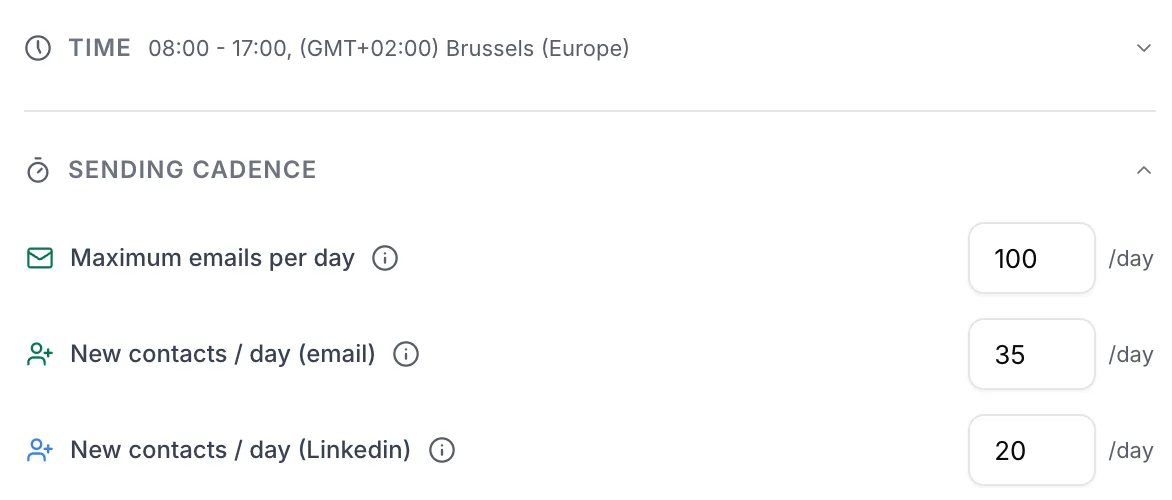
In the campaign editor, the Campaign Settings panel on the right has two blocks: Time, collapsed by default, and Sending cadence. A new campaign starts with sensible values: 100 emails a day, 35 new contacts by email and 20 on LinkedIn, Monday to Friday, from 8 am to 5 pm, in your browser's time zone.
 1234
1234- 1Time: click to expand the time zone, active days and sending window.
- 2Maximum emails per day: everything that goes out, follow-ups included, per connected mailbox.
- 3New contacts / day (email): the people who receive their first email, per mailbox.
- 4New contacts / day (Linkedin): per connected LinkedIn account.
A running campaign does not accept settings changes. Click Pause, make your changes, then Resume: Emelia then recalculates the whole schedule. Avoid doing it over and over, and preferably do it during the sending window: resuming after the window has closed pushes everything to the next day.
How many emails a day per mailbox
Two separate settings, not to be confused. New contacts / day (email) counts the people who receive their first email. Maximum emails per day counts everything that goes out, first emails and follow-ups together. Both apply per day and per mailbox connected to the campaign: with three mailboxes set to 100, the campaign can send up to 300 emails a day.
| Situation | New contacts / day | Maximum emails / day |
|---|---|---|
| Established mailbox | 35 | 100 |
| Mailbox starting its first campaigns | 5 to 20 | then step up to 35 and 100 |
If Maximum emails per day is equal to or lower than New contacts / day (email), there is no room left for follow-ups: they stop going out, with no visible error. Emelia refuses to save a lower maximum, and as soon as they are equal it shows: "With many contacts and several email steps, this cadence may stall your campaign".
Volumes multiply by the number of mailboxes. That is the right way to scale up: three mailboxes at 100 rather than one pushed to 300.
What counts toward the limit, and what does not
- Counted: the first emails and all the follow-ups sent by this campaign from this mailbox.
- Not counted: LinkedIn steps, which have their own setting.
- Another campaign on the same mailbox: each campaign has its own limits, with no shared cap. A mailbox plugged into two campaigns set to 100 can send 200 emails a day. Split it by hand, 50 and 50 for example.
- Contacts added along the way: when contacts enter a campaign that is already live (added to the list, synced from a CRM, through the API), their new contacts per day setting applies to the whole campaign, not to each mailbox.
The real pace: spread over the window
These settings are maximums, not targets. Emelia spreads the day's new contacts over the whole sending window: 35 contacts over a window from 8:30 am to 5:30 pm means a first email roughly every fifteen minutes, per mailbox.
A short window does not lose volume, it concentrates it: the same 35 emails go out in a burst. That is exactly what you want to avoid. Aim for a wide window, and no more than about twenty emails an hour per mailbox.
If you launch in the middle of the day, only the end of the window is used that day. And volume naturally drops at the end of a campaign: there are no new contacts left, only follow-ups.
Days and schedule
Expand Time to set the Time zone, the Active days, the Start time and the End time. The days list offers two shortcuts, All days and Business days.
The campaign's time zone applies to every contact: there is no per-prospect time zone. For a target spread over several countries, pick a middle time zone and a wide window.
- Active days also count for delays: a follow-up set to 3 days waits three active days. With only Tuesday, Wednesday and Thursday ticked, a 6-day delay is about two weeks on the calendar.
- Public holidays are not handled automatically: pause the campaign the day before, or untick that day.
In the Launch the campaign window, choose Schedule launch to set the date and time of the first send, a Monday morning for example.
Large multi-mailbox campaigns start in batches
A campaign that sends from many mailboxes does not necessarily start at full speed. Emelia schedules first emails in batches: 200 first emails at a time for the whole campaign, whatever the number of mailboxes, then the next batch once the previous one has gone out.
With twenty mailboxes set to 25 new contacts, a batch therefore covers only ten first emails per mailbox. On a launch or resume day, volume can stay below the theoretical total, the number of mailboxes times the setting: judge it over two or three days before drawing conclusions.
A slow start is normal. A campaign that sends nothing for a whole window while some contacts have never been reached is blocked: write to support with the campaign name. And do not pause and resume it over and over: each resume recalculates everything from the start.
On LinkedIn
New contacts / day (Linkedin) applies per connected LinkedIn account. Emelia stops you before the risky thresholds: above 20 with an invitation in the sequence, a warning reminds you that 20 to 40 invitations are only for LinkedIn Premium. Above 40, the setting is refused if the sequence contains an invitation, and above 80 in every case.
Frequently asked questions
The questions we get asked on this topic, answered briefly.
My campaign sends less than the limit I set. Why?
The settings are maximums. The usual causes: the day's new contacts are spread over the window, the first day only counts the end of the window if you launch late, unticked days send nothing, and a large multi-mailbox campaign starts in batches of 200 first emails. If nothing goes out at all, see My campaign sends nothing.
How many emails a day with a single mailbox?
35 new contacts and 100 emails in total, follow-ups included. A mailbox that is just starting begins lower, between 5 and 20 new contacts, and steps up.
Do limits add up across two campaigns?
Yes. Each campaign has its own limits, with no global cap per mailbox: a mailbox used in two campaigns set to 100 can send 200 emails a day. Split the volume between the campaigns by hand.
Which sending window should I choose?
A wide one, for example from 8:30 am to 5:30 pm, in your prospects' time zone. A short window does not make you send more, it concentrates the sends, which is bad for deliverability.
Do follow-ups go out at the weekend?
Only if Saturday and Sunday are ticked in the active days. By default, a campaign sends Monday to Friday, and day delays only count active days.
Can I change these settings on a running campaign?
Yes, after pausing it. Make your changes, then resume: the schedule is recalculated. Preferably do it during the sending window, and not several times a day.