Linked Helper shows $29.90 a month on its pricing page. Its own documentation says $15.
Both figures are correct. They belong to two versions of the same product, and the one displayed by default costs twice the other. Understanding that difference is the first job to do before reaching for a card, because it is worth $179 a year per LinkedIn account at the monthly rate, and $99 if you take a twelve-month licence.
The second job is knowing what you are actually buying. Linked Helper is not a cloud tool: it is software that runs on your machine, and it keeps running on your machine even in the version called cloud. The vendor says so itself.
We recorded both grids in full, four commitment lengths for two plans and two versions, along with the licence, credit and storage pages of the help centre, on 7 September 2026.

What Linked Helper actually is
Before talking about money, the tool needs placing, because its architecture explains its whole price list.
Desktop software, not an extension and not an online service. Linked Helper installs on your computer, under Windows, macOS or Linux, and drives LinkedIn from your own machine and your own IP address. It is not a browser extension, which sets it apart from part of the market and lets it, according to the vendor, pass the main bot detectors: DataDome, Cloudflare, PerimeterX, Akamai and Imperva.
What it does. Connection requests, message sequences with follow-ups and reply detection, InMails, messages to group members or event attendees, profile visits, follows, skill endorsements, likes and comments. On top of that sit a campaign builder with more than 30 action types, an internal CRM with notes and tags, a built-in inbox, and CSV exports.
What it collects. Profile and organisation scraping from LinkedIn, Sales Navigator and Recruiter, lists of people who liked or commented a post, group members, event attendees, employees from a company page, and an auto-collect that keeps pulling new profiles from a saved search. On top of that sits an in-house enrichment service, billed in credits, which returns emails, phone numbers and company data without visiting the profile.
Who it is for. Freelancers, recruiters and small teams that want to automate LinkedIn while keeping control of their own infrastructure, and who do not like the idea of a tool connecting to their account from an unknown server.
What it is not. Linked Helper is not a searchable B2B directory: it enriches profiles you bring it from LinkedIn, it does not let you filter a company database. And it does not send cold email: the channel is LinkedIn, full stop.
Two grids, and the one you are shown is not the cheaper
This is the starting point, and it is easy to miss.
Linked Helper now exists in two versions of the same product, with identical LinkedIn automation capabilities according to the vendor. What changes is where your data lives.
Local storage | Cloud storage | |
Where the data lives | on your computer | on the vendor's servers |
Where the campaigns run | on your computer | on your computer |
Standard, 1-month licence | $15 | $29.90 |
Pro, 1-month licence | $45 | $59.90 |
Gap | reference | +99% on Standard, +33% on Pro |
The site's pricing page displays the cloud storage version. The grid documented in the help centre, the one at $15 and $45, is the local storage version.
What the cloud version actually brings. Access to the same data from another device with no manual file transfer, an automatic backup that protects you from a machine failure, sharing of LinkedIn accounts and campaign data with colleagues or clients, and incoming webhooks to feed a campaign from a third party system.
What it does not bring, and this is the important part. It does not run Linked Helper in the cloud. Asked whether the cloud storage version requires the computer to be turned on to run campaigns, the vendor answers yes, specifying that only the data is moved to its servers and that campaigns run on your computer through Linked Helper.
Two reservations to know before choosing this version. It is offered only to some users, the vendor writing that it offers it to "part of its users". And migrating from one version to the other is not possible at the moment, in either direction. The choice is therefore made at the door, and it binds you.
For one person on one machine, the local version does the same work for half the price on the Standard plan. The cloud version earns its keep when several people need to see the same data, or when you alternate between two computers.
The licence grid
Linked Helper does not sell a subscription but a licence, and the distinction is not cosmetic: there is no automatic renewal. A licence opens one LinkedIn account for a given period, then expires. To continue, you buy again manually. The vendor presents this arrangement as suited to recruiters working on a project basis.
Here is the local storage grid, the one in the help centre.
Term | Standard, total | Standard, per month | Pro, total | Pro, per month |
1 month | $15 | $15.00 | $45 | $45.00 |
3 months | $40 | $13.33 (-11%) | $120 | $40.00 (-11%) |
6 months | $60 | $10.00 (-33%) | $180 | $30.00 (-33%) |
12 months | $99 | $8.25 (-45%) | $297 | $24.75 (-45%) |
And the cloud storage one, as displayed on the pricing page.
Term | Standard, per month | Pro, per month |
1 month | $29.90 | $59.90 |
3 months | $26.60 (-11%) | $53.30 (-11%) |
6 months | $20.00 (-33%) | $40.00 (-33%) |
12 months | $16.50 (-45%) | $33.00 (-45%) |
The term discounts are exactly the same in both versions, 11%, 33% and 45%. The annual commitment is the most rewarding lever in the whole grid: it drops the monthly cost from $15 to $8.25 on Standard, and from $45 to $24.75 on Pro.
One rule not to forget: one licence equals one LinkedIn account. It cannot serve two accounts at the same time, but it transfers from one to the other. It works on any computer, but not on several at once. Three salespeople with three LinkedIn accounts therefore means three licences.
Five LinkedIn accounts, one plan
Emelia's Grow plan drives 5 LinkedIn accounts and 50 mailboxes for 97 € per month, with no license to buy again at renewal.
Standard or Pro: the list of twenty a day
Standard and Pro have, according to the vendor, identical functionality. What separates them comes down to three differences, only one of which really weighs.
Standard caps at 20 actions per 24 hours on a precise list of actions, here in full:
- liking and commenting on posts, every like counting towards the quota;
- messaging the members of a LinkedIn group;
- messaging the attendees of an event;
- sending a person to an external CRM;
- sending a person or an organisation to a webhook;
- inviting someone to join a group;
- inviting someone to an event;
- tagging prospects under a post with the Boost post action;
- inviting people to follow a company page;
- sending a message containing an image.
Second difference: messaging history. On Standard it can be exported neither to CSV nor through a webhook. It stays readable inside Linked Helper and in LinkedIn, but it does not come out.
Third difference: data credits, five times more numerous on Pro. We come to those below.
What is not limited on Standard deserves saying, because it is the bulk of prospecting work: connection requests, message sequences with follow-up and reply detection, InMails, unlimited campaigns, the internal CRM with tags and notes, CSV export of profiles and data collection. One person inviting and following up will never reach the cap of twenty.
The cap bites as soon as you do bulk engagement, likes and comments at volume, or as soon as you take the data out of the tool: webhook integrations are explicitly limited to twenty profiles a day on Standard, while they are unlimited on Pro. Twenty profiles a day to a CRM is 620 a month, and that is little for a team.
The simple rule: if your use is invite plus follow-up, Standard is enough. If you automate engagement on posts or if you synchronise a CRM, Pro is not a comfort option, it is a necessity, and it triples the bill.
Data credits, and what they actually buy
Every licence ships with a stock of credits for the in-house enrichment service, which returns contact details without visiting the profile.
Term | Standard | Pro |
1 month | 620 credits | 3,100 credits |
3 months | 1,860 credits | 9,300 credits |
6 months | 3,660 credits | 18,300 credits |
12 months | 7,320 credits | 36,600 credits |
A detail nobody notices: the allowance is not quite proportional. At three months, Standard does give 620 credits a month. At six and twelve months, the allowance falls to 610 a month. The gap is 1.6%, it is negligible, but it exists and it runs the wrong way when you commit for longer.
The consumption scale is published, and it is the real driver of the budget.
Data obtained | Credits |
One email | 1 credit |
One piece of profile information | 1 credit |
One social network or messaging handle | 2 credits |
One piece of company data | 2 credits |
One phone number | 10 credits |
The 620 credits of a monthly Standard licence therefore represent 620 emails, or 62 phone numbers, or any mix of the two. On an annual Pro licence, the 36,600 credits give 36,600 emails or 3,660 numbers.
One billing trap to know. The two enrichment actions are not billed the same way. The Data Enrichment action charges on every successful request, even if you already had the data. The Find Profile Emails action only charges if a valid email was found. On a partly enriched database, the first will make you pay twice for what you already had.
Extra credits are bought in packages, with a steep volume discount.
Package | Price | Cost per credit |
1,000 | $15 | $0.0150 |
5,000 | $49 | $0.0098 |
10,000 | $89 | $0.0089 |
50,000 | $284 | $0.0057 |
At the best tier an email therefore comes to $0.0057 and a phone number to $0.057, which is competitive. Note that data credits never expire, neither those delivered with a licence nor those bought separately. AI credits, on the other hand, expire with the licence that brought them, unless they were bought separately.
Those AI credits, used for generating and personalising messages, vary with the commitment length: from 250 to 1,500 on Standard, from 500 to 3,000 on Pro. The vendor does not state clearly on its pricing page whether this is a monthly allowance or a total for the term. It is a line to get clarified if your use of AI is central.
An email at 0.019 €, no pack to buy
19 € for 1,000 credits at Emelia: a found email costs one, a verification a quarter, a phone number fifty.
Volume discounts, the real lever for agencies
This is the part of the grid agencies and teams need to know, because it stacks with the term discount.
Licences bought on one invoice | Discount |
10 to 19 | -10% |
20 to 49 | -20% |
50 to 74 | -30% |
75 to 99 | -35% |
100 to 999 | -40% |
1,000 and above | -50% |
The two discounts add up. The vendor gives its own example: 76 annual Standard licences come to $4,890.60, which is $8,789.40 less than renewing monthly for each person separately, and a total discount of 64.25%.
The arithmetic checks out: 76 licences at $99 make $7,524, less 35% gives exactly $4,890.60, against the $13,680 of 76 monthly licences over twelve months.
The same mechanism applies to credit packages, with the same thresholds.
For an agency running many LinkedIn accounts, Linked Helper therefore becomes one of the cheapest tools on the market per unit. For one person alone, those discounts are out of reach.
The cost the grid does not show
Linked Helper runs on your computer. Your campaigns only execute when the machine is on and the software is open. That is true of the local version and of the cloud storage version alike.
That leaves two possibilities, and both have a cost.
Leaving your own machine on. Free in appearance, but your computer has to stay on during the hours you want the actions to happen, which means not shutting it at night if you spread your sending, and dealing with sleep modes and restarts.
Renting a server. This is the route the vendor documents itself, with installation articles for Windows VPS and Ubuntu VPS, plus remote web control without going through a remote desktop. You then add the price of the server to the price of the licence, generally a few dollars to a few tens of dollars a month depending on the configuration, and a stable IP address, which Linked Helper also lets you handle through a dedicated proxy with a built-in quality check.
That cost is not a criticism, it is the flip side of the model: you keep control of your infrastructure and of your IP. But it has to enter the comparison with a cloud tool, where execution is included in the subscription.
What Linked Helper does not do
No searchable database. The tool enriches and scrapes profiles you bring it from LinkedIn. It does not let you filter a company directory by sector or headcount.
No cold email. The channel is LinkedIn. There is no email sequence and no mailbox to connect.
No mailbox warmup. The question does not arise, since it sends no email.
No execution without your machine. See above, it is the structural characteristic of the product.
No automatic renewal. Which is an advantage if you work by project, and a mental load if you want it to run without thinking about it.
LinkedIn and cold email in one place
Emelia chains LinkedIn automation, Sales Navigator scraping and email sending, with email warmup included.
Linked Helper against five cloud alternatives
What the five tools below have in common is that they execute the actions from their own servers: nothing to install, nothing to leave switched on.
The scope used: the monthly cost for one single LinkedIn account, with two separate entry points, the cheapest plan that automates LinkedIn, and the cheapest plan that adds email.
Tool | LinkedIn from | What that price covers | Both channels from | Execution |
Linked Helper | Standard local, $15 | LinkedIn only: invitations, sequences and unlimited campaigns, 620 data credits | does not send email | your machine |
Emelia | Start, $37 | unlimited LinkedIn, unlimited cold email, warmup, scraping, 3 mailboxes | Start, $37 | cloud |
Waalaxy | Pro, €19 | LinkedIn only: 300 invitations per month, no cold email | Business, €69 | cloud |
HeyReach | Growth, $79 per account | LinkedIn only: unlimited campaigns, unified inbox, 100 enrichment credits | goes through a third-party tool | cloud |
Expandi | Business, $99 | LinkedIn and email from your own mailbox, dedicated IP, 1 account | Business, $99 | cloud |
Dripify | Pro, $79 | LinkedIn and email sequences, unlimited campaigns, 100 credits | Pro, $79 | cloud |
Prices taken from each vendor's official pages, in their billing currency. Waalaxy bills in euros, the four others in dollars. These amounts do not convert: the one you will be charged is the one in the vendor's own currency.
Two price columns rather than one, because these are two different questions. If you are only looking to replace Linked Helper, only the first one matters. Two tools on this list have no second column: Linked Helper does not send email, and neither does HeyReach, which finds verified addresses but hands the sending to Instantly, Smartlead or EmailBison, so to a second subscription.
A word of candour before the detail. On licence price alone, Linked Helper is the cheapest on this list, and by a distance: $15 a month, $8.25 on a twelve-month licence, against €19 at best elsewhere. And this is not a crippled entry tier, contrary to what one often sees: invitations, sequences with follow-up, InMails and the number of campaigns are not capped on Standard.
A low entry price does not mean the same scope, and that is what the middle column is for. Linked Helper's $15 and Waalaxy's €19 buy LinkedIn and nothing else. Emelia's $37 buys, in the same subscription, unlimited LinkedIn actions, unlimited cold email, mailbox warmup and Sales Navigator scraping. Emelia therefore costs more than double Linked Helper on the subscription line, and the honest question is whether you need the second channel, not which figure is smaller.
Emelia

Emelia runs LinkedIn campaigns natively on every plan, with unlimited LinkedIn actions from the entry tier and Sales Navigator scraping that is unlimited too and consumes no credits. What changes from one plan to the next is the number of LinkedIn accounts you can drive, one then five then twenty, not the volume of actions. Execution runs on its servers, with no machine to leave switched on.
Added to that, in the same subscription and the same sequence: cold email with unlimited sending and contacts, mailbox warmup without limit, contact search and address verification. Emelia does not bill per seat, but by the number of LinkedIn accounts and mailboxes.
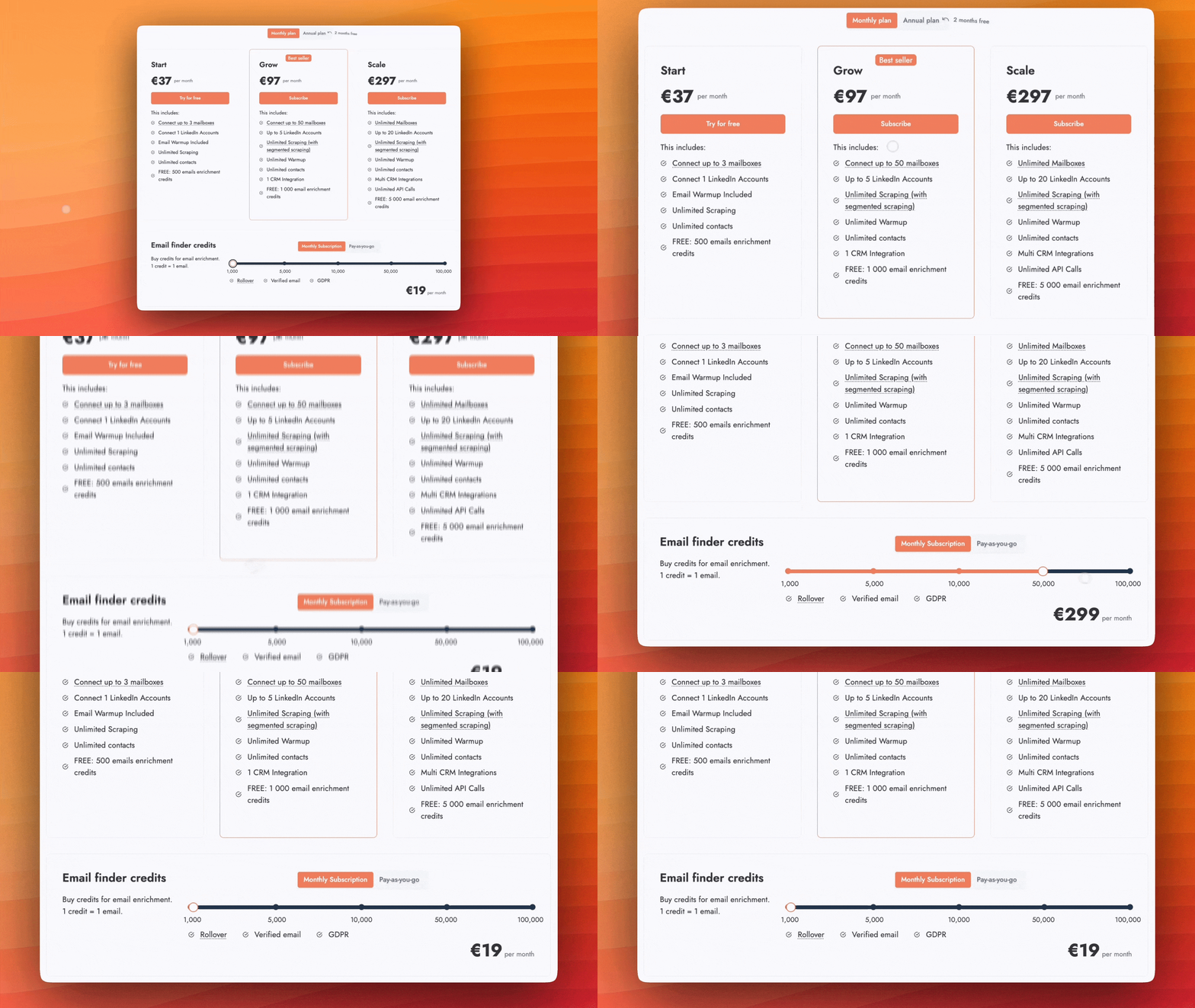
Annual billing gives two months free. Credits are optional: they are needed neither to send emails nor to act on LinkedIn, only to find an email or a phone number, verify an address or run an AI action. An email found costs 1 credit, a verification 0.25 credit and a phone number 50 credits.
Credits | Monthly subscription, with rollover |
1,000 | $19 |
5,000 | $49 |
10,000 | $99 |
50,000 | $299 |
100,000 | $499 |
Waalaxy

Waalaxy runs LinkedIn campaigns from its entry plan at €19 per user, with 300 invitations per month, then 800 on the higher plans. The vendor has removed the dependency on the extension: campaigns now run on its servers, whatever the state of your browser.
The Pro plan already covers unlimited campaigns, ready-made sequences, automatic follow-ups and CRM synchronisation. The Advanced plan adds API access, the Make, Zapier and n8n modules and priority support. Cold email only arrives on the Business plan at €69. Two reservations: the address search credits are modest, 25 per month on the entry tier and 500 above, and the LinkedIn inbox is a paid add-on on all three plans.
Plan | Monthly per user | LinkedIn invitations | Email finder credits | Cold email |
Pro | €19 | 300 / month | 25 / month | no |
Advanced | €49 | 800 / month | 500 / month | no |
Business | €69 | 800 / month | 500 / month | yes |
A quarterly commitment takes off 20% and an annual one 50%, the steepest discount on this list, which brings the Pro plan under €10 a month. A 14-day free trial is offered.
HeyReach

HeyReach runs unlimited LinkedIn campaigns and stands out on one point: everything is built to drive many accounts at once, with a unified inbox across all senders, workspaces partitioned by client and fine-grained permission management.
It does not do email itself. It finds verified addresses, with 100 enrichment credits per sender, then hands the sending to Instantly, Smartlead or EmailBison through native integrations. Multichannel therefore exists, but it assumes a second subscription. Note also that the Unlimited plan advertises unlimited senders while applying a fair-use cap at 300.
Plan | Monthly | Quarterly | Annual | Sender accounts |
Growth | $79 | $71 | $63 | per sender |
Agency | $999 | $899 | $799 | 25, upgradeable to 50 |
Unlimited | $2,999 | $2,699 | $2,399 | unlimited, capped at 300 |
Growth is billed per sender account: two accounts cost $158. The higher tiers bundle a fixed number of accounts for a flat fee and add whitelabel. A reduced-price programme exists for organisations under $250,000 in annual revenue with fewer than five people.
Expandi
Expandi runs conditional LinkedIn campaigns, with elaborate follow-up scenarios, and puts account safety forward: each user gets a dedicated IP address tied to a country, and the tool applies a gradual ramp-up with randomised limit ranges.
Unlike HeyReach, it adds real email steps inside the sequence: you connect your own mailbox, whatever the provider, and email follow-ups chain with LinkedIn actions. The trade-off for that positioning is the price, the highest on this list for a single account, and an agency grid that is not public.
Plan | Monthly | Annual | LinkedIn accounts |
Business | $99 | $79 | 1 |
Agency | On quote | On quote | from 10 seats |
Annual billing takes off around 20%, so two months free. The Agency plan starts at ten seats and is negotiated, the vendor stating that the price per account falls with volume. A 7-day free trial is offered, shorter than the 14 days most competitors give.
Dripify

Dripify runs LinkedIn campaigns from its own servers, with nothing to install. Its entry plan at $59 is however limited to a single campaign, which reserves it for testing: real use starts on the Pro plan, which unlocks unlimited campaigns and full daily quotas.
Email sequences are included from the first paid plan, with no supplement and no module to activate, along with 100 email search credits each month. The entry tier already brings detailed analytics, sequence templates and 24-hour support. The Pro plan adds a dedicated inbox and CSV export, the Advanced plan multi-team management and A/B testing.
Plan | Monthly per user | Annual | What changes |
Basic | $59 | $39 | 1 campaign, limited quotas |
Pro | $79 | $59 | unlimited campaigns, full quotas, CSV export |
Advanced | $99 | $79 | multi-team management, A/B testing, tagging |
Annual billing takes off around a third, bringing the Pro plan to $59. Since pricing is per user, it multiplies mechanically with team size, with no volume discount published.
To dig into each of these tools you can read our article on Waalaxy pricing, our article on HeyReach pricing, our article on Expandi pricing and our article on Dripify pricing.
37 € a month, no license to buy again
The plan runs as long as you want and stops when you decide, in two clicks from your account.
Which licence to choose
You are testing the tool. The 14-day free trial gives access to both Standard and Pro capabilities, which lets you see where you hit the cap of twenty before choosing.
You are alone, on one machine. Local storage version, Standard licence, annual commitment: $99 for the year, so $8.25 a month. It is the best ratio in the whole grid.
You alternate between two computers, or you share data with a colleague. The cloud storage version earns its keep, but it doubles the price of Standard, $29.90 against $15. Check that the sharing genuinely serves you before paying $179 more a year at the monthly rate, or $99 on a twelve-month licence.
You synchronise a CRM or a webhook. Move to Pro. Twenty profiles a day is 620 a month, and you will be blocked. The extra cost is $198 a year on an annual commitment.
You do engagement on posts. Pro as well: likes and comments count towards the cap of twenty.
You run ten LinkedIn accounts or more. Buy every licence on a single invoice. The volume discount stacks with the term discount, and it starts at ten licences.
You want it running at night. Budget for a server on top of the licence. The vendor documents installation on Windows and Ubuntu VPS, but it does not supply one.
You also need to send emails. Linked Helper does not do that. A tool that unites both channels will cost you less than two subscriptions.
Conclusion
Linked Helper is the cheapest in its category on licence price: $8.25 a month on a twelve-month commitment, against $63 to $79 at HeyReach, Expandi and Dripify. The licence model, with no automatic renewal, suits project work very well, and the volume discounts make it a bargain for multi-account agencies.
One nuance is due, and it deserves saying: on an annual commitment Waalaxy falls to €9.50 a month, roughly the same price, in the cloud and with no machine to leave switched on. What really separates the two is therefore not the price but the cap, 300 invitations a month at Waalaxy against no invitation limit at Linked Helper.
That price has a counterpart, and it is structural rather than tariff related: the software runs on your machine. What you save on the subscription, you pay in electricity, in a computer left on or in server rental, and in administration time. It is not a hidden flaw, it is the model, but it has to go into the budget before comparing with a cloud tool.
Two traps deserve one last mention. The price shown on the pricing page is the cloud storage version, which costs twice the classic Standard and still does not run your campaigns without your computer. And the cap of twenty actions a day on the Standard plan is invisible until you take the data out, then becomes blocking overnight as soon as you wire up a webhook.
So ask yourself two questions before choosing: can my machine stay on when my campaigns need to run, and will I need to export to a CRM. The first decides between Linked Helper and a cloud tool, the second between Standard and Pro.
Frequently asked questions about Linked Helper pricing in 2026
How much does Linked Helper cost in 2026?+
On local storage, the Standard licence runs from $15 for one month to $99 for twelve, so $8.25 a month. The Pro licence runs from $45 for one month to $297 for twelve, so $24.75 a month. The cloud storage version shows $29.90 a month on Standard and $59.90 on Pro, with the same term discounts.
Why does the site show $29.90 and the documentation $15?+
Because they are two versions of the same product. The pricing page shows the cloud storage version, where your data lives on the vendor's servers. The help centre documents the local storage version, where it stays on your computer. The automation capabilities are identical.
Does the cloud version run Linked Helper without my computer?+
No. The vendor answers explicitly that yes, the computer has to stay on, and that only the data is moved to its servers. Campaigns run on your machine in both versions.
What is the difference between Standard and Pro?+
Three things. Standard caps at 20 actions per 24 hours on a precise list, which includes likes and comments, messages to group members and event attendees, sending to a CRM or a webhook and messages with an image. Standard cannot export messaging history. And Pro receives five times more data credits.
Is there automatic renewal?+
No. Linked Helper sells licences, not subscriptions. On expiry you have to buy again manually to continue. The vendor presents this as suited to recruiters working on a project basis.
Does one licence cover several LinkedIn accounts?+
No. One licence equals one LinkedIn account. It cannot serve two at the same time, but it transfers from one to the other. It works on any computer, but not on several simultaneously.
How do the agency discounts work?+
They start at ten licences bought on a single invoice, at 10%, and climb to 50% beyond a thousand licences. They stack with the term discount. The vendor gives its own example: 76 annual Standard licences come to $4,890.60, so 64.25% less than renewing monthly separately.
How much does an email or a phone number cost?+
An email consumes 1 data credit, a phone number consumes 10. The monthly Standard licence brings 620 of them, the annual Pro licence 36,600. Extra credits run from $0.015 each for a package of 1,000 to $0.0057 for a package of 50,000.
Do the credits expire?+
Data credits never expire, whether delivered with a licence or bought separately. AI credits delivered with a licence expire with it, unlike those bought separately.
Which cloud alternative to Linked Helper?+
Tools that execute the actions from their own servers avoid having to leave a machine switched on: Waalaxy from €19 per user, Dripify at $59 annually on its Pro plan, HeyReach at $63 per sender account and Expandi at $79. Emelia, at $37, adds cold email and mailbox warmup in the same place as LinkedIn automation.