

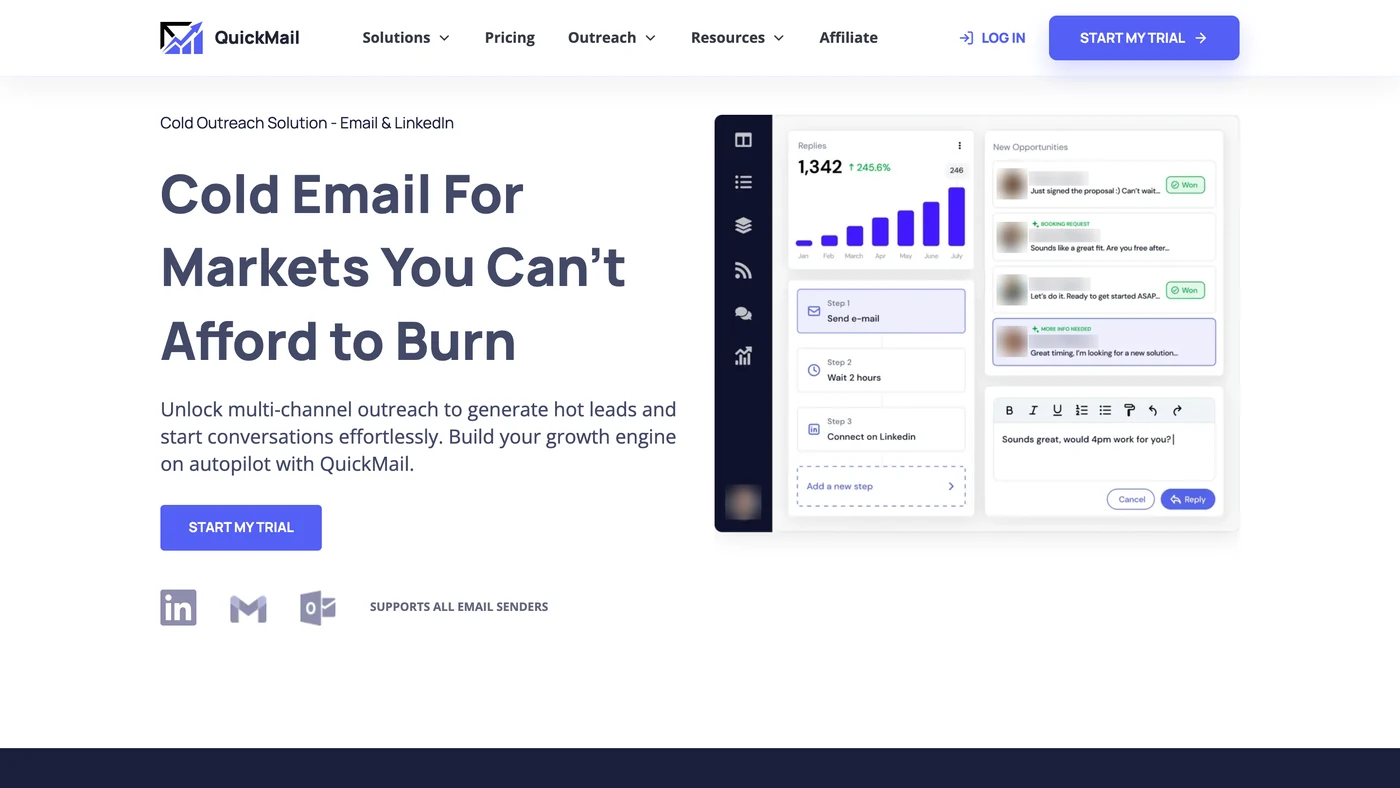
QuickMail vs Emelia at a glance
 QuickMail

- Cold email from your own mailboxesYesYes
- LinkedIn automationYesYes
- Email and LinkedIn in one sequenceYesYes
- Email finderNoYes
- Phone number finderNoYes
- Native CRM integrationYesYes
- APIYesYes
Checked on November 17, 2026 on QuickMail’s own pages and on Emelia’s pricing page.
QuickMail.io reviews: G2, Capterra and an unclaimed Trustpilot profile
G2 and Capterra block automated visits, so their scores are those shown in search results in November 2026; Trustpilot and the Chrome Web Store were read on their own pages. Most of what QuickMail’s users have written sits on G2, 119 reviews; QuickMail’s own comparison pages still quote a 4.6.
What users rate highly
- Support: 4.8 out of 5 for customer service on Capterra, the best of its four sub-scores
- Campaign automation and an easy start, the strengths G2’s review summaries put first
- 96% positive reviews on Capterra, with value for money at 4.6 and features at 4.6
The complaints that keep coming back
- Deliverability: emails landing in spam, a recurring point in G2’s review summaries
- Price, and some time to learn the tool, with ease of use at 4.5 on Capterra, its lowest sub-score
- Trustpilot: a profile under the old quickmail.io domain that QuickMail has not claimed, with 3 reviews; the quickmail.com profile has none
QuickMail Auto Warmer: what its changelog announced in October 2026
Warm-up costs nothing extra at QuickMail: each of the three plans lists a free Auto Warmer on the pricing page. The name hides a history. QuickMail first handed warm-up to an outside service; in September 2025 it launched a built-in Auto Warmer, for mailboxes bought through QuickMail only.
On October 20, 2026, its changelog announced the change people search for: the built-in Auto Warmer “is now available for all types of email accounts”, with no outside service needed. The pricing page had not caught up when we read it, and QuickMail’s help articles still give different versions of how far the Auto Warmer reaches.
At Emelia, warm-up is part of the plan too, for every mailbox it connects: 3 on Start, 50 on Grow, more on Scale, with no partner account to open.
Unlimited inboxes, two caps: a contact stock and a monthly send limit
QuickMail promises unlimited mailboxes from $49 a month. The trap: connecting your mailboxes is the most tedious step, and only once they are plugged in do you discover the caps on contacts and emails. With 100 mailboxes connected, the Growth plan really runs only about 32, barely a third. The Starter plan, barely 1.
The yardstick: a mailbox normally sends to 35 new contacts a day, and 100 emails a day in all, follow-ups included. Over a month of 22 working days, one mailbox is therefore about 770 new contacts and 2,200 emails.
The Growth plan caps at 25,000 contacts and 100,000 emails a month: enough to run about 32 mailboxes. Beyond that, QuickMail’s help centre sells 10,000 more contacts for $10 a month and 100,000 more emails for $100: running 50 mailboxes at full pace comes to $219 a month.
At Emelia, Grow at €97 a month connects 50 mailboxes, with no limit on contacts or on emails sent. Scale, at €$97 a month connects 50 mailboxes, with no limit on contacts or on emails sent. Scale, at $297 a month, goes up to 1,000 mailboxes.
What unlimited pricing hides
1,000 contacts ÷ 770 per mailbox ≈ 1.3; 5,000 emails ÷ 2,200 per mailbox ≈ 2.3: about 1 mailbox before a cap stops you.
25,000 contacts ÷ 770 per mailbox ≈ 32.5; 100,000 emails ÷ 2,200 per mailbox ≈ 45.5: about 32 mailboxes before a cap stops you.
100,000 contacts ÷ 770 per mailbox ≈ 129.9; 500,000 emails ÷ 2,200 per mailbox ≈ 227.3: about 130 mailboxes before a cap stops you.
How we count
Contact cap ÷ 770 and email cap ÷ 2,200 per mailbox: the lower result wins. QuickMail’s contact cap is a stock of leads kept in the account, not a monthly allowance: once it is full, leads have to be deleted before new ones go in. The count here treats it as if it emptied every month, the reading most favourable to QuickMail.
Monthly prices on QuickMail’s pricing page (https://quickmail.com/pricing), checked on November 17, 2026.
When the cap is reached
For the contact stock, QuickMail’s help centre spells out the way: permanently delete leads to make room. Next month’s lists therefore cannot go in while this month’s are still in the account, unless you pay for more contacts, 10,000 at a time (not on Starter). For the monthly emails, QuickMail does not say what happens to running campaigns at the cap; going past it means buying 100,000 more emails.
At Emelia
50 mailboxes for €$97 a month on Grow, with no cap on contacts or on emails sent. Scale goes up to 1,000 mailboxes (fair use).
QuickMail or Emelia: 50 inboxes sending at full pace
Each row starts from the mailboxes an Emelia plan connects and runs them at Emelia’s quotas: 35 new contacts and 100 emails a working day, so 770 contacts and 2,200 emails a month per mailbox over 22 days. QuickMail’s side is the plan that holds both totals, topped up with the add-ons its help centre sells (10,000 contacts for $10, 100,000 emails for $100), the cheapest way to reach them. Starter stops at 1,000 contacts and sells no more, which is why even 3 mailboxes land on Growth. Without the add-ons, 50 mailboxes would need Agency at $299.
QuickMailMailboxes sending flat out, monthly prices
3 mailboxes (≈ 2,310 new contacts and 6,600 emails a month)
50 mailboxes (≈ 38,500 new contacts and 110,000 emails a month)
500 mailboxes (≈ 385,000 new contacts and 1,100,000 emails a month)
Contacts are counted as in the box above. Beyond Agency, one help article sends teams to a sales call, while another sells the add-ons on every plan: the table keeps the add-ons. Neither contacts nor sends are capped at Emelia. Amounts excluding tax; QuickMail’s prices as of November 17, 2026, in US dollars.
Example: 50 mailboxes sending at full pace.
QuickMail$219/month- Growth plan · $99
- 20,000 more contacts · $20
- 100,000 more emails · $100
€97/month- Grow plan · €97
QuickMail bills in US dollars only: its price is shown in dollars, without conversion, so no difference is calculated.
Example: 50 mailboxes sending at full pace.
QuickMail$219/month- Growth plan · $99
- 20,000 more contacts · $20
- 100,000 more emails · $100
$97/month- Grow plan · $97
Do you also prospect on LinkedIn? Accounts, leads and Sales Navigator
If email is all you send, the rows above are the whole story. QuickMail includes LinkedIn in every plan, with no limit on accounts, so adding them changes nothing on its bill, with one catch: every lead needs an email address, a made-up one if necessary, so LinkedIn leads fill the contact stock too (counted here at QuickMail’s default of 12 connection requests a day per account). Emelia’s plans count 1, 3 or 10 accounts, then €$29 a month for each extra one; each is connected once through the Chrome extension. On a LinkedIn profile, the same extension finds the person’s email and phone number, in credits and only when it finds them, then adds them to a campaign.
QuickMailLinkedIn accounts and mailboxes, prices per month
1 LinkedIn account + 3 mailboxes
3 LinkedIn accounts + 50 mailboxes
10 LinkedIn accounts + 500 mailboxes
What the LinkedIn side includes
Sales Navigator searches
Email address of a LinkedIn lead
Where the LinkedIn steps run
LinkedIn accounts
Dollars on QuickMail’s side, your currency on Emelia’s: no difference is computed between them. QuickMail advises up to 12 actions a day per LinkedIn account and withdraws pending invitations after 90 days. Excluding tax.
What QuickMail looks like
QuickMail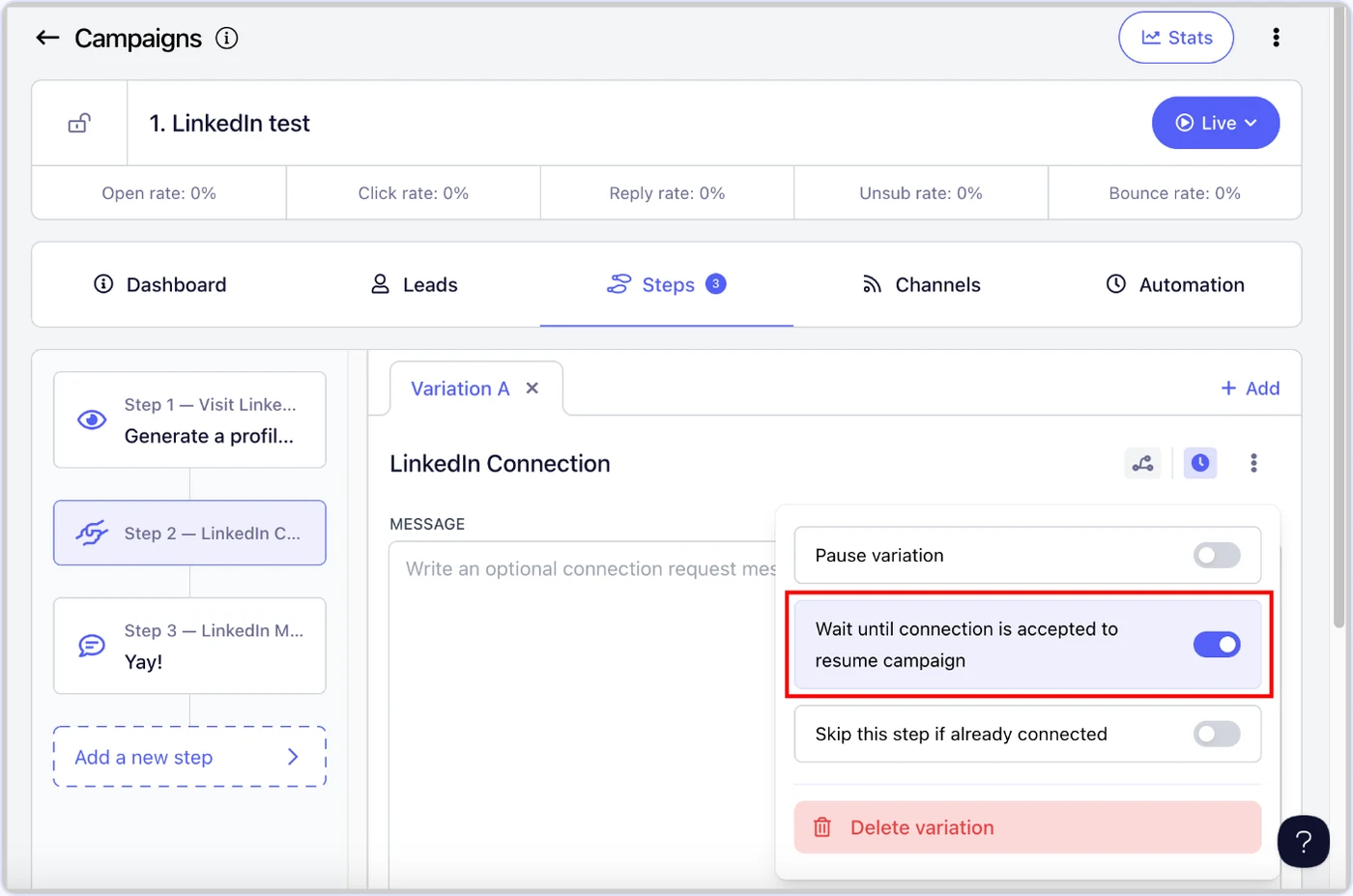
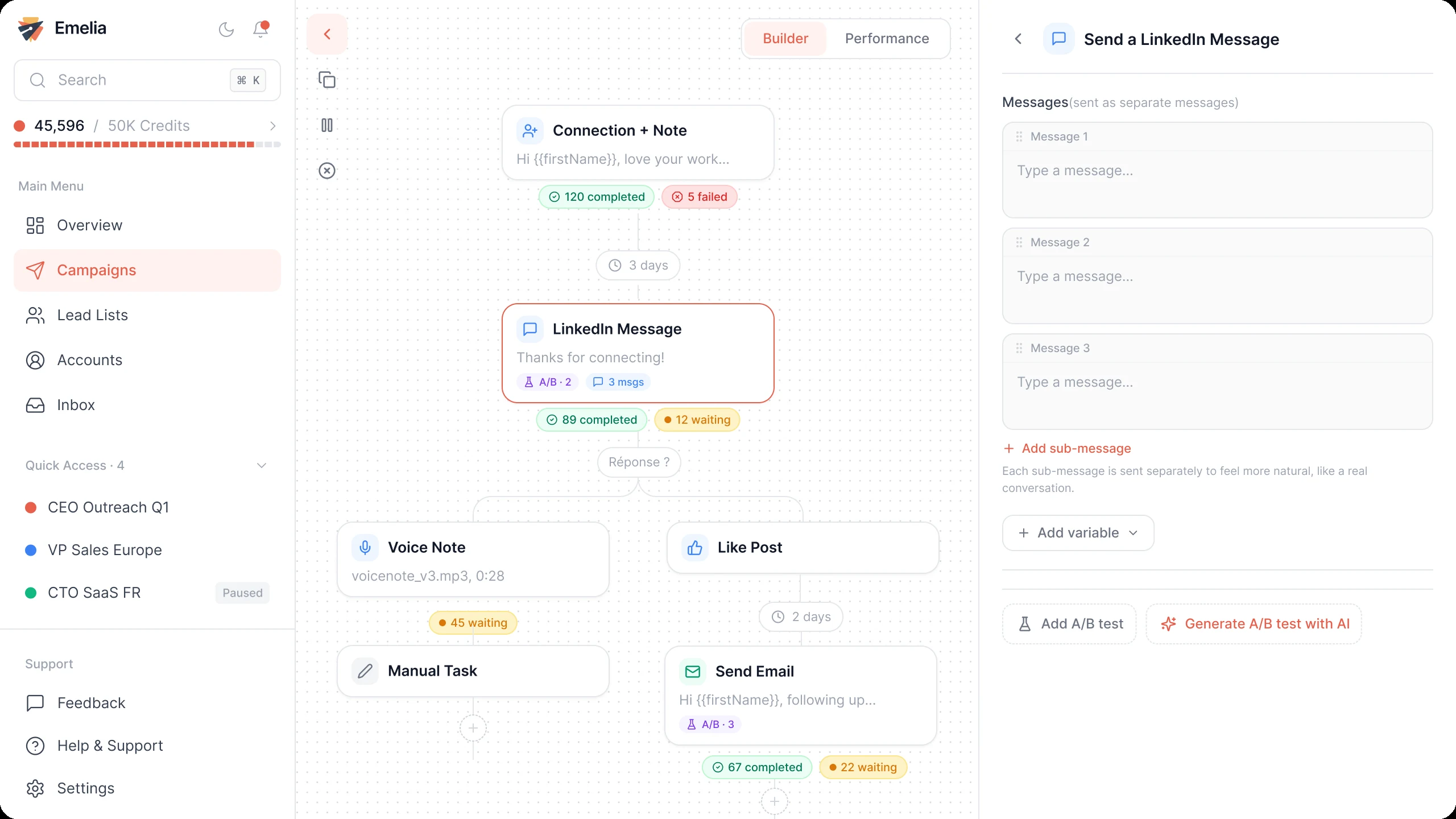
The three QuickMail plans at a glance
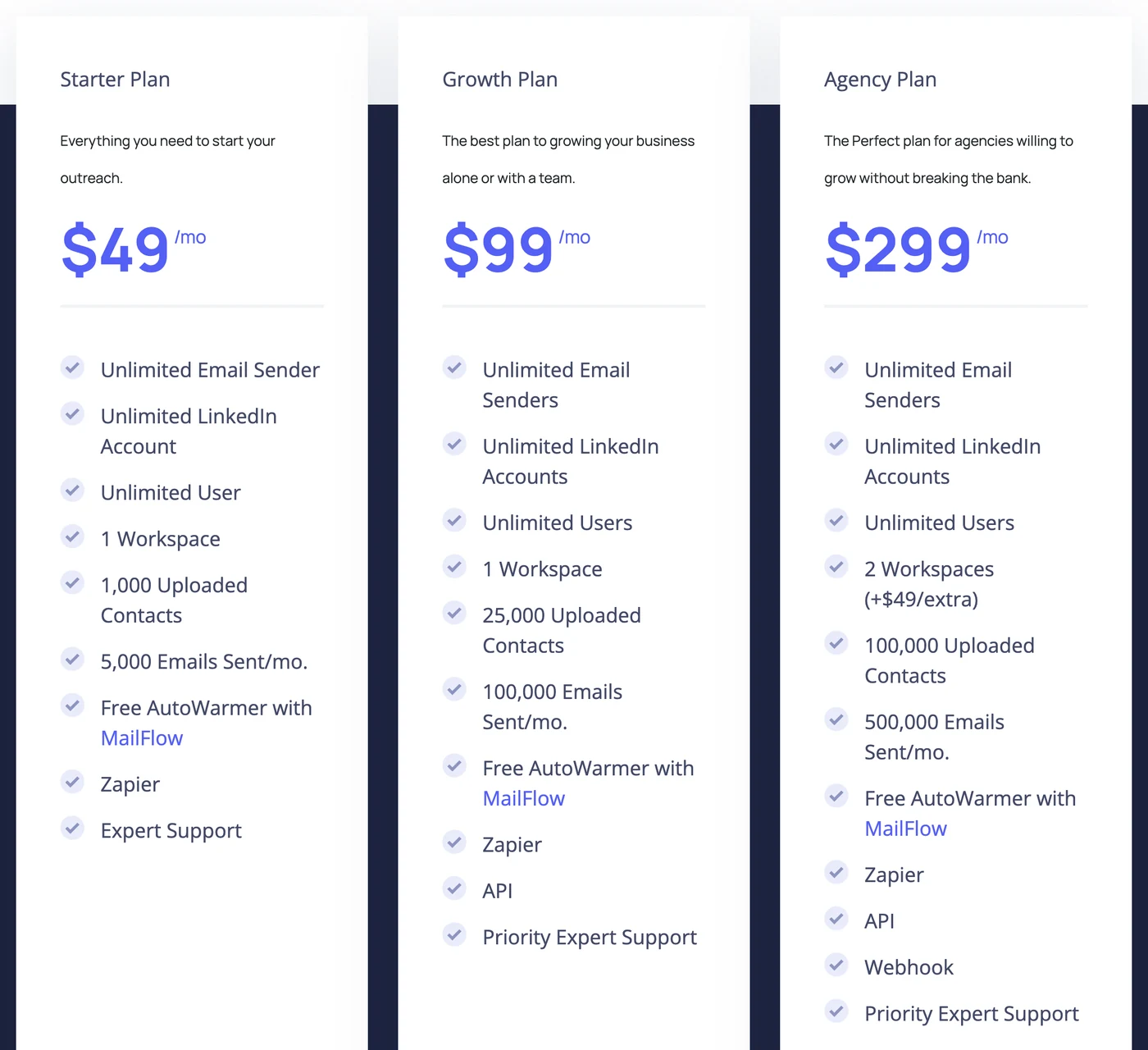
Starter costs $49 a month for 1,000 contacts and 5,000 monthly emails, about 1 mailbox at full pace; Growth $99 for 25,000 contacts and 100,000 monthly emails, about 32 mailboxes; Agency $299 for 100,000 contacts and 500,000 monthly emails, about 130. All three are billed monthly in US dollars; no yearly price is published.
Growth is where Sales Navigator imports, InMail, voice messages, the HubSpot and Pipedrive integrations and the API start. Agency adds a second workspace ($49 a month for each extra one), webhooks, a library of campaigns and a client portal. Every plan, add-ons, the trial and how the grid changed in a year: the QuickMail pricing page.
QuickMail FAQ
In the web app: the “Log in” link at the top of quickmail.com opens its sign-in page, at next.quickmail.com/login. The Chrome extension does not replace it: it connects a LinkedIn account to that same app and opens the Prospecting database.
Both belong to QuickMail. The site moved to quickmail.com in 2023, and quickmail.io now redirects there; support still answers at support@quickmail.io, which is why reviews and searches use both names.
HCG Partners GmbH, a company based in Baar, Switzerland, according to its terms; its servers are in the U.S. QuickMail dates its start to 2014, and Jeremy Chatelaine signs as its founder and CEO. The team describes itself as small, fully remote and bootstrapped, with no outside investment, and its LinkedIn page says it is trusted by 1,000+ small sales teams and B2B founders.
No. Its help centre says LinkedIn imports come without email addresses, to be found and filled in by hand, and QuickMail has no phone finder either. Since August 4, 2026, a free database called Prospecting opens through the extension, but most of its leads are LinkedIn profiles without an email. What QuickMail sells is verification: $10 per 1,000 addresses in one-time credits, or it plugs in an API key from BriteVerify, Dropcontact, Hunter, NeverBounce, ZeroBounce or Bouncer. Emelia finds the email for 1 credit and the phone number for 50, charged only when found, with credits valid for a year.
“QuickMail” (333 users, 5.0 from 3 ratings, live since May 2026) connects a LinkedIn account in one click, builds campaigns from your profile viewers or from the people reacting to a post, filtered by ideal customer profile, and gives access to Prospecting. It does not look up emails or numbers on a profile.
Its comparison pages, alternatives page and agency ranking cite Smartlead, Instantly, lemlist, Woodpecker, Mailshake and Outreach among others, but never Emelia. The QuickMail alternatives page sets each of its verdicts against what the publisher shows today, with Emelia first.
Emelia features: Multichannel outreach · Cold email · LinkedIn automation · Emelia pricing
Emelia is a QuickMail competitor. We have tried to stay fair: every figure about QuickMail comes from its own website or public review sites.


